

Whats for Dinner: Recipe Saver
Christian Altamura Food & Drink iPhoneiPadiPod touch
Whats for Dinner: Recipe Saver is a free Food & Drink app for iPhone and iPad by Christian Altamura. Rated 5.0/5 from 11 ratings. Requires iOS 17.0.
- Rating
- 5.0
- 11 ratings
- Price
- Free
- on the App Store
- Size
- 58 MB
- Age 4+
- Updated
- Oct 26
- 2026 · v14.0
Screenshots
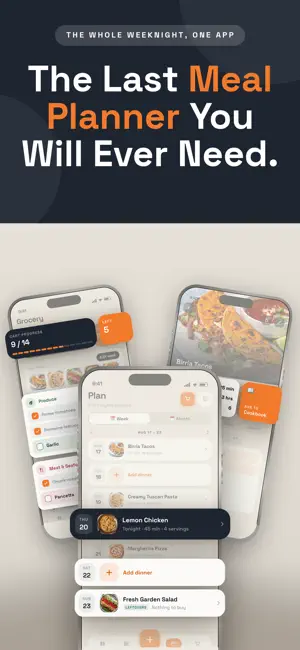


About Whats for Dinner: Recipe Saver
Your recipes, meal plan, and grocery list, all in one spot. Save recipes from anywhere, plan the week in minutes, and walk into the store with a grocery list that built itself, sorted by aisle. No more juggling a recipe app, a notes app and a list on the fridge. PLAN YOUR WEEK Drop recipes onto the days of the week and see the whole plan at a glance. Can't decide? Let the app pick tonight's dinner from recipes you already love: - Spin: one tap and the app picks for you - Narrow it down: answer a few quick questions (time, protein, kind of meal) to get a shortlist - Face-off: this or that, photo against photo, until one recipe wins - Ask: say what you're in the mood for and get an idea in seconds GROCERY LIST THAT BUILDS ITSELF Choose the week's meals and every ingredient lands on one combined list, grouped by Produce, Meat & Seafood, Dairy, Bakery, Pantry and Frozen. - Duplicate ingredients merge into one line - Untick what you already have, and pantry staples are remembered - Add extras by typing or voice - Check items off as you shop, even on weak store signal One lap of the store instead of four. SAVE RECIPES FROM ANYWHERE Every recipe comes in clean: ingredients on one side, steps on the other. - Any recipe website, by link or the Share button - Social videos from TikTok, Instagram, YouTube, Pinterest and Facebook - A photo of a cookbook page or a family recipe card - Say it out loud, paste it, or type your own - Search the web from inside the app PLAN AND SHOP TOGETHER Share recipes, the week's plan and the grocery list with your household. See who grabbed what in the store, split up with two carts on one list, and stop asking "what do you want for dinner?" KEEP IT ORGANIZED - Cookbooks with real cover photos: Weeknights, Baking, Mom's, whatever you like - Sub-recipes: link a sauce or dough to the dish that uses it - Scale servings and edit anything - Export any recipe as a clean PDF to print or share - Full dark mode, and everything syncs to your account WHAT IT ISN'T No ads. No autoplay video. No 900-word essay before the ingredient list. Just your recipes and a plan for the week. SUBSCRIPTION A What's for Dinner Premium subscription unlocks the full app. Weekly and annual plans each start with a free trial. Payment is charged to your Apple ID when the trial ends, and the subscription renews automatically unless cancelled at least 24 hours before the end of the current period. Manage or cancel anytime in your App Store account settings. Terms of Use: https://www.apple.com/legal/internet-services/itunes/dev/stdeula/ Icons by: https://icons8.com/icons/set/food--style-sf-regular
Ratings & reviews
5.0
11 ratings
What’s new
Version 14.0 · Updated October 26, 2026
Made for iPhone Duo What's for Dinner now makes the most of every screen, folded or unfolded. • Tabs in the side column. Books, Dinner, Add, Plan and Grocery move into the side column, right under your thumb, so the full screen is yours. • Back is in reach. Back buttons now sit in that same column, above your tabs. No more stretching to the top corner. • List and recipe, side by side. Open a cookbook unfolded and your recipes stay on the left while the one you picked opens on the right. • Expand to cook. Tap Expand to open a recipe full screen, with ingredients right beside the method. Tap Collapse to go back. • Bigger everything when unfolded. Larger meal photos in the monthly plan, more cookbook columns, and a two-column grocery list sorted by aisle. Ask What's for Dinner, now in Add Describe what you're craving or what's in the fridge, and we'll find a real recipe from the web. It's right in the Add menu. Smoother recipe pages • Add to Cookbook and Plan for This Week are now side by side, next to prep, cook and serves. • Pick cookbooks straight from Review Recipe before you save. A better first import Your free first recipe is held safely on your phone until you sign in. No more confusing Save button along the way. Plus layout fixes and polish throughout. Before you post: • Check the device name. I used "iPhone Duo" because that's what the simulator calls it. Make sure it matches Apple's official product name for the listing. • Ask What's for Dinner: the "describe it, get a real recipe" feature already existed on the Dinner tab. If your current users already know it, you could say "now also in Add" instead. • First-import line: that note is mostly for brand-new users. Drop it if you'd rather keep What's New focused on the Duo.
App privacy
The developer, Christian Altamura, reported these privacy practices to Apple.
Data Linked to You
The following data, which may be collected and linked to your identity, may be used for the following purposes:
- Contact Info: Email Address, Name
- User Content: Photos or Videos
Used for: App Functionality
Alternatives to Whats for Dinner: Recipe Saver
Looking for apps like Whats for Dinner: Recipe Saver? Here are 6 similar apps on the App Store. The highest rated is Whats4Dinner? (5.0/5), and all 6 are free to download.
-
 Whats4Dinner?
5.0
-
 What's for dinner planner
-
 Healthy Recipe & Meal Planner
-
 Meal Planner - Swipe Dinner
5.0
-
 WAIV - Discover Experiences
5.0
-
 Crunch Bell
| App | Rating | Price | Last updated | Compare |
|---|---|---|---|---|
| Whats for Dinner: Recipe Saver | 5.0 / 5 (11 ratings) | Free | October 26, 2026 | |
| Whats4Dinner? | 5.0 / 5 (1) | Free | Oct 26, 2026 | Compare |
| What's for dinner planner | – | Free | Sep 20, 2026 | Compare |
| Healthy Recipe & Meal Planner | – | Free | Feb 17, 2026 | Compare |
| Meal Planner - Swipe Dinner | 5.0 / 5 (3) | Free | May 28, 2026 | Compare |
| WAIV - Discover Experiences | 5.0 / 5 (1) | Free | Oct 28, 2025 | Compare |
| Crunch Bell | – | Free | Sep 30, 2026 | Compare |