

Cartoon Avatar Image Converter
Dedaldev Doo Graphics & Design iPhoneiPadiPod touch
Cartoon Avatar Image Converter is a free Graphics & Design app for iPhone and iPad by Dedaldev Doo. Requires iOS 15.0. Updated September 23, 2026.
- Price
- Free
- on the App Store
- Size
- 106 MB
- Age 4+
- Updated
- Sep 23
- 2026 · v0.1.11
Screenshots

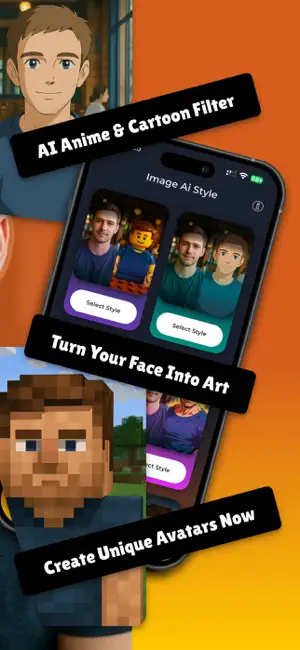


About Cartoon Avatar Image Converter
Turn any photo into a cartoon avatar, an anime painting or a chibi figure in seconds. Pick a style, upload one selfie, and the AI does the rest. No editing skills needed. Every result is generated on your own photo, so the face stays yours. Choose a watercolor anime portrait, a collectible 3D doll, a manga character or a hand-drawn sketch, then save it as a profile picture or share it with friends. Art Styles • Anime Painting. Watercolor portrait with soft brush texture • Cartoon Avatar. Clean toon character built from your selfie • Chibi Figure. Big head, tiny body, cute collectible look • Manga Portrait. Sharp ink lines and expressive detail • 3D Doll. Collectible action figure version of you • Comic Art. Bold strip look with dramatic shading • Emoji and Stickers. Custom faces for every chat • Pencil Sketch. Hand-drawn graphite with paper texture • Caricature. Playful exaggerated features • Pixel Art. Retro game sprite version of your face How It Works 1. Browse the style gallery and pick your look 2. Upload a selfie or photo from your gallery or camera 3. The AI generates your portrait in seconds 4. Save it, set it as a profile picture, or share it Why People Use It • One tap from photo to finished art • 50+ styles, hand-built and not generic filters • Fast processing, results in seconds • Works on selfies, group photos and pet photos • Great for profile pictures, stickers and cards • New styles added regularly • Built by Dedaldev, trusted for creative apps Popular Uses • An anime painting to share on social media • A chibi figure of yourself for gaming profiles • Turn a selfie into a manga portrait for chat apps • Become a 3D doll or collectible action figure • Custom emoji, stickers and greeting cards • Keep a pencil sketch of a favorite family photo Common Questions Do I need drawing skills? No. You pick a style and upload one photo. Everything else is automatic. How long does it take? A few seconds per image. There is nothing to set up and nothing to learn. Can I use a group photo or a pet photo? Yes. Group shots and pet portraits both work, not only single selfies. What Makes The Result Look Like You Some tools drop a fixed template over your face and the output looks like a stranger. Here the model reads the shape of your face, the angle of your head and the light in your photo, then rebuilds all of that in the chosen style. Eyes, jawline and hair keep their real proportions. That is why a chibi figure, a manga portrait and a pencil sketch of the same photo all still read as the same person. Perfect For • Anyone who wants a profile picture that stands out • Fans of anime, manga, comic and cartoon art • People looking for a quick and easy portrait maker • Anyone making a present for a friend or partner Your photo is processed to create your art and is not shared with other users. Download now and see yourself in anime, chibi or comic art. Privacy Policy: https://imageaistyle.com/privacy-policy/ Terms & Conditions: https://imageaistyle.com/terms-and-conditions/
What’s new
Version 0.1.11 · Updated September 23, 2026
You now get a clear message when your phone loses connection, instead of a screen that waits forever. Purchases run on an updated billing system, so buying a generation is more reliable. Smaller fixes and cleanup under the hood.
App privacy
The developer, Dedaldev Doo, reported these privacy practices to Apple.
Data Used to Track You
The following data may be used to track you across apps and websites owned by other companies:
- Identifiers: Device ID
Data Linked to You
The following data, which may be collected and linked to your identity, may be used for the following purposes:
- Purchases: Purchase History
- Contact Info: Email Address, Name
- Identifiers: User ID, Device ID
- Usage Data: Product Interaction
- User Content: Photos or Videos
Used for: Analytics, App Functionality
Alternatives to Cartoon Avatar Image Converter
Looking for apps like Cartoon Avatar Image Converter? Here are 6 similar apps on the App Store. The highest rated is Cartoon Yourself Toonify (5.0/5), and all 6 are free to download.
-
 Cartoon Yourself Toonify
5.0
Cartoon Yourself Toonify
5.0
-
 Cartoon Photo Editor - Toonio
4.7
Cartoon Photo Editor - Toonio
4.7
-
 Phovi: AI Photo & Video Editor
4.1
Phovi: AI Photo & Video Editor
4.1
-
 Cartoony: Cartoon Photo Editor
4.7
Cartoony: Cartoon Photo Editor
4.7
-
 Banana AI - image generation
4.3
Banana AI - image generation
4.3
-
 AI Tattoo Generator - Inkwell
4.2
AI Tattoo Generator - Inkwell
4.2
| App | Rating | Price | Last updated | Compare |
|---|---|---|---|---|
| Cartoon Avatar Image Converter | – | Free | September 23, 2026 | |
| Cartoon Yourself Toonify | 5.0 / 5 (1) | Free | Apr 28, 2025 | Compare |
| Cartoon Photo Editor - Toonio | 4.7 / 5 (48) | Free | Oct 31, 2025 | Compare |
| Phovi: AI Photo & Video Editor | 4.1 / 5 (8) | Free | Oct 25, 2026 | Compare |
| Cartoony: Cartoon Photo Editor | 4.7 / 5 (203) | Free | May 1, 2026 | Compare |
| Banana AI - image generation | 4.3 / 5 (9) | Free | Oct 26, 2026 | Compare |
| AI Tattoo Generator - Inkwell | 4.2 / 5 (77) | Free | Dec 11, 2024 | Compare |