

WorkBreak - Break Reminder
Martin Schroder Productivity iPhoneiPadiPod touch
WorkBreak - Break Reminder is a free Productivity app for iPhone and iPad by Martin Schroder. Requires iOS 15.0. Updated August 3, 2026.
- Price
- Free
- on the App Store
- Size
- 31 MB
- Age 4+
- Updated
- Aug 3
- 2026 · v2026.08.02
Screenshots
About WorkBreak - Break Reminder
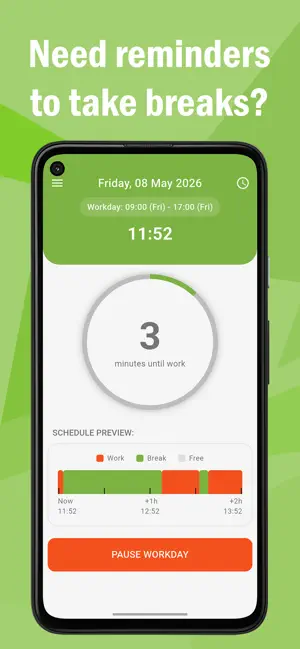
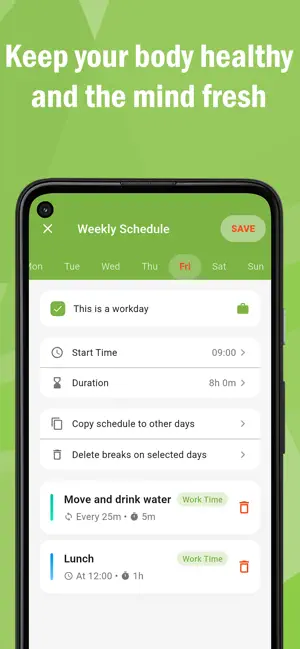
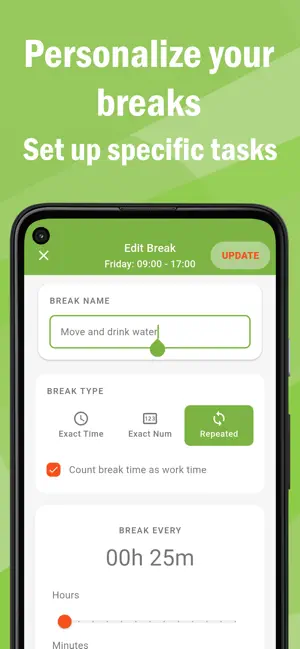
Work productively—rest on time. Work Break helps you stay healthy and focused with an easy, automated break schedule. Personalized reminders tell you exactly when to stand up, stretch, move, drink water, or eat, so you never forget to take the rest you need during a busy workday. Be more focused and productive Increase your productivity by taking rest on time. Long sedentary working hours without proper breaks can fatigue your brain, slow your thinking, cause difficulty focusing, and leave you exhausted by the end of the day. Taking regular breaks helps you stay sharp and finish the day with energy to spare. Keep your body and mind healthy Sitting for hours without breaks may contribute to Repetitive Strain Injury (RSI) and chronic pain in your spine, joints, and sinews. Be reminded to stand up, stretch, move, stay hydrated, and take time to eat—or create any personalized reminder that fits your needs. Healthy food and regular movement are essential for brain function and the regeneration of body and mind. Features • Set up your own work day schedule • Create personalized reminders with your own text • Start and stop your work schedule at any time • See a schedule overview for the next 2 hours • Get notifications with optional sound alerts • No internet connection required • No data collection or leaking of data to anyone Permissions & Privacy Your privacy is extremely important to us. This application doesn’t require any permissions or any login with personal data. Work Break works completely offline, and no data ever leaves your device. Questions? Problems? Feedback? We are committed to creating the best experience for you. Every piece of feedback matters. Please reach out anytime at [email protected]
What’s new
Version 2026.08.02 · Updated August 3, 2026
- Fixed error about "breaks outside of worktime", when many breaks were defined on a single workday. - Minor fixes and improvements
App privacy
The developer, Martin Schroder, reported these privacy practices to Apple.
Data Used to Track You
The following data may be used to track you across apps and websites owned by other companies:
- Identifiers: Device ID
- Usage Data: Advertising Data
Data Linked to You
The following data, which may be collected and linked to your identity, may be used for the following purposes:
- Identifiers: Device ID
- Usage Data: Advertising Data
Used for: Third-Party Advertising, Analytics, App Functionality
Data Not Linked to You
The following data, which may be collected but is not linked to your identity, may be used for the following purposes:
- Usage Data: Other Usage Data, Product Interaction
- Diagnostics: Crash Data, Performance Data, Other Diagnostic Data
Used for: Third-Party Advertising, Analytics, App Functionality
Alternatives to WorkBreak - Break Reminder
Looking for apps like WorkBreak - Break Reminder? Here are 6 similar apps on the App Store. The highest rated is BreakMode (5.0/5), and all 6 are free to download.
-
 Dorii: Shift Schedule Alarms
-
 BreakMode
5.0
BreakMode
5.0
-
 Daily Planner & To-Do - Orbit
-
 WhisperNote: Whisper to Text
-
 Tickd: Daily Planner & To-Do
-
 Work/Break
| App | Rating | Price | Last updated | Compare |
|---|---|---|---|---|
| WorkBreak - Break Reminder | – | Free | August 3, 2026 | |
| Dorii: Shift Schedule Alarms | – | Free | Sep 23, 2026 | Compare |
| BreakMode | 5.0 / 5 (5) | Free | Jul 17, 2026 | Compare |
| Daily Planner & To-Do - Orbit | – | Free | Mar 27, 2026 | Compare |
| WhisperNote: Whisper to Text | – | Free | Oct 10, 2026 | Compare |
| Tickd: Daily Planner & To-Do | – | Free | Oct 22, 2026 | Compare |
| Work/Break | – | Free | Dec 3, 2025 | Compare |