

TourVision: Travel Map Video
Mapstory ApS Photo & Video iPhoneiPadiPod touch
TourVision: Travel Map Video is a free Photo & Video app for iPhone and iPad by Mapstory ApS. Requires iOS 26.0. Updated October 21, 2026.
- Price
- Free
- on the App Store
- Size
- 62 MB
- Age 4+
- Updated
- Oct 21
- 2026 · v3.8.2
Screenshots



About TourVision: Travel Map Video
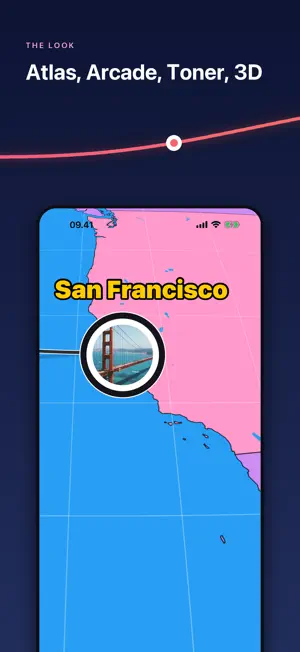
The trip is over — the bragging starts now. TourVision turns a finished trip into an animated route video: a 3D plane, car, or train glides across the map, drawing every leg of your journey as it goes. Make your film, export it to Photos, and never a watermark. RELIVE YOUR TRIP IN SECONDS • Drop your stops on the map — every city, island, and detour. • Set how you travelled each leg — plane, car, train, boat, bus, bike, or on foot. • Add your dates and the itinerary builds itself, day by day. WATCH IT FLY • A real 3D vehicle rides your route — a plane that climbs, banks into its turns, and casts a shadow on the ground below. • The camera chases along at a steady cinematic pace, so short hops and long hauls both feel right. • Every video opens on a spinning globe, then dives down to where the journey began. DIRECT IT • Drive the film by hand: hold the knob and the film runs under your thumb, forwards or back. Tap Record while you hold it, choose the frame, and the take is what you drove. Render it to Photos when you are ready. • Film it by hand: turn the lock off and your own camera moves — pan, zoom, tilt — are recorded and replayed in the video. • Scenes: every photo a stop shows is a scene on the rail. Tap it to compose pictures, words and the map on a strip; photos arrive on a wave in the colours of your route. • Cut it to a clip: a take can cover any stretch of the route, in the frame you choose first — 9:16, 1:1 or 16:9. CHOOSE WHAT DRIVES IT • Nineteen vehicles built in: airliners and a 747, a fighter jet, a helicopter and a drone, a yacht, a Viking ship and a lifeboat, a camper van, a 4x4, a taxi, a tank — and a pedestrian who actually walks. • Tap the vehicle on the map to change it, from this point or from the start of the leg. Mix them along the way. • Follow the real roads on a driving, cycling or walking leg, as closely as you like — and set how hard the vehicle brakes for the bends. • Draw an area on the map and say a few words about it: the loop draws itself in and your voice plays as the film arrives — in the video too. • Bring your own. Drop in a .glb 3D model and your camper, boat, or motorbike drives the whole route. MAKE THE MAP YOURS • Six map looks: dynamic 3D Standard, clean Mono, classic Streets, Toner, the Atlas with its colour themes — and Arcade, the map in chunky pixels. • Show only what you want — toggle POI icons, place, road, and transit labels, and 3D buildings. • Set the mood with Day, Dusk, Dawn, or Night lighting. SHARE IT ANYWHERE • Export straight to Photos — portrait for Stories and Reels, square for feeds, widescreen for YouTube. • No watermark. No subscription to hit export. No account to sign up for. Made for the post-vacation flex, the honeymoon recap, the road-trip epic — and for dreaming up the next one, too. Don't just map your trip — fly it.
What’s new
Version 3.8.2 · Updated October 21, 2026
Round the globe, and a colour for every stop. • New here? The app opens on Round the globe: Copenhagen, Dubai, Tokyo, San Francisco and home, with a photo at every landing — and a look that changes along the way, School atlas to Vintage to Night to Pop. • The colour score. On the rail, each stop wears a dot in its own look, and the track is painted from one look to the next. Tap a dot to choose that stop's look; with one look for the whole trip it asks first — this stop only, or the whole trip. • On the map, a small swatch beside the stop you are on opens the same choice. • The rail's mark is a line across it now, not a knob — the strip is what moves. • The arrow wears the right colour from the first frame.
App privacy
The developer, Mapstory ApS, reported these privacy practices to Apple.
Data Linked to You
The following data, which may be collected and linked to your identity, may be used for the following purposes:
- Identifiers: Device ID
- Usage Data: Product Interaction, Other Usage Data
Used for: Analytics, App Functionality
Data Not Linked to You
The following data, which may be collected but is not linked to your identity, may be used for the following purposes:
- User Content: Photos or Videos, Other User Content
Used for: App Functionality
Alternatives to TourVision: Travel Map Video
Looking for apps like TourVision: Travel Map Video? Here are 6 similar apps on the App Store. The highest rated is AeroAnimate: Travel Map Video (4.7/5), and all 6 are free to download.
-
 Waymotion - Travel Animations
-
 AeroAnimate: Travel Map Video
4.7
-
 TripScene
-
 TravelMotion: Journey Animator
-
 Travel Animator – TripMap
-
 Routeclip
| App | Rating | Price | Last updated | Compare |
|---|---|---|---|---|
| TourVision: Travel Map Video | – | Free | October 21, 2026 | |
| Waymotion - Travel Animations | – | Free | Oct 27, 2026 | Compare |
| AeroAnimate: Travel Map Video | 4.7 / 5 (3) | Free | Jul 25, 2026 | Compare |
| TripScene | – | Free | Sep 11, 2026 | Compare |
| TravelMotion: Journey Animator | – | Free | Apr 10, 2026 | Compare |
| Travel Animator – TripMap | – | Free | Sep 19, 2026 | Compare |
| Routeclip | – | Free | Feb 10, 2025 | Compare |