

Calorithm
Shunsuke Maeda Health & Fitness iPhoneiPadiPod touchApple Watch
Calorithm is a free Health & Fitness app for iPhone and iPad by Shunsuke Maeda. Requires iOS 16.0. Updated October 22, 2026.
- Price
- Free
- on the App Store
- Size
- 56 MB
- Age 4+
- Updated
- Oct 22
- 2026 · v2.2.2
Screenshots


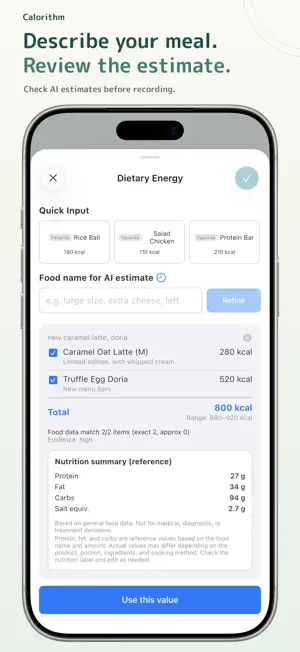
About Calorithm
Calorithm — Log and Review Your Calorie Balance and Weight Calorithm shows your calorie balance, the difference between what you eat and what you burn, by day, week, month, quarter, and year, from your meal, exercise, and weight records and Apple Health data. Logging and basic summaries are free. See Your Calorie Balance in Charts See calorie balance, intake and expenditure, weight, body fat, PFC, salt equivalent, steps, and sleep in daily, weekly, monthly, quarterly, and yearly charts, alongside the goals you set. Choose and reorder the cards you want to see. Auto-Synced with Apple Health Active energy, resting energy, weight, and body fat percentage are pulled from Apple Health each time you open the app. Steps and sleep are read only if you allow it and are never written. Today's steps and last night's sleep are shown in the app and used in trend charts and Reports. Log Meals and Exercise Enter food names and calories by hand, or save meals and exercises you log often. You can also estimate calories with AI from a food name or a photo, and adjust the result with comments like "large size" or "extra cheese." Active energy for exercise can be estimated from its name and duration. Daily, Weekly, and Monthly Reports Reports summarize your records for each period without using AI. To look deeper, carry a report into Ask. Ask About Your Records Ask questions about your meals and exercise with record-aware AI consultation. Review Your Day on the Timeline See meals, exercise, and weight entries in order. Tap an entry to edit or delete it. Share as an Image Share cards from Trends and Reports as an image. Backup Back up your records and settings to a password-encrypted file, and restore them. Home Screen Widget Check today's balance from a widget without opening the app. Meal Guidance Notifications Set times for breakfast, lunch, and dinner to see how many calories are left for your next meal. Dark Mode Switch between light and dark appearance. Your Data, Protected Your health and food log data is stored on your device with AES-256 encryption. When you use AI features, only the input, photos, or record summaries needed are sent to AI services: Google for estimates and AI reports, OpenAI for Ask. Steps and sleep are sent only as summarized values, such as daily totals and nightly durations. Not a Medical Device Calorithm is not a medical device and does not diagnose, treat, cure, or prevent any medical condition. Consult a healthcare professional before making medical decisions. Calorithm Plus (iOS / Japan) An optional paid plan for iOS in Japan. Choose monthly (¥280) or yearly (¥2,400). Eligible new subscribers receive a 14-day free period. Free features remain available, including everything listed above. What Plus adds Compare your records in charts - Overlay moving averages or the average of a range you choose on charts - See weekly calorie balance next to weight change - Compare this week with last week, or this month with last month, over the same number of days - Compare each day's balance with the same weekday over the past 4 weeks Compare with public guidelines - Compare your weight pace, PFC balance, and salt equivalent with public reference values Reports - Weekly and monthly Reports add comparisons with the past 4 weeks and a balance-and-weight analysis AI - A larger AI allowance for estimates and Ask than Free - Web search for estimates and Ask when needed - See more of your past consultations Also - No ads - While on Plus or the free trial, buy extra points for AI (purchased points do not expire) - Estimate cards (calorie burn estimated from your records, weight outlook); both are estimates Terms of Use: https://www.apple.com/legal/internet-services/itunes/dev/stdeula/
What’s new
Version 2.2.2 · Updated October 22, 2026
Fixed differences between calorie charts and the summary when the hour changes. Improved syncing with widgets and Apple Watch, and consistency in meal guidance and PFC progress.
App privacy
The developer, Shunsuke Maeda, reported these privacy practices to Apple.
Data Used to Track You
The following data may be used to track you across apps and websites owned by other companies:
- Identifiers: Device ID
- Usage Data: Product Interaction, Advertising Data
Data Linked to You
The following data, which may be collected and linked to your identity, may be used for the following purposes:
- Location: Coarse Location
- Identifiers: Device ID, User ID
- Usage Data: Product Interaction, Advertising Data
- Health & Fitness: Health, Fitness
- User Content: Other User Content, Customer Support
- Sensitive Info: Sensitive Info
- Purchases: Purchase History
- Contact Info: Email Address
Used for: Third-Party Advertising, Developer’s Advertising or Marketing, Analytics, Product Personalization, App Functionality
Data Not Linked to You
The following data, which may be collected but is not linked to your identity, may be used for the following purposes:
- Diagnostics: Performance Data, Other Diagnostic Data, Crash Data
- User Content: Photos or Videos
Used for: Third-Party Advertising, Developer’s Advertising or Marketing, Analytics, Product Personalization, App Functionality
Alternatives to Calorithm
Looking for apps like Calorithm? Here are 6 similar apps on the App Store. The highest rated is Calorie Tracker: CalTrack (5.0/5), and all 6 are free to download.
-
 Intake & Burn
-
 Calorie Tracker: CalTrack
5.0
-
 Calorie Balance: Weight Trend
-
 KcalCounter: Calorie Tracker
-
 カロリー家計簿
-
 calmy
| App | Rating | Price | Last updated | Compare |
|---|---|---|---|---|
| Calorithm | – | Free | October 22, 2026 | |
| Intake & Burn | – | Free | Oct 15, 2026 | Compare |
| Calorie Tracker: CalTrack | 5.0 / 5 (5) | Free | Sep 11, 2026 | Compare |
| Calorie Balance: Weight Trend | – | Free | Oct 19, 2026 | Compare |
| KcalCounter: Calorie Tracker | – | Free | Oct 22, 2026 | Compare |
| カロリー家計簿 | – | Free | Jul 15, 2026 | Compare |
| calmy | – | Free | Dec 2, 2025 | Compare |
Compare Calorithm with the top alternatives: ratings, updates, ASO score and keyword gaps →