

FullTime: Big Clocks & Timers
Emotive Engines, LLC Utilities iPhoneiPadiPod touch
FullTime: Big Clocks & Timers is a paid Utilities app for iPhone and iPad by Emotive Engines, LLC. Rated 5.0/5 from 1 ratings. Requires iOS 18.0.
- Rating
- 5.0
- 1 ratings
- Price
- 9.99 USD
- on the App Store
- Size
- 16 MB
- Age 4+
- Updated
- Aug 28
- 2025 · v1.0.1
Screenshots


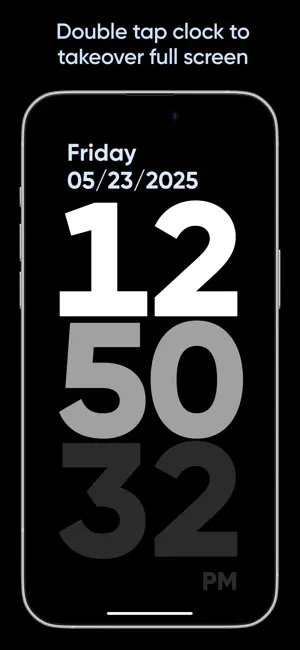
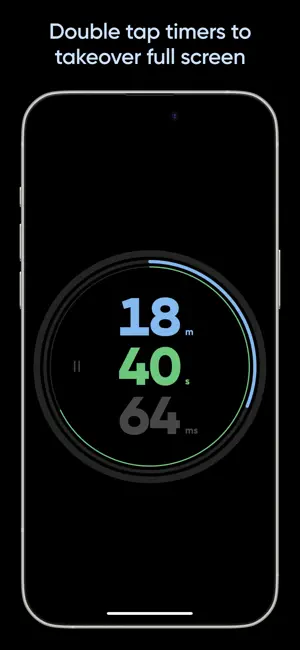
About FullTime: Big Clocks & Timers
FullTime displays large clocks and timers full screen on your iPad or iPhone. Use Split Screen mode to display a clock and timer at the same time and drag to resize to your preference. OR, double tap on a clock or timer to make them takeover the entire screen. Double tap again to return to Split Screen mode. This is the perfect app for those that keep an iPhone or iPad docked beside your Mac while working, an iPad in the kitchen, or even your iPhone mounted in your vehicle. Put your screens to work and display useful time related information. CLOCK DESIGNS Several clock designs are included to suit your preference. Simply long press on a clock to reveal the selection menu and select a clock design. Some are optimized for portrait or landscape device orientation but will always scale to fit. TIMERS • Stopwatch: Large, easy to read from a distance with progress ring visualizations • Time Countdown: Enter an amount of hours, minutes or seconds and countdown with visualization • Countdown to Specific Time: Enter a time to countdown to – perfect for showing when you need to leave for appointments or workday remaining. • Time Remaining Today: A fun progress ring visualization of hours, minutes, seconds left in the current day. • Time Remaining This Year: Visualization of time remaining today, this week, this month and rest of the year. Colorful and vibrant. TIMER QUICK CHANGE Long press on a displayed timer to reveal the timer selection menu, and tap on a timer type. Please note that they will not all run simultaneously and are reset upon selecting a new timer. BACKGROUND MODE SUPPORT A stopwatch and countdown timer will update as expected after sending FullTime to the background and returning to the app. COMPLETE PRIVACY No usernames, passwords or logins. We don’t collect a single thing about you or how you use the app. Nothing whatsoever is transmitted from your device to us. Terms of Use: https://www.apple.com/legal/internet-services/itunes/dev/stdeula/ Privacy Policy: https://fulltime.app/privacy
What’s new
Version 1.0.1 · Updated August 28, 2025
• Added ability to choose different date formats: "mm/dd/yyyy", "dd/mm/yyyy" or "yyyy/mm/dd" from the About this app menu. • Fixed a minor bug where the longest day of the week could be truncated.
App privacy
The developer, Emotive Engines, LLC, reported these privacy practices to Apple.
Data Not Collected
The developer does not collect any data from this app.
Alternatives to FullTime: Big Clocks & Timers
Looking for apps like FullTime: Big Clocks & Timers? Here are 6 similar apps on the App Store. The highest rated is Tally - Countdown App (5.0/5), and 5 of the 6 are free to download.
-
 Epochly: Unix Time Converter
-
 Timerow - Multi Time Tracker
-
 Tally - Countdown App
5.0
Tally - Countdown App
5.0
-
 Chronoflows
-
 ATO — Day Counter & Milestones
-
 re:timer – a modern timer
5.0
re:timer – a modern timer
5.0
| App | Rating | Price | Last updated | Compare |
|---|---|---|---|---|
| FullTime: Big Clocks & Timers | 5.0 / 5 (1 rating) | 9.99 USD | August 28, 2025 | |
| Epochly: Unix Time Converter | – | Free | Sep 29, 2026 | Compare |
| Timerow - Multi Time Tracker | – | Free | Jun 10, 2026 | Compare |
| Tally - Countdown App | 5.0 / 5 (3) | Free | Sep 19, 2026 | Compare |
| Chronoflows | – | Free | Apr 7, 2026 | Compare |
| ATO — Day Counter & Milestones | – | Free | May 25, 2026 | Compare |
| re:timer – a modern timer | 5.0 / 5 (7) | 1.99 USD | Jun 1, 2026 | Compare |