

Easy Reverse Video Creator
MITSUKO MARGOT KUBOTA ONO Photo & Video iPhoneiPadiPod touch
Easy Reverse Video Creator is a free Photo & Video app for iPhone and iPad by MITSUKO MARGOT KUBOTA ONO. Requires iOS 17.6. Updated August 28, 2026.
- Price
- Free
- on the App Store
- Size
- 7 MB
- Age 4+
- Updated
- Aug 28
- 2026 · v1.3.0
Screenshots


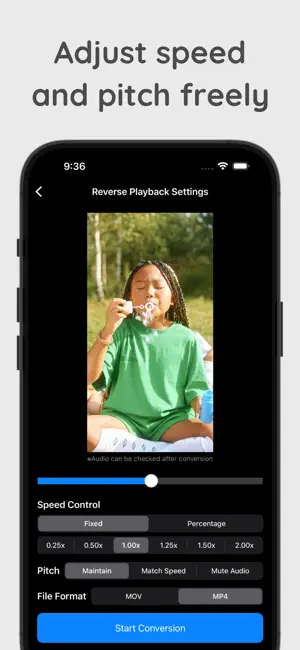
About Easy Reverse Video Creator
This app converts your videos into reverse playback. With its simple, user-friendly interface, you can not only reverse play but also customize playback speed and pitch to your liking. ● App Features & Highlights 【SIMPLE OPERATION】 ・Tap the video you want to reverse in the list ・Just choose “Playback Speed,” “Pitch,” and “File Format” 【INTUITIVE REVERSE PLAY】 ・One-tap conversion to reverse playback ・Instantly preview your result 【PLAYBACK SPEED CONTROL】 ・Fixed speeds: 0.25×, 0.5×, 1.0×, 1.5×, 2.0× ・Fine-tune in 0.1× increments 【PITCH CONTROL】 ・Three modes: Maintain Pitch, Match Speed, No Audio ・Natural-sounding pitch adjustment 【NO LOGIN OR REGISTRATION REQUIRED】 ・Ready to use immediately after install ・No account needed ● Notes 1. This app only supports videos recorded with your iPhone/iPad camera. Imported videos from external sources (e.g., downloads) are not supported and may fail to convert. 2. Conversion can take time. Although longer videos are supported, we recommend using clips under one minute for best performance.
What’s new
Version 1.3.0 · Updated August 28, 2026
Added a one-time purchase option to remove ads. You can purchase it or restore your purchase from Settings.
App privacy
The developer, MITSUKO MARGOT KUBOTA ONO, reported these privacy practices to Apple.
Data Used to Track You
The following data may be used to track you across apps and websites owned by other companies:
- Location: Coarse Location
- Identifiers: Device ID
- Usage Data: Product Interaction, Advertising Data
- Diagnostics: Crash Data, Performance Data
Data Not Linked to You
The following data, which may be collected but is not linked to your identity, may be used for the following purposes:
- Location: Coarse Location
- Identifiers: Device ID
- Usage Data: Product Interaction, Advertising Data
- Diagnostics: Crash Data, Performance Data
Used for: Third-Party Advertising
Alternatives to Easy Reverse Video Creator
Looking for apps like Easy Reverse Video Creator? Here are 6 similar apps on the App Store. The highest rated is Reverse Video: Slow Motion (4.7/5), and all 6 are free to download.
-
 ReverseCam - Video Reverser
4.5
ReverseCam - Video Reverser
4.5
-
 Reverse Video - Backwards Play
2.5
Reverse Video - Backwards Play
2.5
-
 VideoReverser: Reverse Video
4.0
VideoReverser: Reverse Video
4.0
-
 Video Reverse Editor
4.6
Video Reverse Editor
4.6
-
 Reverse Video: Slow Motion
4.7
Reverse Video: Slow Motion
4.7
-
 AI Reverse Video Editor - RevV
4.0
AI Reverse Video Editor - RevV
4.0
| App | Rating | Price | Last updated | Compare |
|---|---|---|---|---|
| Easy Reverse Video Creator | – | Free | August 28, 2026 | |
| ReverseCam - Video Reverser | 4.5 / 5 (2) | Free | Nov 22, 2025 | Compare |
| Reverse Video - Backwards Play | 2.5 / 5 (2) | Free | Jan 15, 2026 | Compare |
| VideoReverser: Reverse Video | 4.0 / 5 (1) | Free | Oct 5, 2026 | Compare |
| Video Reverse Editor | 4.6 / 5 (11) | Free | Oct 4, 2026 | Compare |
| Reverse Video: Slow Motion | 4.7 / 5 (3) | Free | Oct 10, 2026 | Compare |
| AI Reverse Video Editor - RevV | 4.0 / 5 (3) | Free | Oct 17, 2024 | Compare |