

Monthly Expense
August Aeppli Finance iPhoneiPadiPod touch
Monthly Expense is a free Finance app for iPhone and iPad by August Aeppli. Requires iOS 15.0. Updated May 24, 2026.
- Price
- Free
- on the App Store
- Size
- 50 MB
- Age 4+
- Updated
- May 24
- 2026 · v2.2
Screenshots

About Monthly Expense
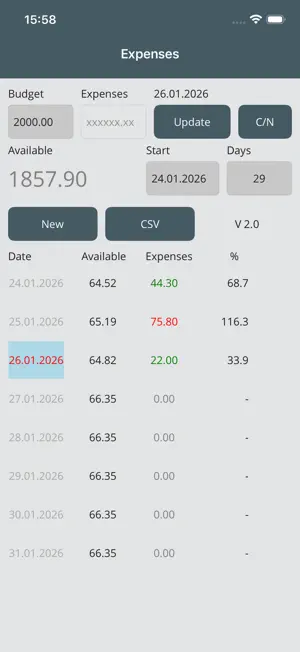
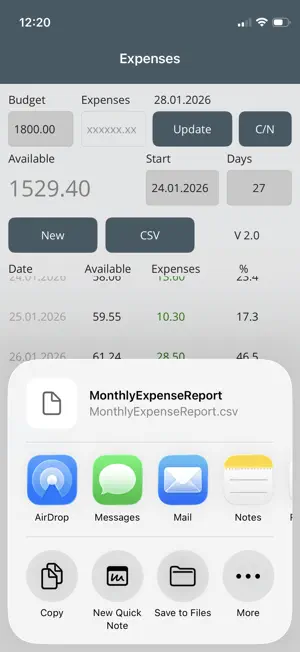
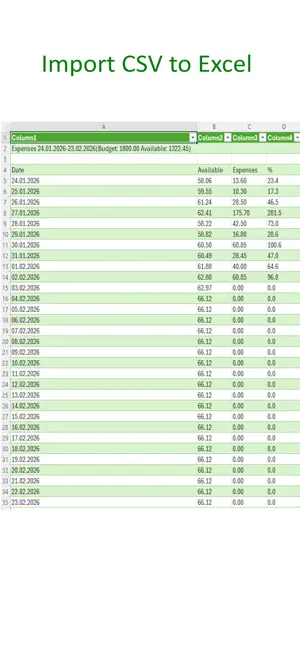
1. Enter budget 2. Select start date 3. Click Update These simple steps allow you to control your budget over the specified period. By default, the days correspond to one month. However, the specified days can be changed as desired. By selecting the current day (shown in light blue), the expenses must be entered and confirmed with “Update.” If the expenses are less than the available amount, they are marked in green; otherwise, they are marked in red. After entering the amount, the remaining amount will be distributed over the remaining days. The % column shows the percentage of expenditure. The “C/N” key (Credit Note) can be used to add a credit note to the total amount available. An Excel file can be sent at any time via a standard communication channel using CSV. Clicking “New” resets the data and allows you to start a new month with a new budget.
What’s new
Version 2.2 · Updated May 24, 2026
Text corrections
App privacy
The developer, August Aeppli, reported these privacy practices to Apple.
Data Not Collected
The developer does not collect any data from this app.
Alternatives to Monthly Expense
Looking for apps like Monthly Expense? Here are 6 similar apps on the App Store. The highest rated is My Save Wise (5.0/5), and all 6 are free to download.
-
 TrackBay
-
 LONDORA - Gestion financière
-
 Income Expense Budget Tracker
-
 Spentra: Expense Tracker
-
 My Save Wise
5.0
My Save Wise
5.0
-
 Portfolio Journal: Tracker
| App | Rating | Price | Last updated | Compare |
|---|---|---|---|---|
| Monthly Expense | – | Free | May 24, 2026 | |
| TrackBay | – | Free | Sep 11, 2026 | Compare |
| LONDORA - Gestion financière | – | Free | Oct 21, 2026 | Compare |
| Income Expense Budget Tracker | – | Free | Apr 7, 2026 | Compare |
| Spentra: Expense Tracker | – | Free | Feb 21, 2026 | Compare |
| My Save Wise | 5.0 / 5 (2) | Free | Jun 23, 2025 | Compare |
| Portfolio Journal: Tracker | – | Free | Oct 19, 2026 | Compare |
Compare Monthly Expense with the top alternatives: ratings, updates, ASO score and keyword gaps →