

PDF Maker - PDF Converter .
Kevin Rupareliya Productivity iPhoneiPadiPod touch
PDF Maker - PDF Converter . is a free Productivity app for iPhone and iPad by Kevin Rupareliya. Requires iOS 13.0. Updated November 19, 2025.
- Price
- Free
- on the App Store
- Size
- 10 MB
- Age 4+
- Updated
- Nov 19
- 2025 · v1.1
Screenshots


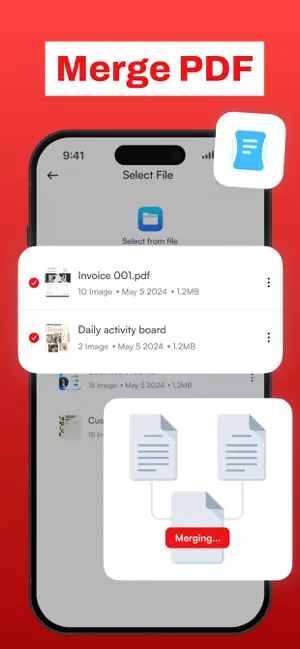
About PDF Maker - PDF Converter .
PDF Maker – Complete PDF Converter & Editor Turn your iPhone or iPad into a powerful PDF creation and management tool. Easily convert photos to PDF, scan documents, compress files, merge PDFs, and much more — all within a single, intuitive app. Key Features :- Image to PDF Conversion Convert multiple photos or images (JPG, PNG) into a single PDF document. Customize layout, resize, rotate, and reorder images before conversion for perfect results. Scan Documents to PDF Use your device’s camera to scan physical documents quickly and save them as PDFs. Compress PDF Files Reduce large PDF file sizes without compromising quality for easier sharing and storage. Convert PDF to JPG Extract images from PDF files and save them as photo files. Lock and Unlock PDFs Protect your PDFs with password encryption or remove restrictions from secured documents. Merge PDFs Combine multiple PDF files into a single document with ease. Add Text and Signature Insert text annotations or add your digital signature directly to PDF documents. Why Choose PDF Maker? • User-Friendly Interface: Simple, clean, and easy-to-navigate design for all skill levels. • Organize Files Efficiently: Create folders and rename files to keep your documents well-organized. • Edit Before Conversion: Crop, rotate, and resize photos before creating PDFs. • Save and Continue Later: Save your work in progress and edit or convert at your convenience. • Seamless Sharing & Printing: Share PDFs via email, AirDrop, Dropbox, or print directly from the app. • Fully Offline: No registration or internet connection required — your data stays private and secure. How to Use PDF Maker 1 Select Photos or Documents: Choose images from your gallery or take new photos to convert. 2 Edit & Arrange: Resize, rotate, and reorder images for your PDF. 3 Convert & Save: Create your PDF and save it within the app. 4 Manage & Share: Organize your PDFs in folders, share via email or cloud services, or print them directly. PDF Maker is the ultimate productivity app for anyone who works with PDFs regularly. Whether you need to combine photos into one document, scan contracts, compress files for easy sharing, or securely lock sensitive PDFs — this app handles it all effortlessly. Privacy policy : https://pdfmakerprivacy.blogspot.com Terms of use : https://sites.google.com/view/kr-terms-of-use/home Download PDF Maker now and take control of your documents today!
What’s new
Version 1.1 · Updated November 19, 2025
Bug fix & Improved app performance
App privacy
The developer, Kevin Rupareliya, reported these privacy practices to Apple.
Data Not Collected
The developer does not collect any data from this app.
Alternatives to PDF Maker - PDF Converter .
Looking for apps like PDF Maker - PDF Converter .? Here are 6 similar apps on the App Store. The highest rated is Photos PDF : Scanner Converter (4.9/5), and all 6 are free to download.
-
 PDF Maker - Convert to PDF
4.6
PDF Maker - Convert to PDF
4.6
-
 Image to PDF : PDF Maker
4.5
Image to PDF : PDF Maker
4.5
-
 PDFMaker: JPG to PDF converter
4.8
PDFMaker: JPG to PDF converter
4.8
-
 PDF Converter ©
4.5
PDF Converter ©
4.5
-
 Photos PDF : Scanner Converter
4.9
Photos PDF : Scanner Converter
4.9
-
 Image to PDF Converter · Edit
4.6
Image to PDF Converter · Edit
4.6
| App | Rating | Price | Last updated | Compare |
|---|---|---|---|---|
| PDF Maker - PDF Converter . | – | Free | November 19, 2025 | |
| PDF Maker - Convert to PDF | 4.6 / 5 (1,243) | Free | Jun 22, 2026 | Compare |
| Image to PDF : PDF Maker | 4.5 / 5 (132) | Free | Dec 11, 2025 | Compare |
| PDFMaker: JPG to PDF converter | 4.8 / 5 (1,409) | Free | Oct 12, 2026 | Compare |
| PDF Converter © | 4.5 / 5 (101) | Free | Sep 13, 2026 | Compare |
| Photos PDF : Scanner Converter | 4.9 / 5 (68,000) | Free | Oct 27, 2026 | Compare |
| Image to PDF Converter · Edit | 4.6 / 5 (307) | Free | Sep 1, 2026 | Compare |