

Be Native: Learn Swift
BN Coding Education iPhoneiPadiPod touchMac
Be Native: Learn Swift is a free Education app for iPhone and iPad by BN Coding. Rated 5.0/5 from 2 ratings. Requires iOS 18.4. Updated October 5, 2026.
- Rating
- 5.0
- 2 ratings
- Price
- Free
- on the App Store
- Size
- 47 MB
- Age 4+
- Updated
- Oct 5
- 2026 · v1.12
Screenshots


About Be Native: Learn Swift
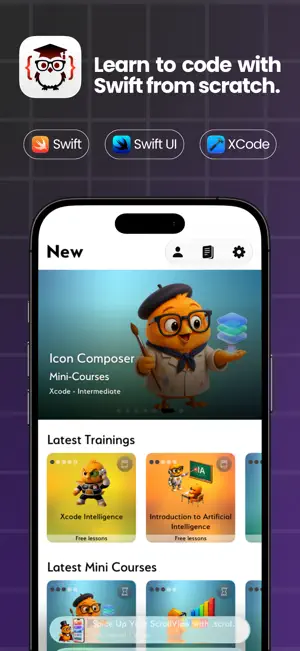
Learn Swift, SwiftUI, and native development for Apple platforms with instructors who have more than 10 years of experience and have taught thousands of students. Be Native combines structured training, guided projects, and continuously updated practical content. Explore sample lessons from many courses and mini-courses to experience the teaching method before choosing a Junior or Senior subscription. BILINGUAL TRAINING New training content includes Spanish and English audio tracks, professional subtitles in both languages, and full transcripts. Dual audio is being extended across the historical catalog. All source code used in the videos is included so you can study, run, and adapt it. FOUR WAYS TO LEARN - Full courses with progressive learning paths and guided projects - Mini-courses focused on specific frameworks, tools, and goals - Quick tips that solve everyday development problems - Practical, reusable code snippets explained with context - Swift, SwiftUI, UIKit, SwiftData, architecture, Xcode, GitHub, and AI-assisted development - Weekly content aligned with the latest iOS, Swift, and WWDC updates CODE NOTES AND EXPLANATIONS Save snippets, development tips, programming notes, and ideas from any lesson or article in the new Notes module. On compatible devices where Apple Intelligence is available, you can also ask the system to explain the code in lesson examples. EXPLORE THE PLATFORM Explore articles, videos, newsletters, live sessions, and original Spanish-language podcasts covering the Apple ecosystem. Save favorites, build topic notebooks, and find the right lesson with private on-device semantic search. A PATH FOR EVERY LEVEL Junior unlocks beginner and junior training. Senior unlocks the full path: beginner, junior, intermediate, senior, and expert. Build solid foundations first and move forward when you are ready. TOOLS THAT SUPPORT REAL LEARNING - Digital notebooks and topic-based notes - Timestamp markers inside every video - Favorites, progress tracking, and notifications - VoiceOver, Dynamic Type, and reduced-motion support - One subscription for iPhone, iPad, and Mac - A Mac experience built from scratch for macOS, with multi-window workflows Be Native also introduces a more modern design, renewed with ideas and feedback from the community. Be Native does not promise shortcuts. It gives you a clear path to understand code, practice with purpose, and become the developer you would hire. Understand the code. Change the world. ASK, FIND AND KEEP LEARNING Ask Be Native answers questions using your courses, lessons, podcasts, articles and transcripts, on device. Spotlight helps you find lessons by idea, not just by matching words. SiriAI can find lessons, create and manage notes, and play podcasts. These features require iOS 27, Apple Intelligence and SiriAI (beta). SiriAI currently speaks English only. More languages are coming soon. Your Library groups saved, in-progress and completed content, with search, sorting and filters. Organise notes in notebooks and folders, recover them from Recently Deleted, and build your own lists. Article read-aloud remembers your place across devices. On iPad, read articles in a two-page landscape layout. Add Shortcuts to resume a course, reopen recent content or open notes.
What’s new
Version 1.12 · Updated October 5, 2026
SiriAI, Spotlight and on-device intelligence. A refreshed Library and Search, with better accessibility. ASK BE NATIVE Ask about what you are studying and get an answer grounded in your own library: courses, lessons, podcasts, articles and their transcripts. It runs on device, so your questions never leave your iPhone or iPad. "How do I animate a chart in SwiftUI?" "What did the MapKit lesson say about annotations?" Ask SiriAI to find lessons. Be Native opens Ask Be Native with your question already submitted: "Find lessons about how to make a map in Be Native" "Search for lessons about SwiftUI using Be Native" Requires iOS 27 on a device with Apple Intelligence and SiriAI (beta). NOTES BY VOICE Create a note, add text to one, rename it or open it without touching the screen. If you leave something out, SiriAI asks for it. Find a note by its content, then tap its card to open it. "Create a note in Be Native" "Add 'check the delegate' to my SwiftData note in Be Native" "Find notes about SwiftUI using Be Native" PODCASTS BY VOICE Ask for an episode and it starts playing, with the episode and show on the Lock Screen and in Control Center. "Play the latest episode of Apple Coding Daily in Be Native" Say "in Be Native" or "using Be Native" so SiriAI knows which app you mean. SEARCH THAT UNDERSTANDS YOU Your courses, lessons, podcasts, articles and notes are indexed for Spotlight, transcripts included, so searching by an idea finds the lesson that explains it, not just the words you typed. Results come in one list with a featured card, and with Apple Intelligence our engine tells you why it chose them. Before you type, explore by topic. SHORTCUTS FOR TASKS SIRIAI CANNOT HANDLE YET Add them once in Shortcuts, then run them directly. "Continue my course in Be Native" picks up the lesson you left halfway "What was I watching in Be Native" brings back the last thing you opened "Open my notes in Be Native" The Find Lessons shortcut asks what you want to learn, then answers with a short explanation and the lessons that cover it. NOTIFICATIONS THAT TAKE YOU THERE Tapping a notification about new content opens that course or lesson directly. INSIGHT: OTHERS Others now works like the rest of Insight: each source has its own row of cards that you scroll sideways, and tapping a card plays the episode or opens the video. A Liquid Glass button next to the section picker filters by source. NOTES Your notes are now a clean list that is easy to scan, with the title and a short preview of each one. Notebooks and folders use a card layout, notes open in a dedicated reading screen, and Recently Deleted keeps what you delete until you empty it. LIBRARY My Content is now Library: Overview, Saved, In Progress and Completed, with search, sorting, filters by type and year, and grid or list on iPad. Continue where you left off and see your pace at a glance. ARTICLES The read-aloud version remembers where you stopped, on all your devices. On iPad in landscape, Read as a book opens a two-page spread. LISTS AND LESSONS Use + to choose a list. It remembers your last choice and removes an item if it is already on that list. Swipe a lesson to mark it as watched or add it to your last list. ACCESSIBILITY Clearer VoiceOver labels, headings and actions on every screen. Magic Tap starts and pauses playback. Text grows to the largest sizes, Bold Text uses our own typeface, and Reduce Motion and Increase Contrast are respected in light and dark mode. ALSO IN THIS RELEASE Faster, steadier streaming answers. Audio no longer blocks the interface while the app starts. Course trailers pause what you are listening to, and intros use your selected video language. Clearer messages when content is unavailable. Fixes across iPad and Mac. STICKERS A new sticker pack for Messages with up to 30 Swifty moments any developer will relate to. SiriAI currently speaks English only. More languages are coming soon.
App privacy
The developer, BN Coding, reported these privacy practices to Apple.
Data Not Linked to You
The following data, which may be collected but is not linked to your identity, may be used for the following purposes:
- User Content: Other User Content
- Search History: Search History
- Identifiers: User ID, Device ID
- Usage Data: Product Interaction
- Diagnostics: Performance Data
- Contact Info: Email Address, Name
Used for: Analytics, App Functionality
Alternatives to Be Native: Learn Swift
Looking for apps like Be Native: Learn Swift? Here are 6 similar apps on the App Store. The highest rated is Learn SwiftUI: Coding Tutorial (5.0/5), and all 6 are free to download.
-
 Learn SwiftUI: Coding Tutorial
5.0
Learn SwiftUI: Coding Tutorial
5.0
-
 Flutter Quest
-
 SwiftHub: Learn, Build & Hire
-
 Learn Swift: Build iOS Apps
4.5
Learn Swift: Build iOS Apps
4.5
-
 Flutter Conf Latam App
-
 Hacktivate: Capture the Flag
4.7
Hacktivate: Capture the Flag
4.7
| App | Rating | Price | Last updated | Compare |
|---|---|---|---|---|
| Be Native: Learn Swift | 5.0 / 5 (2 ratings) | Free | October 5, 2026 | |
| Learn SwiftUI: Coding Tutorial | 5.0 / 5 (2) | Free | Nov 14, 2023 | Compare |
| Flutter Quest | – | Free | Jul 15, 2026 | Compare |
| SwiftHub: Learn, Build & Hire | – | Free | May 27, 2025 | Compare |
| Learn Swift: Build iOS Apps | 4.5 / 5 (12) | Free | Oct 4, 2026 | Compare |
| Flutter Conf Latam App | – | Free | Sep 26, 2026 | Compare |
| Hacktivate: Capture the Flag | 4.7 / 5 (32) | Free | Sep 10, 2026 | Compare |