

VBook Scan
VBook Scan Technology Limited Utilities iPhoneiPadiPod touch
VBook Scan is a free Utilities app for iPhone and iPad by VBook Scan Technology Limited. Rated 2.0/5 from 4 ratings. Requires iOS 13.0.
- Rating
- 2.0
- 4 ratings
- Price
- Free
- on the App Store
- Size
- 98 MB
- Age 17+
- Updated
- Aug 26
- 2026 · v1.0.13
Screenshots



About VBook Scan
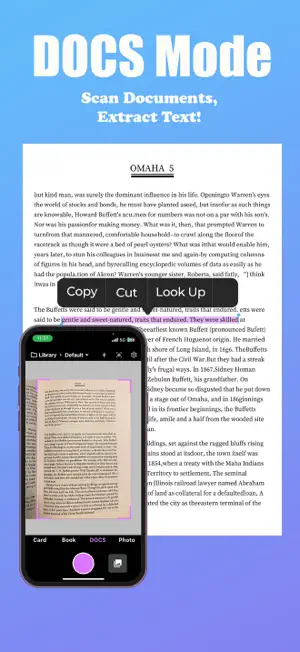
VBook Scan is a reliable book scanner app with OCR designed for users who want to digitize books, documents, cards, and photos using their mobile phone. The app with OCR helps turn printed pages into clear digital files that are easy to store, read, and share. It is useful for students, professionals, and anyone who works with physical paperwork regularly. The app allows users to scan directly with their phone camera. The layout is simple, and features are easy to access. VBook focuses on accuracy and readability without adding unnecessary complexity. Scan Books with Page Flattening Books often have curved pages that reduce scan quality. VBook Scan solves this problem by allowing users to scan books with page flattening. This feature smooths curved pages automatically, creating clean and readable scans. Pages are also split correctly to improve viewing on mobile screens. This makes scanning textbooks, notebooks, and manuals easier. Users can save their scanned books digitally and access them anytime. Document Scanner with Text Extraction VBook works as a powerful document scanner with text extraction for daily paperwork. Users can scan letters, forms, receipts, and notes with clear results. The app supports scan documents to editable text, which helps reduce manual typing. It also works as a document OCR scanner App, making it suitable for office work, study materials, and record storage. OCR Text and Handwriting Recognition VBook Scan includes a built in OCR text scanner that extracts printed text from scanned images. Users can copy and reuse text from documents and photos for editing or sharing. The app also supports handwritten content through a handwriting OCR scanner app. Users can convert handwritten notes into readable digital text. It also supports document OCR to word, which helps create editable documents quickly. Scan to PDF Converter and File Export VBook Scan includes a simple scan to PDF converter that allows users to save scanned pages as PDF files. This is useful for sharing documents or keeping digital records. The app also supports convert image to PDF scanner, allowing users to turn photos into PDF documents. Users can also scan documents and convert to word when editable formats are needed. Image to Text and Text Extraction Tools With the text extractor from image feature, VBook Scan allows users to capture text from images easily. This is helpful for extracting information from printed materials and photos. The image to text OCR scanner converts images into editable text with good accuracy. This feature saves time and improves productivity for both students and professionals. Business Card and ID Card Scanning VBook includes a business card scanner for storing contact information digitally. Users can scan both sides of a card, and the app aligns them automatically. The app also works as a card scanner app for ID cards, allowing users to keep important card details organized and accessible. Photo Scanner for Old Photo Restoration VBoo works as a photo scanner for old photo collections. Users can scan printed photos and preserve them digitally. The app allows users to scan and restore old photos easily. It also supports restore and colorize photos to improve faded images. Users can make photo clear and enhance photo quality using simple tools. VBook Scan also supports photo repair and restoration for damaged photos. Free and Premium Access Options VBook is available on multiple mobile platforms. New users can start with a Free Trial at $0 per month, which includes basic scanning features, limited OCR usage, and PDF exports. Users who upgrade to the Premium plan at $69 per year unlock unlimited scans, unlimited OCR, and advanced file conversion options designed for higher scanning needs. VBook is built for users who need a simple and dependable scanning app. It helps reduce paper use and keeps important information accessible anytime. User Agreement:https://www.vbookscan.com/terms-of-service.html
What’s new
Version 1.0.13 · Updated August 26, 2026
fix: resolve share function issue
App privacy
The developer, VBook Scan Technology Limited, reported these privacy practices to Apple.
Data Not Collected
The developer does not collect any data from this app.
Alternatives to VBook Scan
Looking for apps like VBook Scan? Here are 6 similar apps on the App Store. The highest rated is Letterly: AI Note Taker (4.7/5), and all 6 are free to download.
-
 CZUR Scan
-
 PicPak: E-Ink Photo Frame
3.3
PicPak: E-Ink Photo Frame
3.3
-
 Letterly: AI Note Taker
4.7
Letterly: AI Note Taker
4.7
-
 SpaceWalker by VITURE
4.1
SpaceWalker by VITURE
4.1
-
 UGREEN NAS
4.1
UGREEN NAS
4.1
-
 uBlock Origin Lite
4.7
uBlock Origin Lite
4.7
| App | Rating | Price | Last updated | Compare |
|---|---|---|---|---|
| VBook Scan | 2.0 / 5 (4 ratings) | Free | August 26, 2026 | |
| CZUR Scan | – | Free | Mar 19, 2026 | Compare |
| PicPak: E-Ink Photo Frame | 3.3 / 5 (12) | Free | Oct 21, 2026 | Compare |
| Letterly: AI Note Taker | 4.7 / 5 (1,124) | Free | Oct 15, 2026 | Compare |
| SpaceWalker by VITURE | 4.1 / 5 (1,468) | Free | Aug 24, 2026 | Compare |
| UGREEN NAS | 4.1 / 5 (313) | Free | Oct 13, 2026 | Compare |
| uBlock Origin Lite | 4.7 / 5 (959) | Free | Oct 19, 2026 | Compare |
Compare VBook Scan with the top alternatives: ratings, updates, ASO score and keyword gaps →