

MinePOI: Save Coordinates
Evgeny Dmitriev Utilities iPhoneiPadiPod touch
MinePOI: Save Coordinates is a free Utilities app for iPhone and iPad by Evgeny Dmitriev. Requires iOS 17.0. Updated August 10, 2026.
- Price
- Free
- on the App Store
- Size
- 7 MB
- Age 4+
- Updated
- Aug 10
- 2026 · v1.1.3
Screenshots


About MinePOI: Save Coordinates
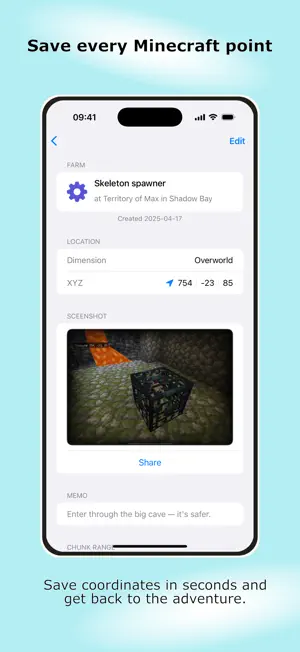
Save, track, and organize coordinates for your Minecraft worlds MinePOI is a companion app for Minecraft that helps you save points of interest, track coordinates, and organize locations across all your worlds — so you never lose important places again. As you explore Minecraft’s endless worlds, you’ll discover caves, mob spawners, biomes, villages, bases, and rare structures. Without a dedicated coordinate tracker, these locations are easily lost among screenshots, notes, or forgotten coordinates. MinePOI keeps everything organized and easy to find. Key Features • Save coordinates in seconds — focus on exploring, not writing notes • Track points of interest (POI) across all your worlds • Calculate chunk borders with a built-in chunk tool • Convert coordinates between Overworld and Nether instantly • Add screenshots and notes to every saved location • Organize points by places like Spawn, Base, Villages, or custom areas • Categorize locations: farms, resources, builds, structures • Filter and search locations to find what you need fast • Import and export your data to back up or share between devices Who is MinePOI for? • Explorers tracking biomes, structures, and landmarks • Builders working with chunks, farms, and large projects • Survival players managing bases across multiple worlds • Anyone looking for a clean way to track coordinates and locations Free Version • 1 Minecraft world • Up to 20 saved points Lifetime Premium • Unlimited worlds • Unlimited saved points Stay organized. Track every place. Never lose your Minecraft discoveries again. Download MinePOI and take full control of your worlds. Disclaimer This app is an unofficial companion tool and is not affiliated with, endorsed, sponsored, or approved by Mojang AB or Microsoft. Minecraft is a trademark of Mojang AB. All related assets, names, and trademarks are the property of their respective owners. The use of the term “Minecraft” is solely for descriptive purposes to indicate compatibility with the game. Terms of Use: https://www.apple.com/legal/internet-services/itunes/dev/stdeula/ Privacy Policy: https://support.robofly.org/minepoi/privacypolicy.html
What’s new
Version 1.1.3 · Updated August 10, 2026
This update includes improvements and bug fixes to make MinePOI more stable and reliable. Fixes: - Various bug fixes and stability improvements
App privacy
The developer, Evgeny Dmitriev, reported these privacy practices to Apple.
Data Not Linked to You
The following data, which may be collected but is not linked to your identity, may be used for the following purposes:
- Usage Data: Product Interaction
- Diagnostics: Crash Data, Performance Data, Other Diagnostic Data
Used for: Analytics, App Functionality
Alternatives to MinePOI: Save Coordinates
Looking for apps like MinePOI: Save Coordinates? Here are 6 similar apps on the App Store. The highest rated is LiveKit (4.8/5), and all 6 are free to download.
-
 Seed Map Pro for Minecraft
4.7
Seed Map Pro for Minecraft
4.7
-
 Cartograft
4.1
Cartograft
4.1
-
 SeedMap - Explore Your Seeds
2.4
SeedMap - Explore Your Seeds
2.4
-
 LiveKit
4.8
LiveKit
4.8
-
 Seed Map: Biomes & Structures
3.1
Seed Map: Biomes & Structures
3.1
-
 Lunar Proxy for Minecraft: PE
4.4
Lunar Proxy for Minecraft: PE
4.4
| App | Rating | Price | Last updated | Compare |
|---|---|---|---|---|
| MinePOI: Save Coordinates | – | Free | August 10, 2026 | |
| Seed Map Pro for Minecraft | 4.7 / 5 (36) | Free | Oct 20, 2026 | Compare |
| Cartograft | 4.1 / 5 (22) | Free | Jul 21, 2026 | Compare |
| SeedMap - Explore Your Seeds | 2.4 / 5 (21) | Free | Oct 21, 2026 | Compare |
| LiveKit | 4.8 / 5 (31) | Free | Oct 8, 2025 | Compare |
| Seed Map: Biomes & Structures | 3.1 / 5 (44) | Free | Sep 26, 2026 | Compare |
| Lunar Proxy for Minecraft: PE | 4.4 / 5 (654) | Free | Sep 17, 2026 | Compare |