

Poke: Block Apps & Websites
Gautham Shankar Productivity iPhoneiPadiPod touch
Poke: Block Apps & Websites is a free Productivity app for iPhone and iPad by Gautham Shankar. Rated 3.8/5 from 11 ratings. Requires iOS 17.6.
- Rating
- 3.8
- 11 ratings
- Price
- Free
- on the App Store
- Size
- 88 MB
- Age 4+
- Updated
- Jul 24
- 2026 · v1.5.6
Screenshots


About Poke: Block Apps & Websites
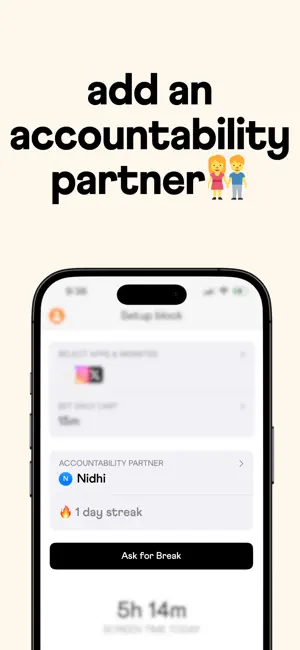
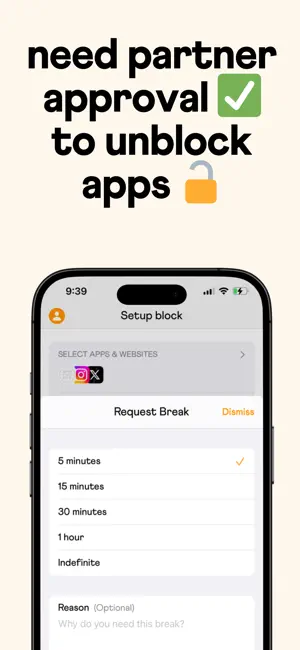
Tired of screen time apps you can ignore? Poke helps you build healthy phone habits through powerful blocking, real accountability, and on-demand focus timer sessions.. It's the screen time app that actually works because you choose how strict you want to be—and you can add an accountability partner to keep you honest. How Poke Works Create Custom Blocks You define what to block and when. Choose specific apps or websites, then set either: - Time windows (e.g., block social media 9 AM - 5 PM on weekdays) - Daily usage limits (e.g., allow 30 minutes of TikTok per day) Focus Timer — Deep Work on Demand Need to focus right now? Start a Focus Timer and Poke blocks your distracting apps for exactly as long as you need. No scheduling required—just set your timer and go. Choose Your Break Method For each block, decide how strict you want to be: - Allow Breaks: Take breaks anytime you need them - Ask Partner: Request permission from your accountability partner for breaks - Not Allowed: No breaks—stay committed to your goals Your Accountability Partner Add an accountability partner to make your commitment real. When you set a block to "Ask Partner" mode and need access to a blocked app, you send them a break request. They can approve or deny it in real-time, helping you stay on track when willpower fails. Your partner can also add you to their blocks, creating mutual accountability. Honor Your Commitments When you hit your limits or enter a blocked time window, Poke gently blocks those apps. Depending on your break settings, you either take a break yourself, ask your partner for permission, or stay blocked. It's not about restriction; it's about achieving the goals you set for yourself. Poke combines powerful blocking with optional social accountability to help you build the phone habits you actually want. Privacy policy: https://usepoke.com/privacy-policy Terms of service: https://usepoke.com/terms-of-service, https://www.apple.com/legal/internet-services/itunes/dev/stdeula/
Ratings & reviews
3.8
11 ratings
What’s new
Version 1.5.6 · Updated July 24, 2026
Bug fixes & improvements.
App privacy
The developer, Gautham Shankar, reported these privacy practices to Apple.
Data Linked to You
The following data, which may be collected and linked to your identity, may be used for the following purposes:
- Identifiers: Device ID
- Usage Data: Product Interaction
- Purchases: Purchase History
- Contact Info: Email Address, Name
- User Content: Photos or Videos
Used for: Analytics, App Functionality
Data Not Linked to You
The following data, which may be collected but is not linked to your identity, may be used for the following purposes:
- Contact Info: Email Address, Name
Used for: Analytics
Alternatives to Poke: Block Apps & Websites
Looking for apps like Poke: Block Apps & Websites? Here are 6 similar apps on the App Store. The highest rated is App Blocker - Focus & Detox (5.0/5), and all 6 are free to download.
-
 LockPact: Screen Time Partner
4.3
LockPact: Screen Time Partner
4.3
-
 Screen Time Buddy - Focus
4.3
Screen Time Buddy - Focus
4.3
-
 Phone Jail - Tools for Focus
4.8
Phone Jail - Tools for Focus
4.8
-
 App Blocker - Focus & Detox
5.0
App Blocker - Focus & Detox
5.0
-
 Friend Controls: Screen Time
4.7
Friend Controls: Screen Time
4.7
-
 Useless - Screen Time Control
4.5
Useless - Screen Time Control
4.5
| App | Rating | Price | Last updated | Compare |
|---|---|---|---|---|
| Poke: Block Apps & Websites | 3.8 / 5 (11 ratings) | Free | July 24, 2026 | |
| LockPact: Screen Time Partner | 4.3 / 5 (7) | Free | Oct 23, 2026 | Compare |
| Screen Time Buddy - Focus | 4.3 / 5 (10) | Free | Apr 20, 2026 | Compare |
| Phone Jail - Tools for Focus | 4.8 / 5 (40) | Free | Apr 21, 2026 | Compare |
| App Blocker - Focus & Detox | 5.0 / 5 (1) | Free | Sep 25, 2026 | Compare |
| Friend Controls: Screen Time | 4.7 / 5 (639) | Free | Oct 24, 2026 | Compare |
| Useless - Screen Time Control | 4.5 / 5 (291) | Free | Oct 3, 2026 | Compare |