

GigSA: Events jobs
Maaly bukhari Productivity iPhoneiPadiPod touch
GigSA: Events jobs is a free Productivity app for iPhone and iPad by Maaly bukhari. Rated 5.0/5 from 2 ratings. Requires iOS 17.0. Updated October 7, 2026.
- Rating
- 5.0
- 2 ratings
- Price
- Free
- on the App Store
- Size
- 18 MB
- Age 12+
- Updated
- Oct 7
- 2026 · v1.1.10
Screenshots



About GigSA: Events jobs
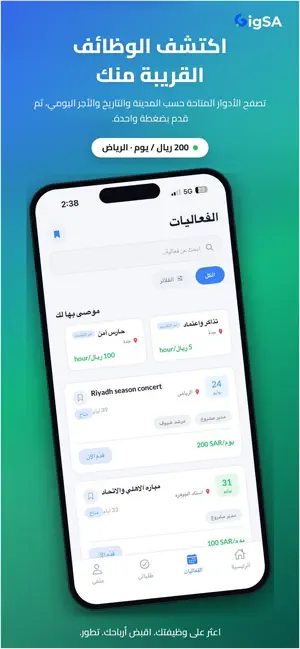
GigSA connects event organizers with reliable staff and gives freelancers direct access to real opportunities, concerts, big music festivals, sport events, and more. Verity of event gigs . Fast hiring. Secure payments. For Freelancers • Browse verified gigs near you. • Apply in one click with your profile. • Get alerts for roles that match your skills. • Track shifts and payments in one place. For Organizers • Post gigs and hire staff quickly. • Explore pool of vetted staff - Smart matching to find the right talent. • Manage your temporary staff and payments easily. Follow Us Linkedin: GigSA Event Staffing Solution Instagram: @GigSA.events TikTok: @GigSA.events Email: [email protected] Copyright 2025 GigSA
What’s new
Version 1.1.10 · Updated October 7, 2026
What's new in this update: • Fixes a crash when opening the app in version 1.1.9. • Automatic check-in. On a shift day, GigSA checks you in when you arrive at the venue, and while you're checked in it notes when you leave or return, even when the app is closed. Background location is no longer used. • Hours that change day by day. Multi-day gigs with different hours on each day list every day with its own times. Today's shift, the check-in time, and your attendance history all use that day's planned hours, and show whether you were on time, late or left early. • Accept or reject role changes. When an organizer edits your role after you're hired, you're notified, see what changed (old and new rate, pay type or hours), and can accept or reject it. • Breaks that make sense. After your break is approved the Attendance tab shows "On break", and an "I'm back" button lets your supervisor know you've returned. • Know when the organizer checks you in or out. You're notified when an organizer records your check-in or check-out, the Attendance tab shows who did it, and you can confirm or dispute a check-out done for you. • Payments handled by GigSA. You're notified when GigSA sends your payment and can confirm you received it. If something is wrong with a payment, report the problem from Earnings and follow its status until it's resolved. • Smaller fixes. Rates show their real unit (per hour, day or week) instead of always per day. The check-in card shows your actual check-in time. Accepted terms stay accepted when you reopen an event.
App privacy
The developer, Maaly bukhari, reported these privacy practices to Apple.
Data Linked to You
The following data, which may be collected and linked to your identity, may be used for the following purposes:
- Financial Info: Payment Info
- Location: Precise Location
- Contact Info: Physical Address, Email Address, Name, Phone Number
- User Content: Emails or Text Messages, Photos or Videos, Customer Support, Other User Content
- Identifiers: User ID
Used for: App Functionality
Alternatives to GigSA: Events jobs
Looking for apps like GigSA: Events jobs? Here are 6 similar apps on the App Store. The highest rated is radius_live (3.0/5), and all 6 are free to download.


| App | Rating | Price | Last updated | Compare |
|---|---|---|---|---|
| GigSA: Events jobs | 5.0 / 5 (2 ratings) | Free | October 7, 2026 | |
| aac talent app | – | Free | Jan 29, 2026 | Compare |
| Zonizer | – | Free | Sep 4, 2026 | Compare |
| radius_live | 3.0 / 5 (10) | Free | Nov 20, 2024 | Compare |
| Gigs – Event Staffing Jobs | – | Free | Apr 7, 2026 | Compare |
| سمار ايفنت | – | Free | Feb 18, 2026 | Compare |
| Black Hat MEA | 1.5 / 5 (2) | Free | Oct 9, 2026 | Compare |
Compare GigSA: Events jobs with the top alternatives: ratings, updates, ASO score and keyword gaps →