

Scanmarker Keyboard
Topscan ltd. Education iPhoneiPadiPod touch
Scanmarker Keyboard is a free Education app for iPhone and iPad by Topscan ltd. Requires iOS 15.0. Updated October 21, 2026.
- Price
- Free
- on the App Store
- Size
- 9 MB
- Age 4+
- Updated
- Oct 21
- 2026 · v2.14
Screenshots



About Scanmarker Keyboard
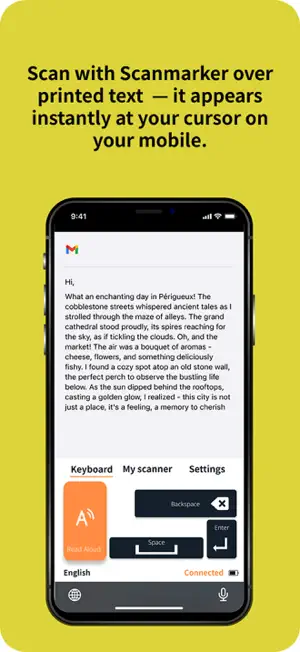
ScanMarker Keyboard - Compatible with ScanMarker Air & Reader Models Unlock the full potential of your ScanMarker Air and ScanMarker Reader with the ScanMarker Keyboard app, designed to seamlessly integrate with these advanced scanning devices for a powerful, efficient, and user-friendly experience. Core Functionality: Wireless Text Scanning: Easily scan and instantly transfer text from documents, books, or any printed material directly to your iPhone or iPad. The ScanMarker Air and ScanMarker Reader work wirelessly via Bluetooth to provide real-time text transfer and reading. OCR (Optical Character Recognition): The app uses OCR technology to accurately capture and convert printed text into editable content, eliminating the need for manual typing. Real-time Reading: For users needing accessibility support, the ScanMarker Keyboard app reads out the text immediately after scanning. The app supports multiple languages, making it ideal for multilingual users. Easy Text Editing & Saving: Once scanned, the text is ready for editing, sharing, or saving to your device's notes, word processor, or any compatible app. Integration with ScanMarker Air & Reader Models: ScanMarker Air: The app connects to the ScanMarker Air model via Bluetooth, allowing for real-time scanning and text transfer. Perfect for users on-the-go who need quick, wireless scanning. ScanMarker Reader: For a more robust reading experience, the app pairs with the ScanMarker Reader to provide both reading and scanning capabilities. Great for those needing to quickly transfer scanned text for later use or integration into digital documents. Use Cases for Target Users: Students: Scan and save important notes from textbooks, articles, or lecture materials. Easily organize and access scanned text for study sessions. Dyslexic Users: With the text-to-speech feature, dyslexic users can scan and listen to the text aloud, helping with reading comprehension and reducing reading fatigue. Professionals & Researchers: Quickly capture and store text from research papers, documents, or printed materials for further analysis or referencing. Perfect For: ScanMarker Air & Reader Users: Ideal for those who already own a ScanMarker Air or ScanMarker Reader and want to maximize their functionality on iOS devices. Students, Teachers, Researchers, and Professionals: Anyone who needs to capture and edit text from printed materials quickly and efficiently.
What’s new
Version 2.14 · Updated October 21, 2026
New Settings screen for scanning hand, reading speed and language. Simpler first-time setup: choose your scanner first. Read Aloud fixes, Hebrew/Arabic text fix, clearer battery indicator.
App privacy
The developer, Topscan ltd., reported these privacy practices to Apple.
Data Linked to You
The following data, which may be collected and linked to your identity, may be used for the following purposes:
- Contact Info: Email Address, Other User Contact Info
Used for: App Functionality
Alternatives to Scanmarker Keyboard
Looking for apps like Scanmarker Keyboard? Here are 6 similar apps on the App Store.
-
 Ikeda International School
-
 Aauti Learn
-
 Synapse: Flashcard Maker
-
 Ireland Geography Quiz
-
 ABA Exam (BCBA)
-
 The Foundation Stone
| App | Rating | Price | Last updated | Compare |
|---|---|---|---|---|
| Scanmarker Keyboard | – | Free | October 21, 2026 | |
| Ikeda International School | – | Free | Jun 20, 2025 | Compare |
| Aauti Learn | – | Free | Jun 22, 2026 | Compare |
| Synapse: Flashcard Maker | – | Free | Sep 24, 2026 | Compare |
| Ireland Geography Quiz | – | 1.99 USD | Nov 25, 2025 | Compare |
| ABA Exam (BCBA) | – | 8.99 USD | Apr 17, 2024 | Compare |
| The Foundation Stone | – | Free | Jul 12, 2026 | Compare |