

Bluetooth Device Finder App
Arslan Ahmad Lifestyle iPhoneiPadiPod touch
Bluetooth Device Finder App is a free Lifestyle app for iPhone and iPad by Arslan Ahmad. Requires iOS 15.6. Updated November 21, 2025.
- Price
- Free
- on the App Store
- Size
- 112 MB
- Age 4+
- Updated
- Nov 21
- 2025 · v1.1.3
Screenshots



About Bluetooth Device Finder App
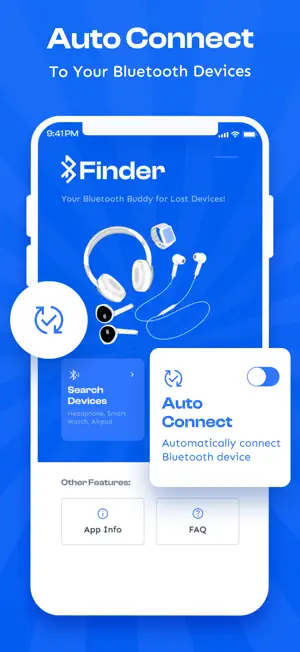
Find your lost AirPods, Apple Watch, headphones, and other Bluetooth devices quickly and easily with Bluetooth Finder – the smart Bluetooth device tracker made for Apple users. Losing your wireless devices like AirPods or an Apple Watch is incredibly frustrating. Whether they’ve slipped between couch cushions, been left at the gym, or fallen under your bed, Bluetooth Finder is your go-to solution. Our app uses signal strength indicators and intelligent device detection to help you locate your missing gadgets with confidence. It’s simple, fast, and made to work seamlessly with your iPhone or iPad. Bluetooth Finder works by scanning your environment for nearby Bluetooth Low Energy (BLE) signals. When your lost device is within range, you’ll see it appear in the list — complete with its signal strength and distance score. As you walk around, our real-time signal meter helps guide you toward your device. The stronger the signal, the closer you are. It’s like a game of “hot and cold,” but with precision tracking that really works. Powerful Features for Apple Users • Find My AirPods & Headphones Misplaced your AirPods or wireless earbuds? Our AirPods Finder mode helps detect their signal even if they’re not in the charging case (depending on model). Stop the panic and start scanning! • Apple Watch Locator Whether it’s fallen behind your nightstand or left in your bag, your Apple Watch can be tracked using Bluetooth signal strength and distance guidance. • Supports Most Bluetooth Devices Find not just Apple products, but any Bluetooth-enabled accessories such as speakers, fitness trackers (like Fitbit or WHOOP), smartwatches, and more. • Live Distance Meter Watch the signal get stronger as you get closer. Our proximity-based scoring system gives you live feedback to zero in on your lost device. • Favorites & Quick Access Add frequently used devices to a favorites list so you can track them faster whenever you need to. • Device Details View helpful info such as signal strength, device name, manufacturer, and more. • Smart Map Integration While Bluetooth doesn’t support GPS tracking, our app intelligently shows the last known area where your device was connected, giving you a helpful starting point. Simple Steps to Use - Open Bluetooth Finder and scan for nearby devices. - Select your lost item from the list. - Move around slowly while watching the signal strength increase. - As the signal strengthens, you’re getting closer — your device is nearby! No setup is required. Just launch the app and start scanning. Whether your device is stuck in a drawer, lost under the car seat, or dropped in your home, Bluetooth Finder helps you find it fast. Whether you're trying to recover a lost pair of AirPods, headphones, your Apple Watch, or another Bluetooth-enabled gadget, Bluetooth Finder has you covered. It’s like having “Find My” for more of your everyday tech — even if they're not connected to iCloud. Works With: • AirPods (All Generations, including Pro and Max) • Beats headphones • Apple Watch (Series 1–9 and Ultra) • Wireless earbuds • Bluetooth speakers • Smartwatches and fitness bands (e.g., Fitbit, WHOOP) • BLE-compatible gadgets Important Notes: • The lost device must be powered on and within Bluetooth range (~30–60 feet indoors). • The app does not use GPS — it works via Bluetooth proximity signals. • Signal strength may vary based on interference, environment, or device placement. Disclaimer: This app is not affiliated with or endorsed by Apple Inc. “AirPods,” “Apple Watch,” and other product names are trademarks of their respective owners. Bluetooth Finder is an independent app designed to help you locate your devices using Bluetooth technology.
What’s new
Version 1.1.3 · Updated November 21, 2025
Bugs Fixed
App privacy
The developer, Arslan Ahmad, reported these privacy practices to Apple.
Data Used to Track You
The following data may be used to track you across apps and websites owned by other companies:
- Identifiers: Device ID
Data Not Linked to You
The following data, which may be collected but is not linked to your identity, may be used for the following purposes:
- Identifiers: Device ID
Used for: Third-Party Advertising, Developer’s Advertising or Marketing
Alternatives to Bluetooth Device Finder App
Looking for apps like Bluetooth Device Finder App? Here are 6 similar apps on the App Store. The highest rated is Prismoy - Color Analysis (5.0/5), and all 6 are free to download.
-
 PickX - Notion DB Picker
-
 ReceiptScan: Warranty Tracker
-
 SearchBom: Find Lost Devices
-
 MI Quotes - Daily Inspiration
-
 Fit Drop AI - Outfit Planner
-
 Prismoy - Color Analysis
5.0
| App | Rating | Price | Last updated | Compare |
|---|---|---|---|---|
| Bluetooth Device Finder App | – | Free | November 21, 2025 | |
| PickX - Notion DB Picker | – | Free | Mar 15, 2026 | Compare |
| ReceiptScan: Warranty Tracker | – | Free | Sep 28, 2026 | Compare |
| SearchBom: Find Lost Devices | – | Free | Feb 8, 2026 | Compare |
| MI Quotes - Daily Inspiration | – | Free | Jul 16, 2025 | Compare |
| Fit Drop AI - Outfit Planner | – | Free | Jan 8, 2025 | Compare |
| Prismoy - Color Analysis | 5.0 / 5 (1) | Free | Sep 9, 2026 | Compare |