
DigLog - Metal Detecting Diary
Gruffydd Johnston Utilities iPhoneiPadiPod touch
DigLog - Metal Detecting Diary is a free Utilities app for iPhone and iPad by Gruffydd Johnston. Rated 3.5/5 from 2 ratings. Requires iOS 18.0.
- Rating
- 3.5
- 2 ratings
- Price
- Free
- on the App Store
- Size
- 10 MB
- Age 4+
- Updated
- Sep 1
- 2025 · v1.2
Screenshots

About DigLog - Metal Detecting Diary
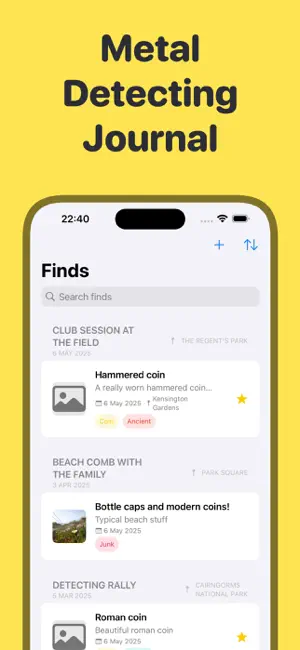
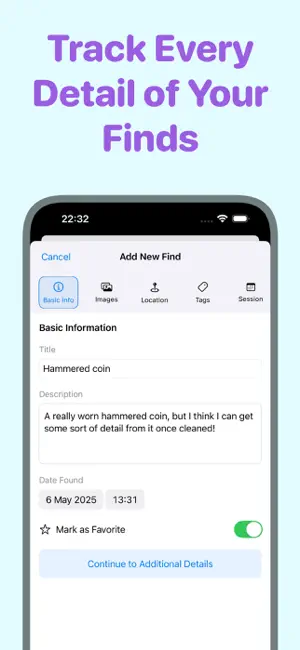
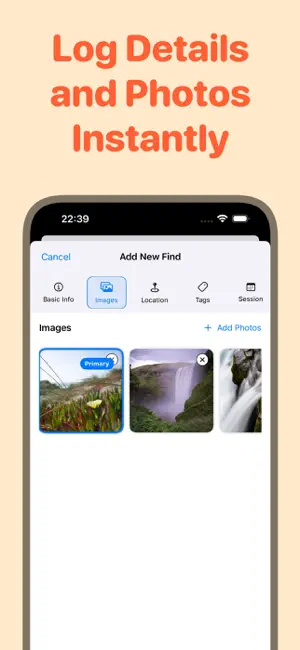
Keep detailed records of your metal detecting adventures by logging finds, locations, and detecting sessions all in one place. Whether you're documenting historical artefacts or tracking your favourite detecting spots, Dig Log helps you maintain a professional journal through an intuitive, detectorist-focused interface. Key Features: • Record finds with photos and precise GPS locations. Requires app subscription for unlimited use. • Organise discoveries by detecting sessions. Requires app subscription for unlimited use. • Track multiple metal detectors and equipment. Requires app subscription for unlimited use. • Map your detecting locations • Tag and categorise your finds • Document historical information and research Stay organised with records of your finds and detecting sessions. Know where discoveries were made and which equipment was used. Dig Log makes it easy to maintain a detailed journal of your metal detecting adventures. Track your metal detecting discoveries with precision and ease. DigLog delivers a comprehensive solution for both novice and experienced detectorists. Download today and transform how you document your finds. Privacy focused: All data is stored locally on your device with optional iCloud sync. No account required. Download Dig Log today and improve your metal detecting documentation. Terms of Use: https://www.apple.com/legal/internet-services/itunes/dev/stdeula/
What’s new
Version 1.2 · Updated September 1, 2025
We've added several new features to make tracking and organising your metal detecting finds easier and more efficient. Session Map View View all finds from a detecting session on an interactive map. Tap "View Finds on Map" to see pins showing where each find was discovered. Target ID Sorting Sort your finds by Target ID numbers to analyse detector readings and identify patterns in your metal detecting results. Quick Session Creation Create and link new sessions directly from the find screens with a dedicated "Create New Session" button. Current Location Shortcuts Instantly set your current GPS location when adding or editing finds with new "Use Current Location" buttons.
App privacy
The developer, Gruffydd Johnston, reported these privacy practices to Apple.
Data Not Linked to You
The following data, which may be collected but is not linked to your identity, may be used for the following purposes:
- Usage Data: Product Interaction
- Location: Precise Location
Used for: Analytics, App Functionality
Alternatives to DigLog - Metal Detecting Diary
Looking for apps like DigLog - Metal Detecting Diary? Here are 6 similar apps on the App Store. The highest rated is Open Season: Treasure Hunting (5.0/5), and all 6 are free to download.
-
 DetectMapper: Finds Log
-
 Teknolocia
-
 Open Season: Treasure Hunting
5.0
Open Season: Treasure Hunting
5.0
-
 Flipd: Reselling Tool
-
 Metal Stud Finder - Detector
-
 Noise Log: Neighbor Complaint
3.0
Noise Log: Neighbor Complaint
3.0
| App | Rating | Price | Last updated | Compare |
|---|---|---|---|---|
| DigLog - Metal Detecting Diary | 3.5 / 5 (2 ratings) | Free | September 1, 2025 | |
| DetectMapper: Finds Log | – | Free | Jun 18, 2026 | Compare |
| Teknolocia | – | Free | Dec 28, 2025 | Compare |
| Open Season: Treasure Hunting | 5.0 / 5 (6) | Free | Apr 27, 2026 | Compare |
| Flipd: Reselling Tool | – | Free | Jul 10, 2026 | Compare |
| Metal Stud Finder - Detector | – | Free | Jan 5, 2026 | Compare |
| Noise Log: Neighbor Complaint | 3.0 / 5 (2) | Free | Sep 18, 2026 | Compare |