

Kimo: Aesthetic AI Editor
Rebo Yazilim Hizmetleri Graphics & Design iPhoneiPadiPod touch
Kimo: Aesthetic AI Editor is a free Graphics & Design app for iPhone and iPad by Rebo Yazilim Hizmetleri. Rated 4.6/5 from 24 ratings. Requires iOS 15.1.
- Rating
- 4.6
- 24 ratings
- Price
- Free
- on the App Store
- Size
- 128 MB
- Age 9+
- Updated
- Sep 11
- 2026 · v1.3.1
Screenshots


About Kimo: Aesthetic AI Editor
One editor, everything in it: 49 film cameras, pro retouch, hair and outfit try on, background cutout, and an AI you can simply talk to. Open Kimo, pick a photo, start editing. FILM CAMERAS 49 hand tuned analog looks, each calibrated against real film response instead of a generic colour filter. Warm, pastel, vintage, mono. Pick one and see it on your own photo instantly. FILTERS AND ADJUST Live preview as you scroll. Exposure, contrast, saturation, temperature and tone curves, all with skin protection so faces do not go orange when you push the grade. RETOUCH • Under eye: one tap, no brushwork. • Makeup presets with intensity control, so it never looks painted on. • Reshape and heal: subtle, local, reversible. • An eraser that knows where the person is, so you can remove what sits behind them without carving into them. HAIR AND OUTFIT Try a new hair colour or cut on your own photo. Try on a garment: pick from ready looks, or use a photo of something you are thinking of buying. EFFECTS • Refocus: real depth aware blur using on device person detection. • Background: swap it, colour it, or cut it out entirely and export a transparent PNG. • Crop and Expand: widen a photo that was framed too tight, filled in by AI. • Text: 22 fonts with outline, shadow and background controls. AI CHAT The AI tab is a conversation. Ask for what you want in plain language and it edits the photo: relighting, background changes, retouching beyond what a slider can do. It works out whether you mean "refine this" or "start over from my original", and it asks a short question only when the answer genuinely changes the result. Questions are free. Tell it a rule, such as "do not change my face" or "keep the background", and it holds that rule for the whole conversation, not just the next message. Rules show above the box, and a tap removes one. Choose which AI model runs your edit, and set a default. MY PRESETS Save a full edit as a recipe and apply it to any photo later. Copy the edit from one shot and paste it onto another. Your look, repeatable. HOW YOUR PHOTOS ARE HANDLED Filters, cameras, adjustments, retouch and refocus run entirely on your device. Those photos never leave your phone. AI features (AI Chat, AI Effects, Hair, Outfit, Crop and Expand) need cloud processing. For those, the photo you are editing is uploaded over an encrypted connection, processed, and the result is returned to you. We do not sell your photos or use them to train models. See our privacy policy for the full detail. SUBSCRIPTION AND CREDITS Kimo is free to use for on device editing: filters, cameras, adjust, retouch, crop and text cost nothing. AI features use credits. Subscribers get a weekly credit allowance, and you can buy extra credits any time if you run out. Terms: https://www.rebostudio.com/legal-pages/terms-conditions Privacy: https://www.rebostudio.com/legal-pages/privacy-policy
Ratings & reviews
4.6
24 ratings
What’s new
Version 1.3.1 · Updated September 11, 2026
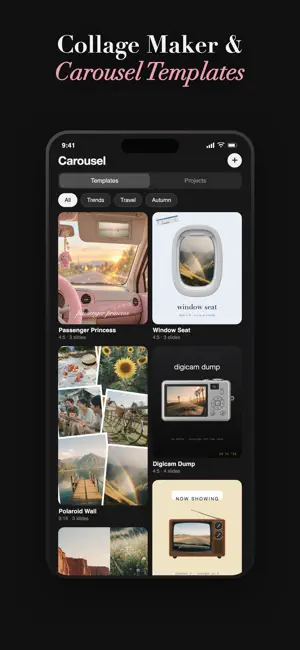
Thank you to the thousands of you who create with Kimo and continue to support us. Your feedback and creativity shaped this update and we think you’re going to love what’s new. NEW IN THIS UPDATE: • Collage Studio: Create Instagram carousels with 47 ready-made templates. Simply add your photos and save every slide in order. • Seamless carousels: Let a photo flow perfectly across two slides, precisely aligned when viewed in the feed. • More ways to create: Personalize your designs with over 160 stickers, photographed backgrounds and a new text tool. Create your next carousel with Kimo and make every swipe stand out.
App privacy
The developer, Rebo Yazilim Hizmetleri, reported these privacy practices to Apple.
Data Used to Track You
The following data may be used to track you across apps and websites owned by other companies:
- Purchases: Purchase History
- Identifiers: Device ID
Data Not Linked to You
The following data, which may be collected but is not linked to your identity, may be used for the following purposes:
- Purchases: Purchase History
- Identifiers: Device ID, User ID
- User Content: Photos or Videos
- Usage Data: Product Interaction
Used for: Developer’s Advertising or Marketing, Analytics, App Functionality
Alternatives to Kimo: Aesthetic AI Editor
Looking for apps like Kimo: Aesthetic AI Editor? Here are 6 similar apps on the App Store. The highest rated is AuraShot (5.0/5), and all 6 are free to download.
-
 Homely AI - Interior Design
4.2
-
 Tattoo Genie: AI Tattoo Design
4.2
-
 PixArt: AI Photo Generator
4.6
-
 Avatify: Generate AI Photos
1.0
-
 AuraShot
5.0
-
 Sivu AI Video & Headshot Maker
4.7
| App | Rating | Price | Last updated | Compare |
|---|---|---|---|---|
| Kimo: Aesthetic AI Editor | 4.6 / 5 (24 ratings) | Free | September 11, 2026 | |
| Homely AI - Interior Design | 4.2 / 5 (18) | Free | Sep 23, 2026 | Compare |
| Tattoo Genie: AI Tattoo Design | 4.2 / 5 (30) | Free | Oct 21, 2026 | Compare |
| PixArt: AI Photo Generator | 4.6 / 5 (45) | Free | Jan 26, 2026 | Compare |
| Avatify: Generate AI Photos | 1.0 / 5 (1) | Free | Jul 8, 2026 | Compare |
| AuraShot | 5.0 / 5 (1) | Free | Oct 16, 2026 | Compare |
| Sivu AI Video & Headshot Maker | 4.7 / 5 (1,397) | Free | Oct 28, 2026 | Compare |