

Video Compressor: Shrink Clips
Ali Umer Utilities iPhoneiPadiPod touch
Video Compressor: Shrink Clips is a free Utilities app for iPhone and iPad by Ali Umer. Requires iOS 15.0. Updated October 19, 2026.
- Price
- Free
- on the App Store
- Size
- 46 MB
- Age 4+
- Updated
- Oct 19
- 2026 · v2.0
Screenshots



About Video Compressor: Shrink Clips
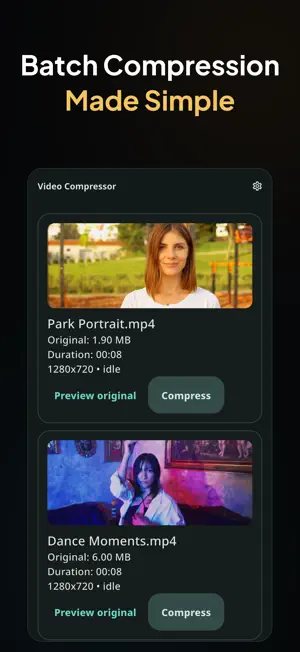
Compress large videos into smaller, shareable copies on your iPhone or iPad. Select one clip or a whole batch, choose a quality or resolution preset, and preview your results before saving. COMPRESS ONE VIDEO OR A BATCH Import videos from your photo library and compress them together. See the original and compressed file sizes for each completed video. CHOOSE YOUR SETTINGS Pick a quality or resolution preset to balance file size and picture quality. Keep the original audio or remove it from the compressed copy. PREVIEW BEFORE SAVING Play the original or compressed video to check the result. Use playback, sound and speed controls while reviewing your clips. SAVE AND SHARE Save individual results to your photo library or share them through the iOS share sheet. Prepare smaller copies for messages, email, uploads and backups. KEEP YOUR ORIGINALS Compression runs on your device and creates separate copies. Your original videos remain untouched, so you decide what to keep. GET MORE WITH PREMIUM Remove ads, save or share all compressed videos together, and view a detailed summary of total sizes and space saved. Core compression, quality and audio controls, previews, and individual saving and sharing are available without Premium. The free experience includes ads. Premium is available through an optional weekly or yearly subscription, or a one-time lifetime purchase. Subscriptions renew automatically unless canceled in your App Store account settings. Final file size and visual quality depend on the source video and selected settings. Privacy Policy: https://owlspeak.web.app/privacy Terms of Use: https://owlspeak.web.app/terms
What’s new
Version 2.0 · Updated October 19, 2026
A fresh look and a smoother compression workflow: - New teal glass app icon and refreshed welcome screens. - More reliable batch compression and cancellation. - Improved video previews and playback stability. - Better saving and sharing on iPhone and iPad. - Clearer compression summaries and improved tablet thumbnails. - Improved purchase restoration and Premium access handling.
App privacy
The developer, Ali Umer, reported these privacy practices to Apple.
Data Used to Track You
The following data may be used to track you across apps and websites owned by other companies:
- Other Data: Other Data Types
Data Linked to You
The following data, which may be collected and linked to your identity, may be used for the following purposes:
- Other Data: Other Data Types
Used for: Third-Party Advertising
Alternatives to Video Compressor: Shrink Clips
Looking for apps like Video Compressor: Shrink Clips? Here are 6 similar apps on the App Store. The highest rated is ClearRecord: Voice & Audio (5.0/5), and all 6 are free to download.
-
 Video Compressor Resize Shrink
-
 Fleetpanda Warehouse
-
 ClearRecord: Voice & Audio
5.0
-
 TopTuber: YouTube SEO Tools
-
 RecordGPT AI Writer Pro
5.0
-
 Image to PDF: Convert to PDF
5.0
| App | Rating | Price | Last updated | Compare |
|---|---|---|---|---|
| Video Compressor: Shrink Clips | – | Free | October 19, 2026 | |
| Video Compressor Resize Shrink | – | Free | Jul 20, 2026 | Compare |
| Fleetpanda Warehouse | – | Free | Aug 17, 2026 | Compare |
| ClearRecord: Voice & Audio | 5.0 / 5 (1) | Free | Jan 26, 2026 | Compare |
| TopTuber: YouTube SEO Tools | – | Free | Oct 24, 2026 | Compare |
| RecordGPT AI Writer Pro | 5.0 / 5 (1) | Free | Jun 19, 2024 | Compare |
| Image to PDF: Convert to PDF | 5.0 / 5 (2) | Free | Jul 22, 2025 | Compare |