

SC Class Assistant
Robert Wilkens Education iPhoneiPadiPod touch
SC Class Assistant is a free Education app for iPhone and iPad by Robert Wilkens. Rated 5.0/5 from 4 ratings. Requires iOS 18.6. Updated October 15, 2026.
- Rating
- 5.0
- 4 ratings
- Price
- Free
- on the App Store
- Size
- 69 MB
- Age 4+
- Updated
- Oct 15
- 2026 · v5.42
Screenshots
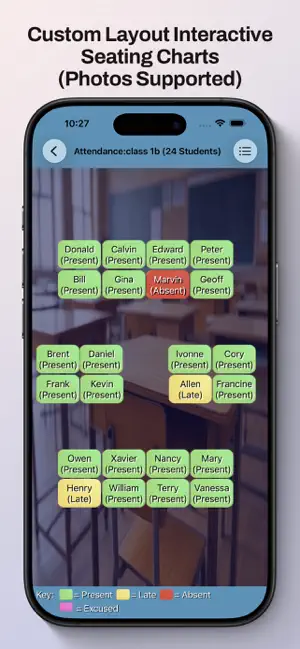
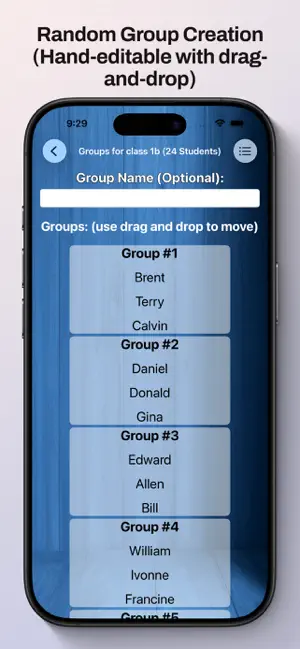

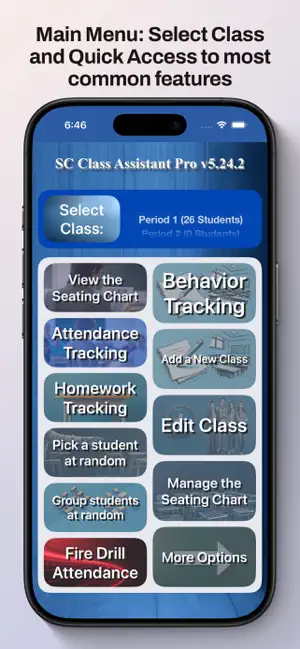
About SC Class Assistant
SC Class Assistant Empower your teaching with the classroom management tool designed by an educator* for educators. Take attendance, track homework, and manage behavior with a single tap on your custom seating chart. Get started for free with support for up to 2 classes and 10 students per class. Upgrade via a lifetime purchase or annual subscription to unlock unlimited classes and students. • Effortless Roster Import Stop manual typing! Import your student list in seconds from any CSV (headers supported) or plain-text file. Compatible with exports from almost all major Student Information Systems. Detailed import templates and instructions available at: https://www.SCClassAssistant.com/support • Seating Chart-Based Tracking Manage your classroom visually. Record attendance, track homework, or conduct fire drill checks directly on your layout. Use Pinch-to-Zoom to see the whole room or Pinch-to-Adjust Text Size for perfect visibility. • Truly Fair Random Student Picker Boost engagement without the bias. Our algorithm ensures every present student is called on exactly once per cycle before anyone repeats. The picker Automatically Skips Absent students. • Dynamic Group Generator Create random groups instantly by group size or count. Fine-tune results with easy drag-and-drop and save multiple configurations for different activities. • Advanced Behavior Management Log participation or disruptions with a tap. Generate and print individual or multi-day summaries to share with parents or administration. • Fully Customizable Layouts Recreate your exact room. Add student photos, drag-and-drop seats, snap-to-grid, or hide empty desks. Supports landscape mode for a wider classroom view. • Teacher Tools Included Exam Grade Calculator: Quickly convert "number of incorrect answers" into percentages. Multi-Day Reporting: View and print attendance and behavior history. Privacy First: Your student data stays on your device: no cloud tracking, no data harvesting. Note: On macOS, pinch gestures require a trackpad. Terms of Use (EULA): https://www.apple.com/legal/internet-services/itunes/dev/stdeula/ *"Designed by an educator" does not mean the developer is an educator, but the person who initially requested the App and specified what it should include was an educator. Subsequently, many online educators who use the App have requested (and received) feature updates.
What’s new
Version 5.42 · Updated October 15, 2026
In most alternate (non-us-english) language translations, "Edit Class" was mis-labelled as "Add Students To Class." This has been corrected.
App privacy
The developer, Robert Wilkens, reported these privacy practices to Apple.
Data Not Collected
The developer does not collect any data from this app.
Alternatives to SC Class Assistant
Looking for apps like SC Class Assistant? Here are 6 similar apps on the App Store. The highest rated is Teacher Aide (cloud) (4.8/5), and all 6 are free to download.
-
 SeatMyClass
-
 Classroom seating
4.5
Classroom seating
4.5
-
 ClassroomPlaner
-
 FlixGRADE - a teacher planner
3.0
FlixGRADE - a teacher planner
3.0
-
 Easy Seating Arrangement
2.5
Easy Seating Arrangement
2.5
-
 Teacher Aide (cloud)
4.8
Teacher Aide (cloud)
4.8
| App | Rating | Price | Last updated | Compare |
|---|---|---|---|---|
| SC Class Assistant | 5.0 / 5 (4 ratings) | Free | October 15, 2026 | |
| SeatMyClass | – | Free | Feb 13, 2026 | Compare |
| Classroom seating | 4.5 / 5 (19) | Free | Jan 23, 2026 | Compare |
| ClassroomPlaner | – | Free | Oct 4, 2026 | Compare |
| FlixGRADE - a teacher planner | 3.0 / 5 (1) | Free | Aug 14, 2026 | Compare |
| Easy Seating Arrangement | 2.5 / 5 (2) | Free | Dec 30, 2024 | Compare |
| Teacher Aide (cloud) | 4.8 / 5 (48) | Free | Aug 23, 2026 | Compare |
Compare SC Class Assistant with the top alternatives: ratings, updates, ASO score and keyword gaps →