

Rooster - Morning Routine
AugurVista OÜ Health & Fitness iPhoneiPadiPod touch
Rooster - Morning Routine is a free Health & Fitness app for iPhone and iPad by AugurVista OÜ. Rated 4.7/5 from 17 ratings. Requires iOS 26.0.
- Rating
- 4.7
- 17 ratings
- Price
- Free
- on the App Store
- Size
- 183 MB
- Age 4+
- Updated
- Oct 6
- 2026 · v2.2.0
Screenshots

About Rooster - Morning Routine
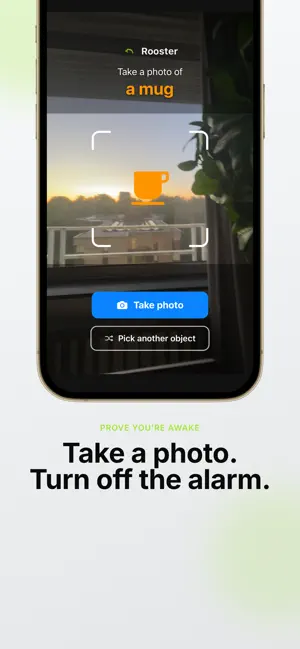
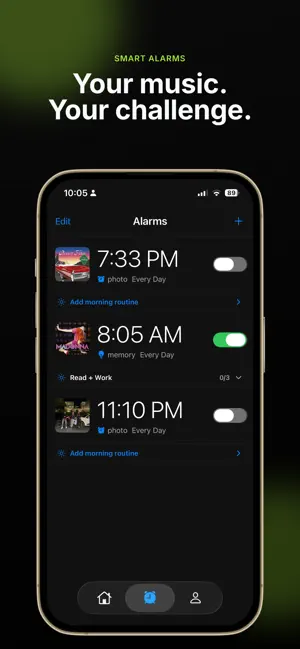
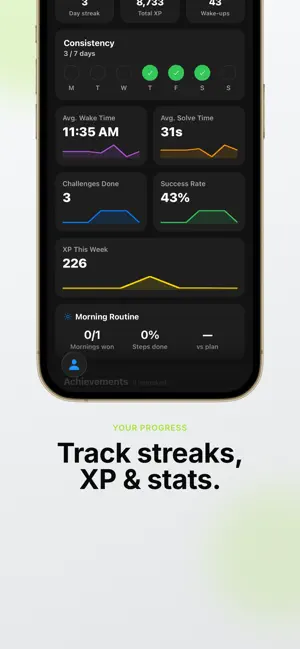
Meet Rooster the wake-up alarm app built to help you stop snoozing and start your morning with energy. Rooster Wake Up Challenge turns your alarm clock into a game: complete a quick challenge before the alarm turns off, track streaks, earn XP, and build a morning routine you actually stick to. Subscription Required: Rooster Wake Up Challenge is free to download, but an active auto-renewable subscription is required to use all features and content shown below. WHY ROOSTER? Most alarm apps let you tap snooze in seconds. Rooster is different. Your alarm keeps escalating until you get out of bed and finish a challenge — math, memory, puzzles, movement, photo verification, and more. Rooster is designed for heavy sleepers, snooze addicts, and anyone who needs a smarter alarm — not just another ringtone. ROOSTER ALARM FEATURES (SUBSCRIPTION REQUIRED) With an active subscription, Rooster includes: - Escalating Alarm: Volume increases if you ignore it — a loud alarm clock that motivates you to wake up. - Daily Wake-Up Challenges: Math alarm, memory games, puzzles, movement tasks, and photo challenges. Dismiss the alarm only after you complete your chosen task. - Custom Alarm Sounds: Connect Deezer or Spotify and wake up to music you love instead of a generic alarm tone. - XP & Levels: Earn Experience Points (XP) and level up through 6 ranks from Novice to Transcendent. - Streak Tracking: Build a morning habit with streak multipliers that reward consistent wake-up times. - Weekly Stats: Charts for performance, average wake-up time, and progress over the week. - Social Accountability: Connect with friends, follow progress, and stay motivated together (subscription required). WHO IS ROOSTER FOR? Rooster is the alarm app for students, young professionals, fitness enthusiasts, and remote workers (16–35) who struggle with oversleeping, snooze addiction, or inconsistent mornings. Whether you need a loud alarm, a challenge alarm, a gamified alarm clock, or a habit-building wake-up app, Rooster helps you own your morning. ROOSTER VS A NORMAL ALARM • Standard iPhone alarm → easy snooze → back to sleep • Rooster alarm → challenge required → you're already awake and moving Use Rooster as your daily alarm clock, morning routine starter, and accountability partner — all in one app. FIND ROOSTER ON THE APP STORE Looking for the Rooster alarm app? Search "Rooster" to find Rooster Wake Up Challenge. Rooster is your go-to wake-up challenge app for iOS — built to replace boring alarms with something you cannot sleep through. MORE WAYS PEOPLE DISCOVER ROOSTER People find Rooster when searching for a wake up alarm, morning alarm clock, loud alarm for heavy sleepers, alarm that stops snoozing, math alarm clock, memory alarm game, challenge alarm, habit alarm, morning routine app, productivity alarm, fun alarm app, or the best alarm for students and remote workers. If that sounds like you, Rooster is the alarm app to try. HOW ROOSTER WORKS Set your wake-up time, pick a challenge, and let Rooster handle the rest. When the alarm rings, Rooster keeps going until you complete the task — no silent snooze. Earn XP, levels, and streaks so mornings feel like progress. Download Rooster Wake Up Challenge today. Every Rooster alarm is a fresh start — conquer the snooze button, complete your challenge, and begin the day with momentum. SUBSCRIPTION INFORMATION Payment is charged to your Apple ID account at confirmation of purchase. Subscription automatically renews unless cancelled at least 24 hours before the end of the current period. Your account is charged for renewal within 24 hours prior to the end of the current period. Manage or cancel subscriptions in Settings → Apple ID → Subscriptions. Any unused portion of a free trial, if offered, is forfeited when you purchase a subscription. Privacy Policy: https://augurvista.com/privacy-policy Terms of Use (EULA): https://www.apple.com/legal/internet-services/itunes/dev/stdeula/
Ratings & reviews
4.7
17 ratings
What’s new
Version 2.2.0 · Updated October 6, 2026
Turn a morning goal into a routine. See if you followed through. Stay accountable with people who notice. This version is about the hour after you are up. Plan that hour, check whether the goal is happening, and share the morning with a group. What changed is the routine builder, the progress view, and the people who can see you showed up. Routine • Routine library. Start from a template instead of a blank checklist: make the bed, drink water, read, train, sit down to work, or step outside. • A personal morning protocol you can repeat on weekdays. Steps stay in sequence, the space between them can shrink, and adding another step is straightforward. • Each step uses your wake sound. Finish the step and that sound stops. • Home shows your alarms and routines on one day schedule. The date you pick stays highlighted. • The Routine screen is cleaner, marked with a sunrise icon. Goal tracking • Activity heatmap on Profile, with your streak underneath. Completed mornings form a pattern you can read at a glance. • Treat the heatmap as a goal check: this week versus the morning you meant to have. • Success cards on Home recap recent wins without sending you down a long page. • A guided setup can begin with the outcome you want: a workout, focused deep work, a calm unhurried start, or simply more time, and point you at a matching template. • Sign-in is available on the intro screen, so a returning person reaches that plan faster. Accountability • An accountability group shares one wake time. Whoever finishes first can choose the sound everyone hears next round. • The group sees who won the morning. Showing up is visible. Skipping is visible. • Your photo is on the tab bar, one tap from friends and groups. The icons are larger. Also in this update • Home stays on today’s schedule. The result cards are compact so the day fits on screen. • Tap an alarm or a routine and you land on it. • The step count on Home matches the routine you saved. • A reminder opens the wake-up or the step it belongs to. • Your alarms keep their on or off state after you leave and come back. • The wake-up task continues until you complete it. • The “Popular” label on setup choices stays readable on smaller phones. How to use it Build a habit stack for the first hour. Pick a template, attach it to a wake time, and let the day schedule show both. Check the heatmap when you want proof the goal is moving. Invite friends into a wake-up group when you want an accountability app with witnesses. Open the library to borrow a sequence. Open the heatmap for a consistency record. Open the group when you want the morning witnessed. Set the outcome once, then let the checklist, the schedule, and the history show whether you kept it. What you can track • A morning goal, carried into a concrete checklist • Follow-through across the week, shown as a heatmap • A streak that sits with that history on Profile • Which day you are looking at, highlighted on the schedule • Recent wins, collected as compact result cards • A shared wake time with a friendly race to finish • Who earned the next group sound • Your photo, so the accountability side is easy to open Rooster covers three jobs alongside the wake-up: a routine planner for the first hour, a goal tracker for the mornings you keep, and an accountability app for a shared start. Daily protocol. Habit stack. Follow-through record. Weekday plan. Group race. Progress calendar. Morning checklist. Shared wake time. Goal progress. Routine library. People also look for a daily routine checklist, goal tracking, habit follow-through, an accountability group, streak history, an activity calendar, a weekday protocol, routine templates, a group wake-up, and a progress view they can reopen. This update is that layer: plan the hour, keep a record, and let a group witness it.
App privacy
The developer, AugurVista OÜ, reported these privacy practices to Apple.
Data Used to Track You
The following data may be used to track you across apps and websites owned by other companies:
- Other Data: Other Data Types
Data Not Linked to You
The following data, which may be collected but is not linked to your identity, may be used for the following purposes:
- Other Data: Other Data Types
- Contact Info: Email Address, Name
- Usage Data: Product Interaction, Other Usage Data
- Diagnostics: Crash Data, Performance Data, Other Diagnostic Data
Used for: Developer’s Advertising or Marketing, Analytics, Product Personalization, App Functionality, Other Purposes
Alternatives to Rooster - Morning Routine
Looking for apps like Rooster - Morning Routine? Here are 6 similar apps on the App Store. The highest rated is SnoozeOff: Loud Alarm Clock (4.8/5), and all 6 are free to download.
-
 Ruffup: Alarm with Missions
4.7
Ruffup: Alarm with Missions
4.7
-
 Snoozless: Mission Alarm Clock
4.7
Snoozless: Mission Alarm Clock
4.7
-
 SnoozeOff: Loud Alarm Clock
4.8
SnoozeOff: Loud Alarm Clock
4.8
-
 Nooze: Stop Snoozing
4.7
Nooze: Stop Snoozing
4.7
-
 Pilat: Pilates Workout at Home
4.5
Pilat: Pilates Workout at Home
4.5
-
 AlarmFit: Stop Waking Up Late
4.8
AlarmFit: Stop Waking Up Late
4.8
| App | Rating | Price | Last updated | Compare |
|---|---|---|---|---|
| Rooster - Morning Routine | 4.7 / 5 (17 ratings) | Free | October 6, 2026 | |
| Ruffup: Alarm with Missions | 4.7 / 5 (86) | Free | Sep 21, 2026 | Compare |
| Snoozless: Mission Alarm Clock | 4.7 / 5 (12) | Free | Oct 6, 2026 | Compare |
| SnoozeOff: Loud Alarm Clock | 4.8 / 5 (1,998) | Free | Aug 3, 2026 | Compare |
| Nooze: Stop Snoozing | 4.7 / 5 (675) | Free | May 8, 2026 | Compare |
| Pilat: Pilates Workout at Home | 4.5 / 5 (6) | Free | Oct 3, 2026 | Compare |
| AlarmFit: Stop Waking Up Late | 4.8 / 5 (732) | Free | Jul 20, 2026 | Compare |