

MyRoster - Shift Worker Rota
Jamie Lollback Lifestyle iPhoneiPadiPod touchApple Watch
MyRoster - Shift Worker Rota is a free Lifestyle app for iPhone and iPad by Jamie Lollback. Requires iOS 18.6. Updated October 22, 2026.
- Price
- Free
- on the App Store
- Size
- 128 MB
- Age 4+
- Updated
- Oct 22
- 2026 · v3.8.4
Screenshots
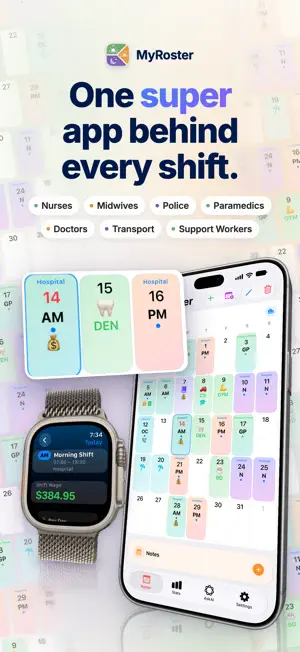
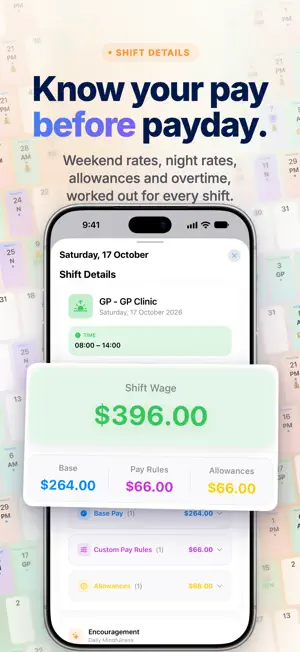


About MyRoster - Shift Worker Rota
The super app for shift workers. Your rota, pay, leave, CPD and expenses, all in one app, built by a nurse. Enter your shifts or snap a photo of your rota, and MyRoster works out your pay: every enhancement, unsocial hours payment, allowance and overtime hour. Know what you'll earn before your payslip arrives. MyRoster requires a paid subscription. Start with a free trial to make sure it's right for you. BUILT FOR YOUR JOB Full-time, part-time, or working more than one job. • NHS Nurses, Midwives & Healthcare Assistants: Agenda for Change bands in England, Scotland, Wales and Northern Ireland, from support workers to matrons. • Any other shift job, from care and retail to hospitality and transport: set your own rates, enhancements and rules and MyRoster does the maths. • Also built for nurses, doctors, paramedics and police in Australia and New Zealand. ACCURATE PAY • Base pay for your exact band and step, or your own custom rates. • Night, weekend and bank holiday rates applied automatically. • Overtime, on-call, London Weighting (HCAS) and allowances at the correct rates. • Take-home pay estimates: income tax, National Insurance and student loans. ROTA & CALENDAR • Add shifts, overtime and leave in a few taps, or save templates for your regular patterns. • Snap a photo of your rota and MyRoster adds the shifts for you. • Track annual leave, sickness, study leave and more. • Work more than one job? Each gets its own profile. • Sync to Apple and Google calendars, or share and print your rota as a PDF. APPLE WATCH • Add a shift from your saved templates, see upcoming shifts and check what's coming on pay day, right from your wrist. • Complications for quick add and the counters. APPLE HEALTH • See your steps and heart rate for every shift and every day. • Compare day, evening and night shifts with your days off in Stats. RESP RATE & HEART RATE COUNTERS • Tap to count respirations or a pulse on iPhone or Apple Watch. • Start one from a widget, Control Centre or the Action Button. CPD & EXPENSES • Log your CPD for revalidation and export it as a PDF with evidence, or as a spreadsheet. • Track work expenses and mileage. Scan a receipt and MyRoster fills in the details, and set regular costs to repeat. • Export expenses as a PDF with receipt photos, or as an Excel spreadsheet. ASKAI • Ask about your pay: "How much did I earn last month?", "What would I earn on Band 6?" • Ask about your terms and conditions: "What are my break entitlements?", "When do unsocial hours payments apply?" • Ask how to use MyRoster: "How do I scan my rota?", "How do I export my CPD?" • Pay breakdowns for any dates and "what if" scenarios. • Runs on-device for privacy on iPhone 15 Pro and newer, with Apple, Claude and ChatGPT for complex questions. AskAI is included in your subscription for now and may become a separate paid feature in future. FRIENDS • See when friends and colleagues are on shift or want to swap a shift, right in your calendar. • You choose what's shared. Pay, notes and personal details never are. • Refer friends and earn free months of MyRoster. STATS & REMINDERS • Earnings by pay component, hours by shift type and leave at a glance. • Compare pay periods and years. • Shift reminders, pay day summaries, and Home Screen and Lock Screen widgets. • Backed up to iCloud and synced across your devices. Terms of Use: https://www.apple.com/legal/internet-services/itunes/dev/stdeula/
What’s new
Version 3.8.4 · Updated October 22, 2026
MyRoster 3.8.4 is here! New: - AskAI can now assist with adding, editing and deleting shifts, leave, events, overtime, on-call and allowances. This works best with Templates. - You can now set weekly templates. - Apple Watch support is here! You can now see your Rota and pay day, and quick add shifts using templates. - Health: You can now sync Apple Health and record your steps and Heart Rate against your shifts - Health Tools: Built in tools to allow you to manually monitor and measure a persons respiratory rate and heart rate. - Custom Priced Shifts: Enable in Settings > Customise. This lets you add a custom shift with any pricing you'd like, on top of your normal award rates. - Refer a friend: Get rewarded with free access for successfully referring friends and colleagues. Learn more: https://myrosterapp.com.au/refer-a-friend/ - You can now highlight your current pay cycle in Settings > Pay Day (Thanks Linda!) - You can now set your own Tax and Super % (Great for global users who don't have built in rates). - You can now add a Public Holiday - Not Worked in the leave tab, which base your base rate. - You can now track time and hours towards a new grade in Settings > Work profile, visible in Stats Changes: - Improved Pay Day widget (can now have it show net or gross), and improved appearance of others. - More filter options for the Stats tab. - Adjusting shortcodes, and custom names changes is now more flexible. - Annual Leave can now bet set by start and end times (Thanks Jeremy!) - Australian Paramedics: New Pay by Salary for average hours (Settings > Work Profile) - pay can be paid by contract hours independent of hours worked, also tracked in Stats. - Opt in to be paid via a fixed salary amount (Settings > Work Profile) - pay can be paid by contract hours independent of hours worked, also tracked in Stats. Fixes: - NZ and UK users can now set their employment types during onboarding - VIC Nurses can add In Charge Allowances again (Thanks Jess!) - Improved Ask AI responses based on feedback including Expenses and CPD. - Improved Superannuation Calculations for various circumstances. Recently: - Welcome, Epworth Private, Victoria and NSWA Control Centre Officers! Your rates are now built in. - AskAI: You can now message AskAI for how to support to use MyRoster. You can now vote if a response was helpful or not to improve it in the future. See more tutorials here: https://myrosterapp.com.au/tutorials - iPhone Duo support.
App privacy
The developer, Jamie Lollback, reported these privacy practices to Apple.
Data Linked to You
The following data, which may be collected and linked to your identity, may be used for the following purposes:
- Contact Info: Email Address
- User Content: Photos or Videos
- Identifiers: User ID
Used for: App Functionality
Data Not Linked to You
The following data, which may be collected but is not linked to your identity, may be used for the following purposes:
- Purchases: Purchase History
- Contact Info: Name
- Identifiers: Device ID
- Usage Data: Advertising Data, Product Interaction
- Health & Fitness: Health
- User Content: Other User Content
- Diagnostics: Crash Data, Performance Data, Other Diagnostic Data
Used for: Third-Party Advertising, Analytics, App Functionality, Other Purposes