

Rise: Routine Planner
Aleksandr Martirosov Productivity iPhoneiPadiPod touchMacApple Watch
Rise: Routine Planner is a free Productivity app for iPhone and iPad by Aleksandr Martirosov. Rated 4.5/5 from 2 ratings. Requires iOS 26.6.
- Rating
- 4.5
- 2 ratings
- Price
- Free
- on the App Store
- Size
- 42 MB
- Age 4+
- Updated
- Nov 20
- 2026 · v3.5
Screenshots
Save to Pinterest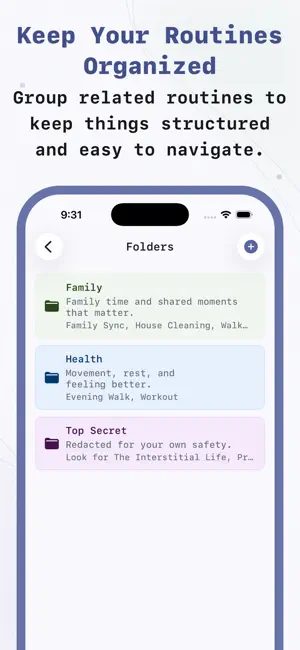


About Rise: Routine Planner
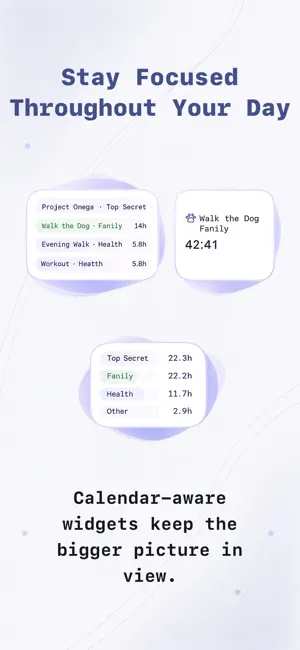
Rise is a routine planner and time tracker that helps you fit work, workouts, reading, and personal projects into the time you actually have. Plan around your Apple Calendar, track each session with a focus timer, and see how your plans compare with what you got done. Build a routine that fits your week Create an activity for anything you want to make time for. Choose which days it repeats, how many sessions you want, and how long each one takes. Give important activities higher priority and group related activities into folders. See what fits today See what’s planned, what’s done, and how much time is still available. Set aside time for yourself, then let Rise suggest where your remaining sessions could fit around the events in Apple Calendar. Add the sessions you want to reserve to your calendar. Start a timer or log time afterward Start, pause, and resume a focus timer for any planned activity. Already went for a run or spent half an hour reading? Log that time afterward and Rise updates your progress. Follow running timers from your iPhone Lock Screen or Mac menu bar. See where your time goes Use Insights to see how much time you’ve planned for each activity and folder. In History, compare planned and completed time by activity or week and use what you learn to adjust your routine. Describe a routine in your own words Try “Study Spanish for 30 minutes on Mondays and Wednesdays, and an hour on Saturdays.” On supported devices, Apple Intelligence fills in the activity for you to review and save. Sync across iPhone, iPad, and Mac with iCloud. No separate Rise account required. Start with up to four activities for free, or unlock unlimited activities with Rise Plus. See today’s plan and run focus timers on Apple Watch, even when your iPhone isn’t nearby. Terms of Use (EULA): https://www.apple.com/legal/internet-services/itunes/dev/stdeula/
What’s new
Version 3.5 · Updated November 20, 2026
Rise comes to Apple Watch. See what’s planned for today, start a focus timer, and complete sessions from your wrist, even when your iPhone isn’t nearby. - Find time in your calendar. Open Assistant from Today to see where your remaining sessions fit around Apple Calendar events. Add the sessions you want to reserve. - See how much time you have left. The redesigned Today view shows what’s scheduled, what you’ve completed, and how much time is still available. You can also set aside Me time. - Track time your way. Log time you’ve already spent, mark a session complete, or use Shortcuts to start, pause, and complete sessions. - Keep timers in view. Follow multiple timers in one iPhone Live Activity or check them from the Mac menu bar. - See how the plan worked out. Compare planned and completed time by activity or week in History. - Get a morning plan summary. Choose when to receive it in Settings, and get an alert when a focus timer finishes.
App privacy
The developer, Aleksandr Martirosov, reported these privacy practices to Apple.
Data Not Linked to You
The following data, which may be collected but is not linked to your identity, may be used for the following purposes:
- Usage Data: Product Interaction
- Diagnostics: Crash Data
Used for: Analytics
Alternatives to Rise: Routine Planner
Looking for apps like Rise: Routine Planner? Here are 6 similar apps on the App Store. The highest rated is Focus Dial (5.0/5), and 4 of the 6 are free to download.
-
 Focus Dial
5.0
-
 Afternoon: Habit Tracker
4.6
-
 TaskMosaic: Family Tasks
-
 Pomodoro Timer deepfocus
-
 Scrap Paper
4.8
-
 Nine Ideas: Build Creativity
4.0
| App | Rating | Price | Last updated | Compare |
|---|---|---|---|---|
| Rise: Routine Planner | 4.5 / 5 (2 ratings) | Free | November 20, 2026 | |
| Focus Dial | 5.0 / 5 (6) | 3.99 USD | Sep 23, 2025 | Compare |
| Afternoon: Habit Tracker | 4.6 / 5 (11) | Free | Oct 30, 2026 | Compare |
| TaskMosaic: Family Tasks | – | Free | Sep 7, 2026 | Compare |
| Pomodoro Timer deepfocus | – | Free | Jun 23, 2025 | Compare |
| Scrap Paper | 4.8 / 5 (35) | 1.99 USD | Feb 15, 2026 | Compare |
| Nine Ideas: Build Creativity | 4.0 / 5 (1) | Free | Jun 16, 2025 | Compare |