

Skipper NDT - Admiral
SKIPPER NDT Utilities iPhoneiPadiPod touch
Skipper NDT - Admiral is a free Utilities app for iPhone and iPad by SKIPPER NDT. Requires iOS 13.0. Updated April 10, 2026.
- Price
- Free
- on the App Store
- Size
- 39 MB
- Age 4+
- Updated
- Apr 10
- 2026 · v2.5.3
Screenshots



About Skipper NDT - Admiral
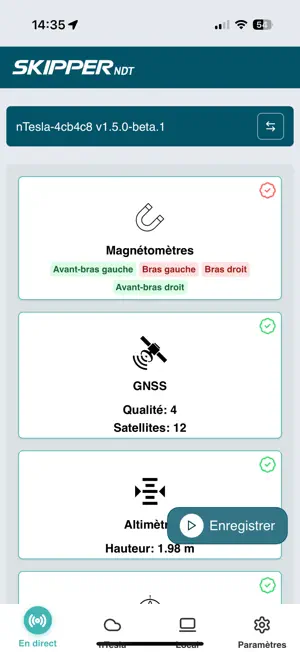
Admiral is a cross-platform application designed for advanced data acquisition management and sensor configuration. Available on Windows, macOS, Linux, and iOS, Admiral supports multiple types of acquisition: calibration, delimitation, mapping, and testing. Easily configure your sensors and their geometry with an intuitive interface and powerful tools. The integrated license management system allows for key validation, manual deactivation, offline access, and license expiration tracking. Two update channels are available: - Stable channel: for production use - Beta channel: to test new features early (access via special license with PREVIEW entitlement) Admiral includes comprehensive unit tests, especially for license management, key validation, and remaining days calculation. Whether you are a developer, engineer, or technician, Admiral helps you configure and ensure the reliability of your measurement systems.
What’s new
Version 2.5.3 · Updated April 10, 2026
What's New in Admiral 2.5.3 New Features • "Copy details" action in the remote acquisitions context menu to quickly share information. • Beta/stable update channels with automatic semver comparison to always stay on the right version. • 7-section acquisition checklist with conditional items and progress tracking so you never miss a step before your surveys. • Mobile file upload support with improved filesystem permissions. • Calibration filtering by location and timestamp to quickly find your data. • File extension validation for license uploads to prevent errors. • Altimeter visibility check for Admiral in the drone checklist. • CartoAccess option to control map style in GridData graphs. • Delete and clear partial acquisition buttons. • Inspection management with delete functionality, inspection form with file upload. • Projects feature with dedicated UI and entitlement check. • Acquisition import from external files. • Responsive icons on changelog buttons. Improvements • Calendar now displays today's date by default. • Improved trajectory pruning with segment-based filtering for cleaner data. • SDK integration for project exports. • Updated height data model with ignored sensors support in PointCloud settings. • Faster filtering using improved convolution. • Optimized calibration data processing via dedicated command. • Improved map rendering with Turbo colorscale and proper geographic coordinates. • Fullscreen image previews instead of dialog boxes. Bug Fixes • Synced with latest SDK and protocol versions. • Export button is now disabled during export and re-enabled after cancel or completion. • Fixed double deletion of partial acquisition directories. • Commas in acquisition names are now properly handled during export. • Fixed normalization formula in getTurboColor function. • Project now updates correctly when one of its inspections is deleted. • Cascade delete of project when last inspection is removed. • Improved date handling in inspection form. • Null values replaced with 0 for bounding box dimensions in zoom calculations. • Fixed navigation in project list. • Improved checklist item accessibility. • UI fixes for collapsible sections and acquisition components. • Fixed local acquisition file export. • Fixed exporter plugin on iOS. Skipper SDK Improvements • Pre-flight sensor validation for drone survey systems. • IMU validation and nTesla v2 support. • R² coefficient calculation for magnetic field model fit. • Automatic best sensor selection based on calibration standard deviation. • Average distance calculation between GNSS positions. • Trajectory segment detection with Gaussian smoothing. • Automatic data cut algorithm. • Improved GNSS data export with better error handling. • Fixed accelerometer axis orientation in IMU conversion. • Hardened RecordReader against data corruption. • Durable manifest writing to prevent chunk/manifest mismatch.
App privacy
The developer, SKIPPER NDT, reported these privacy practices to Apple.
Data Not Collected
The developer does not collect any data from this app.
Alternatives to Skipper NDT - Admiral
Looking for apps like Skipper NDT - Admiral? Here are 6 similar apps on the App Store. The highest rated is Web Visual Code Editor (5.0/5), and all 6 are free to download.
-
 NWAY SHIPPING
-
 NDT Master: UT Weld Calculator
3.0
-
 Web Visual Code Editor
5.0
-
 Unit Converter: Mila's Tools
4.8
-
 FXC Control
2.4
-
 Arpej
| App | Rating | Price | Last updated | Compare |
|---|---|---|---|---|
| Skipper NDT - Admiral | – | Free | April 10, 2026 | |
| NWAY SHIPPING | – | Free | Oct 20, 2026 | Compare |
| NDT Master: UT Weld Calculator | 3.0 / 5 (2) | Free | Oct 12, 2026 | Compare |
| Web Visual Code Editor | 5.0 / 5 (1) | Free | Jul 4, 2026 | Compare |
| Unit Converter: Mila's Tools | 4.8 / 5 (1,505) | Free | Oct 14, 2026 | Compare |
| FXC Control | 2.4 / 5 (28) | Free | Sep 17, 2026 | Compare |
| Arpej | – | Free | Jul 11, 2024 | Compare |