

PDF Scanner: Photo to PDF·
Serhii Shlykov Productivity iPhoneiPadiPod touch
PDF Scanner: Photo to PDF· is a free Productivity app for iPhone and iPad by Serhii Shlykov. Rated 3.7/5 from 3 ratings. Requires iOS 17.6.
- Rating
- 3.7
- 3 ratings
- Price
- Free
- on the App Store
- Size
- 50 MB
- Age 4+
- Updated
- Oct 14
- 2026 · v1.5.2
Screenshots

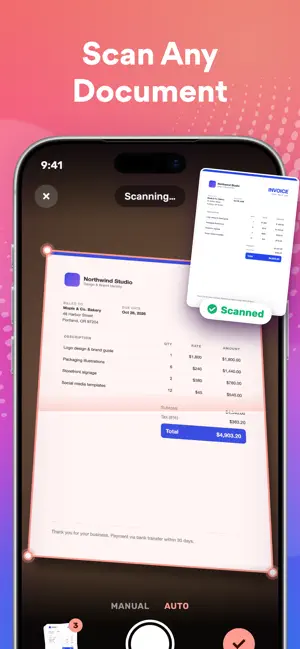


About PDF Scanner: Photo to PDF·
PDF Creator: The Fastest Way to Turn Images into PDFs Turn your photos into polished PDFs in seconds. Create, organize, and share professional documents with just a few taps. With PDF Creator, you can: ► Convert Images to PDF Import from your photo library or capture with the in-app camera to instantly create sharp, high-quality PDFs—perfect for notes, receipts, invoices, forms, business cards, certificates, whiteboards, ID cards, and more. ► Multi-Image Selection Pick multiple photos at once to build clean, multi-page documents in seconds. ► Direct Camera Integration Shoot directly in the app and add pages on the fly—no app-switching or lost shots. ► PDF Preview Flip through pages before saving to confirm order, layout, and clarity every time. ► Smart File Management Access all your PDFs in the built-in library for quick viewing, editing, renaming, and sharing. ► Quick Search Type a keyword to instantly surface the document you need. ► Work Offline Create and manage PDFs without an internet connection—your data stays on device for privacy and security. ► Easy Sharing Send your PDFs via email, messages, AirDrop, or your favorite cloud services in a tap. ► Custom Naming Give files clear, custom names for effortless organization and retrieval. We’re always improving and would love your feedback. Contact us at [email protected]. Payment is charged to your Apple Account at purchase confirmation Subscription renews automatically unless auto-renew is turned off at least 24 hours before the end of the current period Subscriptions can be managed and auto-renew turned off in Account Settings after purchase Your account will be charged for renewal within 24 hours prior to the end of the current period Any unused portion of a free trial will be forfeited when you purchase a subscription Privacy Policy: https://filing-beacon.notion.site/Privacy-Policy-1e5f82bf870880efa3aeda7a3a4991bc Terms of Use: https://filing-beacon.notion.site/Terms-of-Use-1e5f82bf8708809fbcd9e1f762388ca6
What’s new
Version 1.5.2 · Updated October 14, 2026
• New animated onboarding shows how the app works • Translated share extension • Stability improvements and fixes
App privacy
The developer, Serhii Shlykov, reported these privacy practices to Apple.
Data Used to Track You
The following data may be used to track you across apps and websites owned by other companies:
- Identifiers: User ID
Data Linked to You
The following data, which may be collected and linked to your identity, may be used for the following purposes:
- Identifiers: User ID
- Purchases: Purchase History
Used for: Third-Party Advertising, Analytics, App Functionality
Data Not Linked to You
The following data, which may be collected but is not linked to your identity, may be used for the following purposes:
- Identifiers: Device ID
- Usage Data: Product Interaction
- Diagnostics: Crash Data
Used for: Analytics
Alternatives to PDF Scanner: Photo to PDF·
Looking for apps like PDF Scanner: Photo to PDF·? Here are 6 similar apps on the App Store. The highest rated is Word to PDF Converter -convert (5.0/5), and all 6 are free to download.
-
 Picture to PDF - Image Convert
4.0
Picture to PDF - Image Convert
4.0
-
 Photo to PDF - Image Converter
4.5
Photo to PDF - Image Converter
4.5
-
 Image to PDF : Convert Photos
4.6
Image to PDF : Convert Photos
4.6
-
 Word to PDF Converter -convert
5.0
Word to PDF Converter -convert
5.0
-
 Combine & Merge PDF Converter
4.4
Combine & Merge PDF Converter
4.4
-
 Word to PDF Converter - Reader
4.3
Word to PDF Converter - Reader
4.3
| App | Rating | Price | Last updated | Compare |
|---|---|---|---|---|
| PDF Scanner: Photo to PDF· | 3.7 / 5 (3 ratings) | Free | October 14, 2026 | |
| Picture to PDF - Image Convert | 4.0 / 5 (3) | Free | Apr 6, 2024 | Compare |
| Photo to PDF - Image Converter | 4.5 / 5 (103) | Free | Sep 17, 2026 | Compare |
| Image to PDF : Convert Photos | 4.6 / 5 (7) | Free | Jul 9, 2024 | Compare |
| Word to PDF Converter -convert | 5.0 / 5 (3) | Free | Mar 20, 2025 | Compare |
| Combine & Merge PDF Converter | 4.4 / 5 (7) | Free | Jul 16, 2025 | Compare |
| Word to PDF Converter - Reader | 4.3 / 5 (385) | Free | May 15, 2026 | Compare |