

Scanner:PDF Document Scanner
SCAN MASTER Utilities iPhoneiPadiPod touch
Scanner:PDF Document Scanner is a free Utilities app for iPhone and iPad by SCAN MASTER. Rated 4.8/5 from 5 ratings. Requires iOS 15.0.
- Rating
- 4.8
- 5 ratings
- Price
- Free
- on the App Store
- Size
- 37 MB
- Age 17+
- Updated
- Jul 18
- 2026 · v1.5
Screenshots



About Scanner:PDF Document Scanner
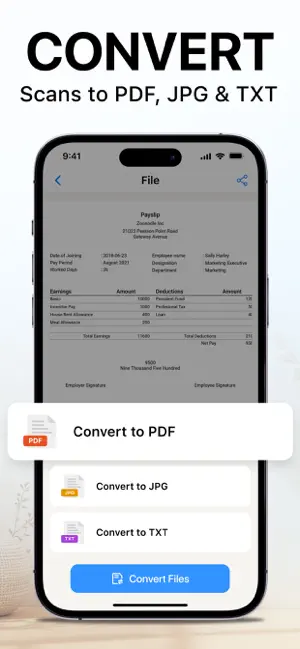
Scanner: PDF Document Scanner makes it easy to scan, convert, organize, and share documents wherever you are. Capture papers, receipts, notes, photos, ID cards, passports, barcodes, and QR codes, then save them as clear PDF or image files. From everyday paperwork to work, study, and travel documents, Scanner: PDF Document Scanner gives you the essential tools to manage files in one place. Import existing documents, adjust pages, convert Word files to PDF, and share your files in just a few taps. KEY FEATURES • Document Scanner Scan papers, notes, receipts, forms, and other documents. Save clear digital copies as PDF or image files. • Barcode & QR Code Scanner Scan product barcodes and QR codes to access embedded information instantly. • Photo Scanner Digitize printed photos and preserve them as high-quality digital copies on your device. • ID Card & Passport Scanner Capture and save digital copies of ID cards, passports, and other important documents. • Import & Edit Files Import files from your device or cloud storage. Rename files, rearrange pages, and make quick adjustments with ease. • Word to PDF Conversion Convert Word documents into PDF files in just a few taps. • File Organization Keep scanned documents and imported files organized for quick and convenient access. • Export & Share Export documents and share them through email, messaging apps, or supported cloud services. SUBSCRIPTION PRICING • Weekly subscription: USD 8.99 per week • Weekly subscription with a 3-day free trial: USD 8.99 per week • Monthly subscription: USD 14.99 per month • Yearly subscription: USD 24.99 per year • Yearly subscription with a 3-day free trial: USD 24.99 per year • One-time lifetime purchase: USD 39.99 SUBSCRIPTION INFORMATION • Payment will be charged to your iTunes Account upon confirmation of purchase. • Subscriptions automatically renew unless auto-renewal is turned off at least 24 hours before the end of the current subscription period. • Your account will be charged for renewal within 24 hours before the end of the current period. • You can manage or cancel your subscription through your Apple ID Account Settings after purchase. • Any unused portion of a free trial period, where offered, will be forfeited when a subscription is purchased. Contact us: [email protected] Terms of Use: https://www.ultralinkshk.com/terms.html Privacy Policy: https://www.ultralinkshk.com/privacy.html
Ratings & reviews
4.8
5 ratings
What’s new
Version 1.5 · Updated July 18, 2026
Refined interaction details. Enhanced smoothne
App privacy
The developer, SCAN MASTER, reported these privacy practices to Apple.
Data Used to Track You
The following data may be used to track you across apps and websites owned by other companies:
- Identifiers: Device ID
Data Linked to You
The following data, which may be collected and linked to your identity, may be used for the following purposes:
- Identifiers: Device ID
Used for: Analytics
Alternatives to Scanner:PDF Document Scanner
Looking for apps like Scanner:PDF Document Scanner? Here are 6 similar apps on the App Store. The highest rated is CleanNow: AI Storage Cleaner (4.7/5), and all 6 are free to download.
-
 Clean Storage - Home Cleaner
4.2
Clean Storage - Home Cleaner
4.2
-
 CleanerMaster - Speed Booster
4.3
CleanerMaster - Speed Booster
4.3
-
 EasyClean: Free Up Storage
4.1
EasyClean: Free Up Storage
4.1
-
 Cleaner: Phone Cleanup App
4.2
Cleaner: Phone Cleanup App
4.2
-
 CleanNow: AI Storage Cleaner
4.7
CleanNow: AI Storage Cleaner
4.7
-
 AI Cleaner : Free Up Storage
4.2
AI Cleaner : Free Up Storage
4.2
| App | Rating | Price | Last updated | Compare |
|---|---|---|---|---|
| Scanner:PDF Document Scanner | 4.8 / 5 (5 ratings) | Free | July 18, 2026 | |
| Clean Storage - Home Cleaner | 4.2 / 5 (43) | Free | Oct 5, 2026 | Compare |
| CleanerMaster - Speed Booster | 4.3 / 5 (233) | Free | Oct 19, 2026 | Compare |
| EasyClean: Free Up Storage | 4.1 / 5 (14) | Free | Oct 15, 2026 | Compare |
| Cleaner: Phone Cleanup App | 4.2 / 5 (303) | Free | Oct 13, 2025 | Compare |
| CleanNow: AI Storage Cleaner | 4.7 / 5 (180) | Free | Sep 7, 2026 | Compare |
| AI Cleaner : Free Up Storage | 4.2 / 5 (217) | Free | Oct 19, 2026 | Compare |