

Melodician
Yuichi Sato Music iPhoneiPadiPod touch
Melodician is a free Music app for iPhone and iPad by Yuichi Sato. Requires iOS 26.0. Updated August 11, 2026.
- Price
- Free
- on the App Store
- Size
- 152 MB
- Age 4+
- Updated
- Aug 11
- 2026 · v2.2.0
Screenshots
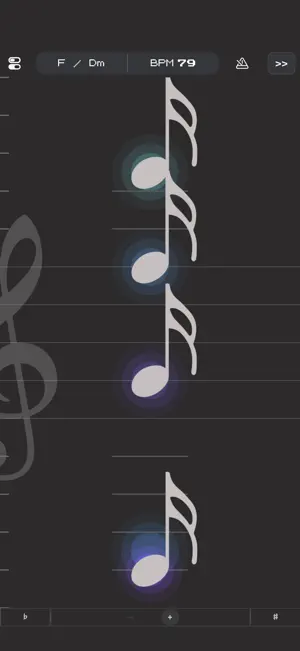

About Melodician
For everyone who plays an instrument. Turn your sheet music into an instrument. Tap notes directly to perform. Enjoy rhythm practice, sight-reading, ear training, and simple song ideas with ease. • Play single notes and chords, with # / b by tapping the left or right edges • Tap length roughly changes note duration • Transpose • Metronome • Recording & Playback • Add takes to layer your performance • Change the key and tempo during playback • Performance data syncs with the companion app “Kalimbar” • Effects • Zoom in and out of the score • Zooming out enables a wider playable note range. 【FAQ】 Q. I’m concerned about the response time (latency) between tapping and hearing the sound. A. We recommend using the device’s built-in speaker or a wired connection (earphones/headphones via USB-C/Lightning). Note: Bluetooth (wireless) audio is more likely to introduce delay by design. Q. When I use 3-finger (or more) multitouch, the sound or behavior becomes unstable. A. If Settings > Accessibility > Zoom is ON, iOS/iPadOS prioritizes its built-in three-finger gestures, which can interfere with this app’s controls. If needed, please temporarily turn Zoom OFF.
What’s new
Version 2.2.0 · Updated August 11, 2026
- v2.2.0 — Aug 10, 2026 - New: Adjustable playback volume for each tone - You can now adjust the playback volume of each tone individually from the tone selection screen. - v2.1.1 — Aug 5, 2026 - Fixed: An issue where the app could become unresponsive when opening Settings from the free-version prompt after changing the display scale - v2.1.0 — Jul 31, 2026 - New: Added 10 more tones - New: Settings now remembers your scroll position while the app is running - New: Added “Credits & Thanks” under Settings > Other - v2.0.0 — Jul 11, 2026 - New: Added 10 new tones - New: You can now select tones from the performance screen - New: Added a sustain pedal - New: You can now adjust how much the treble clef moves with the rhythm - New: You can now choose when playback notes begin to shrink - Improved: Made zooming and other performance controls easier to use - Improved: Updated pedal and playback note visuals to better show note length - Improved: Improved performance screen rendering and stability
App privacy
The developer, Yuichi Sato, reported these privacy practices to Apple.
Data Used to Track You
The following data may be used to track you across apps and websites owned by other companies:
- Usage Data: Advertising Data, Other Usage Data
Data Not Linked to You
The following data, which may be collected but is not linked to your identity, may be used for the following purposes:
- Usage Data: Product Interaction, Advertising Data, Other Usage Data
Used for: Third-Party Advertising, Analytics
Alternatives to Melodician
Looking for apps like Melodician? Here are 6 similar apps on the App Store. The highest rated is Asymetric Metronome (5.0/5), and 5 of the 6 are free to download.
-
 KYAS Ukulele Tuner
-
 Toka Metronome & Drums
-
 Jxylophone
-
 Piano Chord Practice trial
-
 OFFBEAT — Rhythm Trainer
-
 Asymetric Metronome
5.0
Asymetric Metronome
5.0
| App | Rating | Price | Last updated | Compare |
|---|---|---|---|---|
| Melodician | – | Free | August 11, 2026 | |
| KYAS Ukulele Tuner | – | 1.99 USD | Aug 20, 2026 | Compare |
| Toka Metronome & Drums | – | Free | Sep 11, 2026 | Compare |
| Jxylophone | – | Free | Dec 18, 2023 | Compare |
| Piano Chord Practice trial | – | Free | Jun 11, 2026 | Compare |
| OFFBEAT — Rhythm Trainer | – | Free | Oct 20, 2026 | Compare |
| Asymetric Metronome | 5.0 / 5 (1) | Free | Jul 14, 2024 | Compare |
Compare Melodician with the top alternatives: ratings, updates, ASO score and keyword gaps →