

Routine Notes
Gaurav Panchal Productivity iPhoneiPadiPod touch
Routine Notes is a free Productivity app for iPhone and iPad by Gaurav Panchal. Requires iOS 15.0. Updated October 13, 2026.
- Price
- Free
- on the App Store
- Size
- 36 MB
- Age 4+
- Updated
- Oct 13
- 2026 · v1.2.2
Screenshots



About Routine Notes
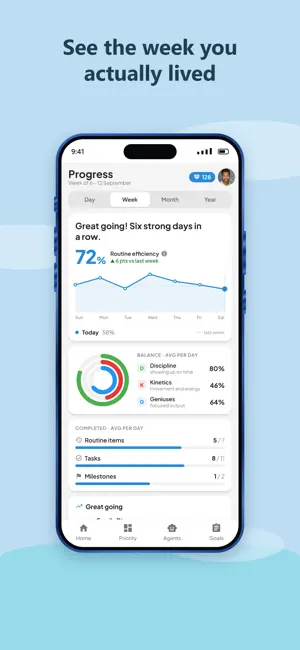
Most task apps are a list that grows. Routine Notes is a day that repeats. You design your day once — honest start times, a point value on each block — and then you show up. Every goal you care about hangs off that timeline, so planning and doing are the same screen. The belief behind it: incremental daily achievement compounds into outcomes that seemed impossible. YOUR DAY, TIME-BOXED Routine Notes lays your day on a timeline, keeps score on punctuality, and never lets a missed check-in silently disappear. • Punctuality window — each routine opens a window around its start time. Tick inside it and the check-in counts as on time. • Quick tasks — drop one-off work into the current routine slot, so improvised work still lands in a time box. • Past, not gone — miss the window and the routine moves to Past with a redeem button. Check in late with points, streak intact. • Skip Day — pause the loop for travel or a sick day without wrecking your history. THE YEAR → DAY CASCADE Turn one yearly ambition into month, week and day milestones — then let your daily wins roll back up. • Break a year goal into month and week milestones, each decomposing into schedulable day goals. • Link days to routines — a day goal attached to a routine shows on the Home card, so the plan and the timeline are the same object. • Wins roll up — five day wins complete a week, three weeks a month, six months a year. You never mark a year done, you arrive at it. • A calendar view prints each day's goal count, so gaps are visible before they become months. A SELF-SORTING PRIORITY MATRIX You never pick a quadrant. How and where you create a task decides it, so the Do / Plan / Delegate / Automate matrix mirrors the shape of your day on its own. • Do — anything you start, or create, for today. • Plan — anything you schedule for a future day. • Delegate — @mention a person in the task and it hands off. • Automate — kick a task off with an agent and it lands here. AGENTS, ATTACHED TO ROUTINES An agent is a worker glued to a routine. Start the task and it fires, work and it listens, finish and it reports success or failure. • Bind an agent to a routine; the routine's schedule becomes the agent's schedule. • Wire the events — point a start event, and an optional end event, at any URL: your own webhook, an n8n flow, your own endpoint, with the goal id substituted in. • Auditable lifecycle — idle, listening, finished, with success and failure counts per agent. • Redeem a late check-in and its agents still fire. Automation shouldn't punish a late human. THE POINT SYSTEM Three things decide whether a soldier takes the mountain — and they are the three ways you earn points. 100 each, 300 a day. • Discipline — be present. Tick routines inside their punctuality window. • Kinetics — put in the work. Clear the steps and quick tasks in every slot. • Geniuses — plan the campaign. Plan week, month and year milestones and link them to today. Points settle overnight and fund your AI agents. Show up daily and AI stays free. ALSO IN THE APP • Chat with each routine — ask what you did last time, break a task down, or plan from your next steps, in a thread scoped to that block. • Progress — routine efficiency with a week-over-week trend, a Discipline / Kinetics / Geniuses balance ring, and what's slipping. • Groups — share a routine with family or a team, see who has checked in today. • Works offline and installs to your home screen. • Sign in with Google or with Apple. Delete your account from inside the app at any time. GETTING STARTED 1. Set honest start times. Morning first, where Discipline is cheapest. 2. Write one year goal. Cascade it down to a day goal you can schedule. 3. Link it to a routine and show up. Earn your points on time and watch the loop compound.
What’s new
Version 1.2.2 · Updated October 13, 2026
A full redesign of every screen. - Home is now a focus card: the routine you are on, its checklist, and a chat thread scoped to that block. - Tapping a routine's check circle always asks first, and names the goal item you are about to complete. - New Priority board, Agents page, Progress trends and a year-to-day goal cascade. - Groups show who has checked in today. - Faster, steadier offline behaviour, and a pile of sync fixes around late check-ins and new days.
App privacy
The developer, Gaurav Panchal, reported these privacy practices to Apple.
Data Linked to You
The following data, which may be collected and linked to your identity, may be used for the following purposes:
- Contact Info: Email Address, Name, Phone Number
- User Content: Other User Content
Used for: App Functionality
Data Not Linked to You
The following data, which may be collected but is not linked to your identity, may be used for the following purposes:
- Identifiers: Device ID
- Usage Data: Product Interaction
- Diagnostics: Other Diagnostic Data
Used for: Analytics
Alternatives to Routine Notes
Looking for apps like Routine Notes? Here are 6 similar apps on the App Store. The highest rated is Baseline Habits (5.0/5), and all 6 are free to download.
-
 Habit Tracker & Reminders
-
 Baseline Habits
5.0
Baseline Habits
5.0
-
 Habits for Life
-
 AI BizPan: Biz Plan Maker
-
 Yukee simple todo list tracker
3.0
Yukee simple todo list tracker
3.0
-
 Candor: Workplace Coach
5.0
Candor: Workplace Coach
5.0
| App | Rating | Price | Last updated | Compare |
|---|---|---|---|---|
| Routine Notes | – | Free | October 13, 2026 | |
| Habit Tracker & Reminders | – | Free | Jan 10, 2026 | Compare |
| Baseline Habits | 5.0 / 5 (1) | Free | Jul 28, 2026 | Compare |
| Habits for Life | – | Free | Feb 1, 2025 | Compare |
| AI BizPan: Biz Plan Maker | – | Free | Jul 14, 2025 | Compare |
| Yukee simple todo list tracker | 3.0 / 5 (1) | Free | Oct 29, 2026 | Compare |
| Candor: Workplace Coach | 5.0 / 5 (1) | Free | Oct 21, 2026 | Compare |
Compare Routine Notes with the top alternatives: ratings, updates, ASO score and keyword gaps →