

Cloud Calendars: Sync & Widget
Arte Soft Ltd Productivity iPhoneiPadiPod touch
Cloud Calendars: Sync & Widget is a free Productivity app for iPhone and iPad by Arte Soft Ltd. Rated 4.6/5 from 14 ratings. Requires iOS 18.0.
- Rating
- 4.6
- 14 ratings
- Price
- Free
- on the App Store
- Size
- 47 MB
- Age 4+
- Updated
- Nov 1
- 2026 · v1.7.4
Screenshots
Save to Pinterest
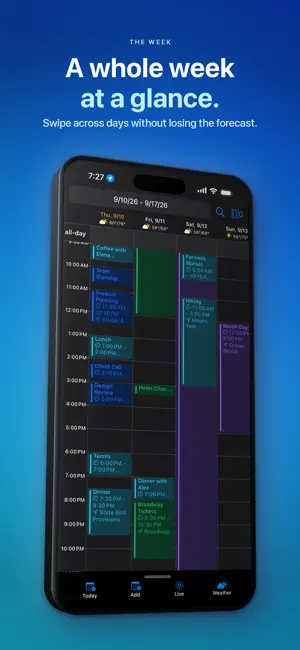
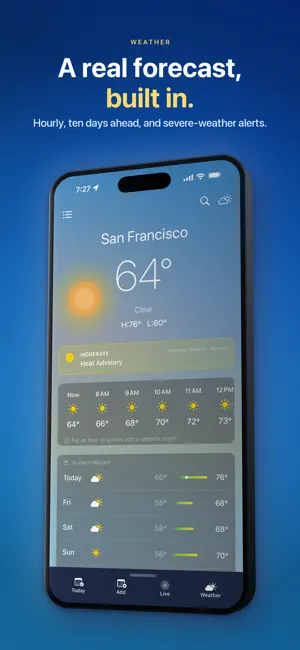
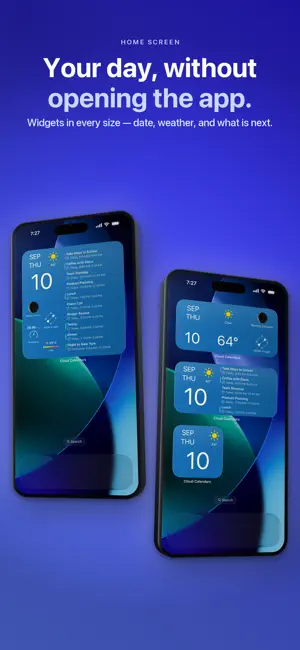
About Cloud Calendars: Sync & Widget
Bring work, personal plans and weather into one calendar on iPhone and iPad. Compare selected calendars, check the forecast for your plans and keep upcoming appointments on your Home Screen. ICLOUD, GOOGLE AND MICROSOFT IN ONE VIEW Use iCloud calendars available on your device and connect Google Calendar. Premium adds Microsoft Calendar. Compare selected calendars while keeping their accounts and permissions clear. Choose the intended calendar when creating an event. SHARE ONE EVENT, NOT YOUR WHOLE CALENDAR Share an event or a calendar with email and QR invitations. Choose the access that fits the invitation. App Clip provides an event preview; adding the event requires the full app. Provider connections and sharing require sign-in where applicable. WEATHER WHILE YOU PLAN Compare your appointments with the hourly forecast. Check the selected place, date and available forecast before arranging an outdoor activity. Explore detailed weather views and an interactive map with wind and temperature layers. Forecast availability depends on the location and provider. A CALENDAR VIEW FOR THE WAY YOU PLAN Switch between Day, Week, Month, Year and List views. See work and personal commitments together, inspect all-day plans and open event details to check exact times. Use calendar views to spot overlaps before offering an apparently free slot. SEE WHAT IS NEXT Choose a date-and-weather layout or medium and large Home Screen widgets with upcoming event lists. Follow a countdown to your next timed appointment with Live Activity. Upcoming-event displays focus on future timed appointments; check all-day plans in the full calendar. FROM A FORECAST HOUR TO AN EVENT DRAFT Find a possible time for a walk, sports session or outdoor appointment in the available hourly forecast. Turn a forecast hour into an event draft, then review its time and destination calendar before saving. Weather planning and a confirmed booking are separate decisions. CHECK A CHANGE BEFORE YOU RELY ON IT Compare start times, durations and overlaps in the week view. Scroll day columns or open the event when you need a closer look. Before dragging or resizing an editable appointment, check its calendar, local time and repeat scope. Reopen it after saving and confirm important changes with participants. WORK AND FAMILY PLANS, WITH CLEAR OWNERSHIP Bring the relevant calendars into view for your weekly review. Keep a school pickup, client call or family trip in the calendar that owns it. Displaying calendars together does not merge the accounts or automatically reserve personal time in a colleague’s work calendar. A shared plan and confirmed attendance are different things. START LOCAL, CONNECT WHEN YOU NEED TO Create a local calendar on your device without creating an account. Local calendars are different from connected provider calendars; check the account and sharing route before relying on another device. CHOOSE YOUR PLAN Base is free and includes Google Calendar sync, Google Meet, calendar views, weather and widgets. Advanced includes Base and removes ads. Premium includes Advanced and adds Microsoft Calendar and Microsoft Teams. PLANNING GUIDES Find practical guides to combining calendars, sharing one event, choosing calendar widgets and planning with weather at www.cloud-calendars.com. Cloud Calendars is free to download with optional auto-renewing subscriptions. Check current local prices in the app or App Store. Payment is charged to your Apple ID at purchase confirmation. Subscriptions renew automatically unless canceled at least 24 hours before the current period ends. Your account is charged for renewal within 24 hours before that period ends. Manage or cancel subscriptions in your App Store account settings. Privacy Policy: https://www.cloud-calendars.com/privacy-policy Terms of Use: https://www.apple.com/legal/internet-services/itunes/dev/stdeula/
Ratings & reviews
4.6
14 ratings
What’s new
Version 1.7.4 · Updated November 1, 2026
Improved layouts across screen sizes, refined Live Activity presentation, and corrected localized weather text. Bug fixes.
App privacy
The developer, Arte Soft Ltd, reported these privacy practices to Apple.
Data Not Collected
The developer does not collect any data from this app.
Alternatives to Cloud Calendars: Sync & Widget
Looking for apps like Cloud Calendars: Sync & Widget? Here are 6 similar apps on the App Store. The highest rated is One Calendar (4.8/5), and all 6 are free to download.
-
 Calendar - 2026
3.3
-
 Awesome Calendar 2
4.6
-
 Week Calendar - Smart Planner
4.4
-
 Calendar · Planner & Reminders
4.6
-
 Pocket Informant
4.5
-
 One Calendar
4.8
| App | Rating | Price | Last updated | Compare |
|---|---|---|---|---|
| Cloud Calendars: Sync & Widget | 4.6 / 5 (14 ratings) | Free | November 1, 2026 | |
| Calendar - 2026 | 3.3 / 5 (13) | Free | Oct 22, 2026 | Compare |
| Awesome Calendar 2 | 4.6 / 5 (4,946) | Free | Nov 7, 2023 | Compare |
| Week Calendar - Smart Planner | 4.4 / 5 (10,366) | Free | Nov 2, 2026 | Compare |
| Calendar · Planner & Reminders | 4.6 / 5 (59,140) | Free | Sep 4, 2026 | Compare |
| Pocket Informant | 4.5 / 5 (6,089) | Free | Oct 5, 2026 | Compare |
| One Calendar | 4.8 / 5 (20,735) | Free | Nov 2, 2026 | Compare |