

ZArchiver File Manager
Parth Patel Utilities iPhoneiPadiPod touch
ZArchiver File Manager is a free Utilities app for iPhone and iPad by Parth Patel. Requires iOS 12.0. Updated April 16, 2025.
- Price
- Free
- on the App Store
- Size
- 61 MB
- Age 4+
- Updated
- Apr 16
- 2025 · v1.0
Screenshots
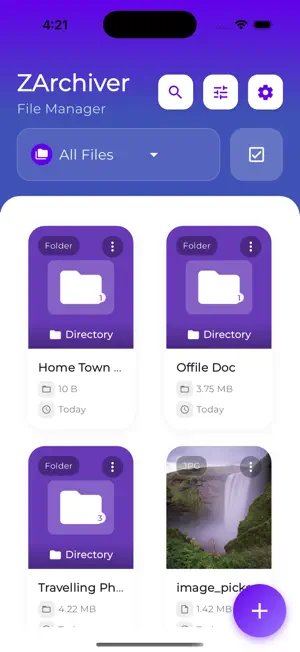


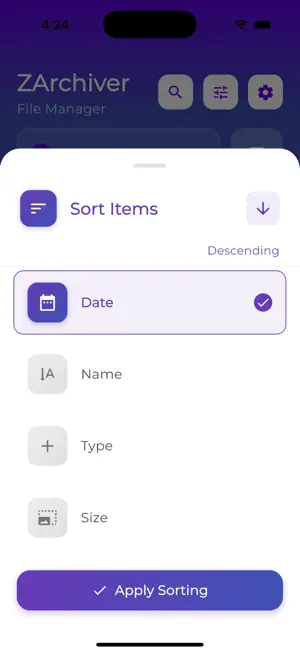
About ZArchiver File Manager
ZArchiver – The Ultimate File Manager & Archiver for iOS Unlock the full potential of your device with ZArchiver File Manager, the all-in-one file manager and archiving solution designed for power users and everyday explorers alike. Seamlessly manage, organize, and protect your files with a beautiful, intuitive interface and a robust set of features that make file handling effortless and secure. Key Features: • Powerful File Management Navigate your device’s storage with ease. ZArchiver provides a modern, user-friendly interface for browsing, searching, and managing all your files and folders. Move, copy, rename, delete, and organize files with just a few taps. Enjoy advanced sorting and filtering options to quickly find what you need, whether it’s documents, images, videos, or archives. • Advanced Archiving & Extraction Compress files and folders into popular archive formats, including ZIP, RAR, 7z, and more. Extract content from a wide range of archive types with lightning-fast performance. Whether you’re saving space or sharing multiple files, ZArchiver makes archiving simple and reliable. • Storage Insights & Optimization Keep your device running smoothly with real-time storage usage insights. Visualize how much space your files and archives occupy, and free up valuable storage with the built-in cache cleaner. ZArchiver helps you identify large files and manage your storage efficiently, ensuring you always have room for what matters most. • Secure & Private Your privacy is our priority. ZArchiver operates entirely on your device, ensuring your files remain secure and private. No data is uploaded or shared without your consent. Protect sensitive files with password-protected archives and enjoy peace of mind knowing your information is safe. • Beautiful & Customizable Design Experience a clean, modern interface with customizable themes and layouts. ZArchiver is optimized for both iPhone and iPad, supporting dark mode and dynamic scaling for a seamless experience on any device. Why Choose ZArchiver? Fast, reliable, and easy to use Supports all major archive formats Regular updates and new features Built with privacy and security in mind Perfect For: Students and professionals managing documents Creatives organizing photos, videos, and projects Anyone who needs to compress, extract, or share files on the go Download ZArchiver today and take control of your files!
App privacy
The developer, Parth Patel, reported these privacy practices to Apple.
Data Not Collected
The developer does not collect any data from this app.
Alternatives to ZArchiver File Manager
Looking for apps like ZArchiver File Manager? Here are 6 similar apps on the App Store. The highest rated is File Manager: File Finder Pro (5.0/5), and all 6 are free to download.
-
 File Manager: File Finder Pro
5.0
-
 File : Quick Folders
-
 ZArchiver - Zip UnZip
4.2
-
 QuickExplorer - File & Storage
-
 7zArchiver: Zip File Extractor
3.2
-
 ZIP Archiver - UnZIP
4.6
| App | Rating | Price | Last updated | Compare |
|---|---|---|---|---|
| ZArchiver File Manager | – | Free | April 16, 2025 | |
| File Manager: File Finder Pro | 5.0 / 5 (2) | Free | Aug 7, 2025 | Compare |
| File : Quick Folders | – | Free | Apr 2, 2026 | Compare |
| ZArchiver - Zip UnZip | 4.2 / 5 (145) | Free | Sep 29, 2026 | Compare |
| QuickExplorer - File & Storage | – | Free | Aug 25, 2026 | Compare |
| 7zArchiver: Zip File Extractor | 3.2 / 5 (18) | Free | Jul 3, 2026 | Compare |
| ZIP Archiver - UnZIP | 4.6 / 5 (124) | Free | Jun 19, 2025 | Compare |