
Pitch Diagram: Vocal Tuner
Daniele Roncaglioni Music iPhoneiPadiPod touch
Pitch Diagram: Vocal Tuner is a free Music app for iPhone and iPad by Daniele Roncaglioni. Rated 3.7/5 from 3 ratings. Requires iOS 17.6.
- Rating
- 3.7
- 3 ratings
- Price
- Free
- on the App Store
- Size
- 14 MB
- Age 4+
- Updated
- Sep 12
- 2026 · v1.9.0
Screenshots
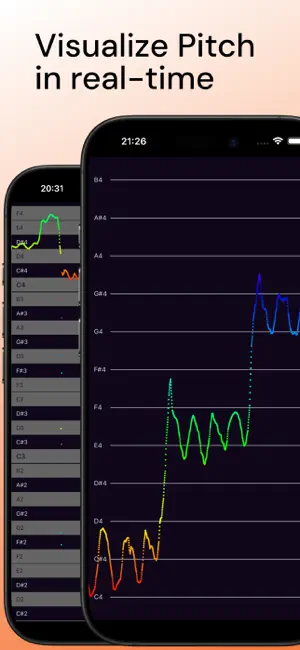
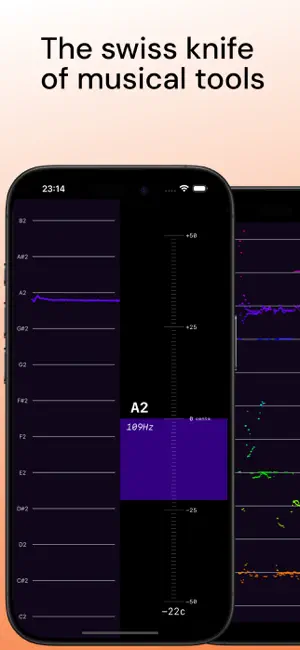
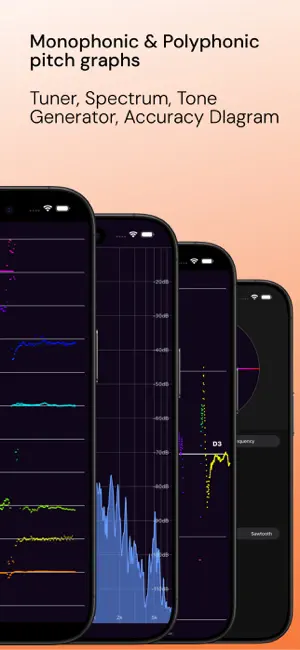
About Pitch Diagram: Vocal Tuner
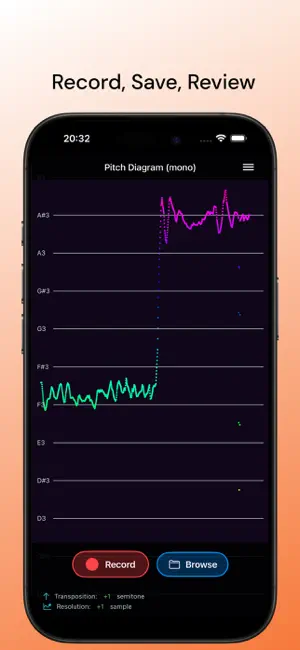
Pitch Diagram gives you real-time visual feedback on every note you sing or play. See your pitch as a smooth, scrolling graph, spot intonation issues instantly, and track your accuracy down to the cent. Whether you're refining vibrato, practicing scales, breaking down melodies, or tuning your instrument, Pitch Diagram is a mirror for your sound. 9 Tools for Musicians • Pitch Diagram (Mono) Real-time pitch graph for single-note music. See every note as a continuous trace. Record you session and export to MIDI. • Pitch Spectrogram (Poly) Detect multiple notes at once. Reveal chords, harmonies, and harmonic overtones in any musical passage. • Tuner Cent-accurate chromatic tuner showing the closest note, cents offset, and exact frequency. • Intonation Tracker See your intonation relative to the nearest note, measured in cents. Ideal for focused practice. • Spectrum Analyzer Full frequency spectrum visualization with logarithmic scale. • Tone Generator Generate reference tones by note or frequency. Sine, triangle, square, and sawtooth waveforms. • Keyboard Interactive piano keyboard with sampled instruments, visual feedback, and a compact transport bar for octave selection. • Interval Trainer Train in-key scale degree recognition against a chord progression. Leveled difficulty increases as you progress. • Solfege Trainer Same flow as Interval Trainer, but you sing the target degree while a pitch diagram tracks you. • Metronome Visual metronome with tap tempo, simple and compound time signatures (2/4, 3/4, 4/4, 6/8, 12/8), and subdivisions down to sixteenth notes. Optional live waveform so you can see whether you are rushing or dragging against the click. • Customize Your View - Switch between grid lines and piano roll background - Adjust visible octave range to match your voice or instrument - Toggle waveform strip for additional context - Transpose notes to any key - Set custom reference tuning - Switch between letter and solfege note labels • Free to Try - The first 10 minutes of usage are free and uninterrupted. - After that, you can use the app for free in 1-minute sessions. - Subscribe for uninterrupted access to everything. Built by a musician, for musicians. Feedback welcome, use the in-app Feedback button or email us. Terms of use: https://www.apple.com/legal/internet-services/itunes/dev/stdeula/ Have questions or feedback? Contact us at [email protected]
What’s new
Version 1.9.0 · Updated September 12, 2026
New: Metronome A visual metronome with tap tempo, simple and compound time signatures, and subdivisions down to sixteenth notes. Turn on the waveform to see whether you are rushing or dragging against the click. Also in this release • The tool menu is now grouped into Analyze, Sound and Learn • Fixed: saved recordings could disappear after restarting the app • Fixed: held keyboard notes could stick when changing the octave range • Various stability fixes across the trainers, tuner and recording
App privacy
The developer, Daniele Roncaglioni, reported these privacy practices to Apple.
Data Not Collected
The developer does not collect any data from this app.
Alternatives to Pitch Diagram: Vocal Tuner
Looking for apps like Pitch Diagram: Vocal Tuner? Here are 6 similar apps on the App Store. The highest rated is Tutuner — Pitch tracking tuner (5.0/5), and all 6 are free to download.
-
 PitchMonitor - Vocal Visual
3.0
PitchMonitor - Vocal Visual
3.0
-
 Vocal Pitch Monitor Tuner
4.0
Vocal Pitch Monitor Tuner
4.0
-
 SingTuner: Vocal Pitch Monitor
-
 Tutuner — Pitch tracking tuner
5.0
Tutuner — Pitch tracking tuner
5.0
-
 AudioPitch: Pitch Monitor
4.8
AudioPitch: Pitch Monitor
4.8
-
 N-Signal / Pitch Canvas
| App | Rating | Price | Last updated | Compare |
|---|---|---|---|---|
| Pitch Diagram: Vocal Tuner | 3.7 / 5 (3 ratings) | Free | September 12, 2026 | |
| PitchMonitor - Vocal Visual | 3.0 / 5 (2) | Free | Sep 22, 2026 | Compare |
| Vocal Pitch Monitor Tuner | 4.0 / 5 (4) | Free | Sep 14, 2026 | Compare |
| SingTuner: Vocal Pitch Monitor | – | Free | Sep 12, 2026 | Compare |
| Tutuner — Pitch tracking tuner | 5.0 / 5 (3) | Free | Oct 20, 2025 | Compare |
| AudioPitch: Pitch Monitor | 4.8 / 5 (8) | Free | Oct 3, 2026 | Compare |
| N-Signal / Pitch Canvas | – | Free | Feb 2, 2026 | Compare |