

ToDoToday: Focus
Stuart Bridge Utilities iPhoneiPadiPod touchMac
ToDoToday: Focus is a free Utilities app for iPhone and iPad by Stuart Bridge. Rated 5.0/5 from 1 ratings. Requires iOS 18.0. Updated September 15, 2026.
- Rating
- 5.0
- 1 ratings
- Price
- Free
- on the App Store
- Size
- 7 MB
- Age 4+
- Updated
- Sep 15
- 2026 · v2.0
Screenshots
About ToDoToday: Focus
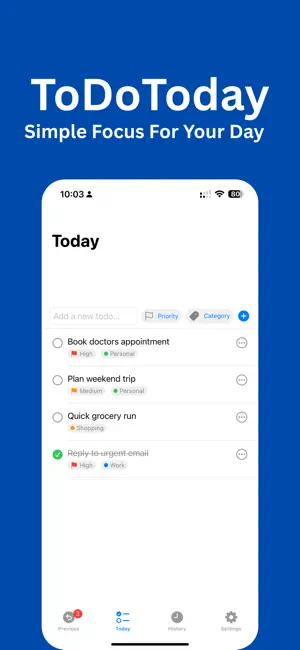
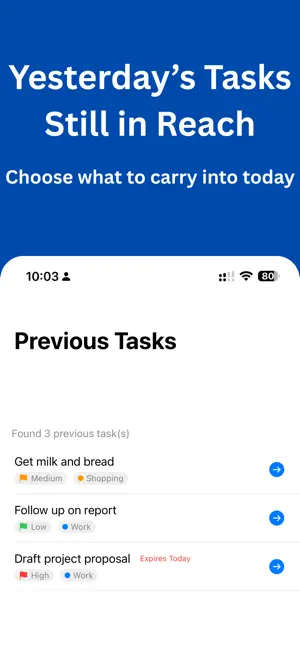
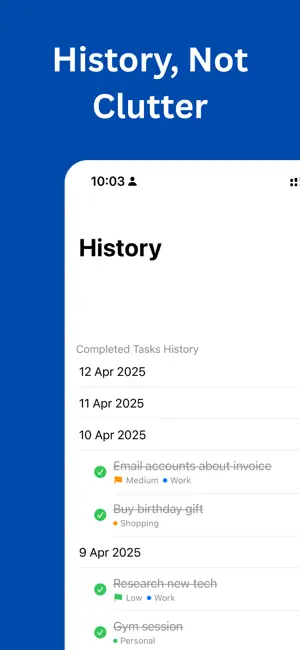
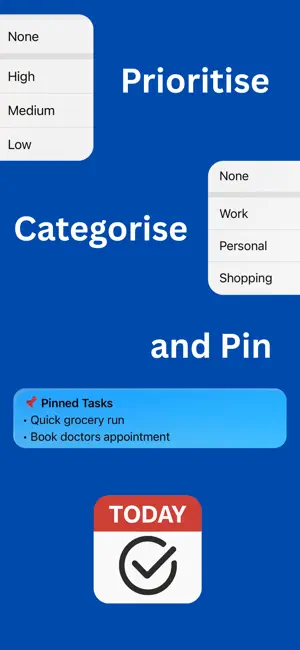
Focus on Today. Achieve More. Feeling overwhelmed by endless to-do lists and bloated productivity apps? TodoToday brings simplicity back, helping you stay focused on just one thing: what needs doing today, across iPhone, iPad, and Mac. With a clean, intuitive design and powerful yet minimal features, TodoToday gets out of your way so you can get things done. Key Features: Today View: A dedicated space for just today's tasks. Add items fast, see your priorities at a glance, and stay focused. Priorities & Categories: Mark tasks as High, Medium, or Low priority with colored icons. Organize further using your own custom categories, synced and consistent across every device. Type a quick tag as you write a task title (like #shopping or !high) and it's applied automatically. Quick Add: Add several tasks at once by typing one per line, or use Pick for me to randomly spotlight a single task when the list itself feels like too much to face. Previous Tasks: Missed something yesterday? Incomplete items appear in a separate "Previous" view, so you can bring them forward with a tap. Nothing is held against you for leaving it there. History View: See what you've accomplished. Completed tasks are grouped by date and kept for as long as you choose. Nag Mode: For the tasks you really can't afford to forget. Turn it on and get reminded repeatedly until it's done, right down to a Lock Screen Live Activity that keeps it in view. Badges & Awards: Small, quiet rewards for milestones, streaks, and a few surprises along the way. Switch on a sarcastic streak of your own if encouragement isn't your style. Seamless Across Devices: iCloud keeps everything in sync across iPhone, iPad, and Mac. Your day is always up to date. Menu Bar App for Mac: View and add today's tasks from your menu bar. Use a global keyboard shortcut for instant access. iOS Features: Live Activities let you pin tasks to your Lock Screen. Get daily reminder notifications (or more, if you prefer). Quickly send tasks to the built in Reminders app. Customizable: Choose how many days of "Previous" tasks to show, and whether to see a count badge for them at all. Set your own history retention period. Create and manage custom categories, with your own colors. Configure notifications and app badge behavior. Choose an encouraging or sarcastic tone for completion messages and badges. Designed for Clarity and Focus TodoToday is for people who want less clutter and more progress. By emphasizing today, it helps reduce overwhelm and makes it easier to take action, especially helpful for neurodivergent users like those with ADHD or autism. Focus features include: Minimalist interface. No projects, sub-tasks, or complex views. Visual cues. Colors and icons for quick understanding. Low-friction input. Add tasks without breaking your flow. Just for today. Avoid the stress of long, rolling to-do lists. Try it Free, Then Unlock Forever Download now and try all features free for 30 days. If it helps bring focus to your day, unlock unlimited use with a one-time purchase. No subscriptions, no fuss. Take control of your day, the simple way. Download TodoToday now.
What’s new
Version 2.0 · Updated September 15, 2026
A big one, redesigned layouts, smarter tagging, and a bunch of new ways to stay on top of your list. • New iPad & Mac experience: a resizable sidebar, drag-to-reorder tasks, and custom sort options • Pick for me: can't decide what's next? Highlight one random task and re-roll as many times as you like • Inline tagging: type #category or !priority right in the task title as you write it • Nag Mode (Premium): repeating reminders that keep nudging you until a task is done • Badges & Awards: 54 badges to unlock as you build better habits, with a dedicated Badges screen • Categories are now fully synced across all your devices, including colours
App privacy
The developer, Stuart Bridge, reported these privacy practices to Apple.
Data Not Collected
The developer does not collect any data from this app.
Alternatives to ToDoToday: Focus
Looking for apps like ToDoToday: Focus? Here are 6 similar apps on the App Store. The highest rated is QR Code · Barcode Reader&Maker (4.9/5), and 4 of the 6 are free to download.
-
 NuDefndr: Photo Privacy
3.0
-
 Phone Storage Cleaner: Recycle
4.1
-
 Calc: Multiline calculator
4.8
-
 Life Countdown - Days Left
-
 Photo2Calendar: Scan Schedule
4.6
-
 QR Code · Barcode Reader&Maker
4.9
| App | Rating | Price | Last updated | Compare |
|---|---|---|---|---|
| ToDoToday: Focus | 5.0 / 5 (1 rating) | Free | September 15, 2026 | |
| NuDefndr: Photo Privacy | 3.0 / 5 (4) | Free | Nov 2, 2026 | Compare |
| Phone Storage Cleaner: Recycle | 4.1 / 5 (12) | Free | Nov 1, 2026 | Compare |
| Calc: Multiline calculator | 4.8 / 5 (44) | Free | May 12, 2025 | Compare |
| Life Countdown - Days Left | – | 4.99 USD | May 28, 2026 | Compare |
| Photo2Calendar: Scan Schedule | 4.6 / 5 (60) | Free | Oct 20, 2026 | Compare |
| QR Code · Barcode Reader&Maker | 4.9 / 5 (7) | 0.99 USD | Aug 23, 2026 | Compare |
Compare ToDoToday: Focus with the top alternatives: ratings, updates, ASO score and keyword gaps →