

DocScann
Alexander Nikonov22270669431 Utilities iPhoneiPadiPod touch
DocScann is a free Utilities app for iPhone and iPad by Alexander Nikonov22270669431. Requires iOS 18.6. Updated September 16, 2026.
- Price
- Free
- on the App Store
- Size
- 20 MB
- Age 4+
- Updated
- Sep 16
- 2026 · v2.0.2
Screenshots


About DocScann
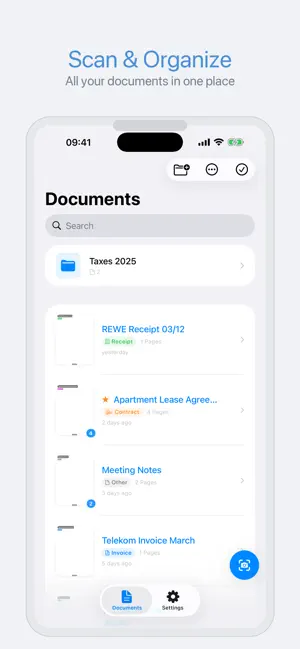
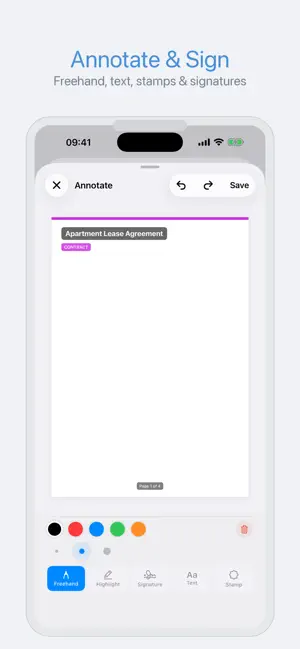
DocScann turns your iPhone into a powerful document scanner. Capture receipts, contracts, IDs, and letters in seconds — then organize, edit, annotate, and share them as professional PDFs. SCAN IN SECONDS Point your camera at any document and DocScann automatically detects edges and captures a clean scan. Multi-page support lets you scan entire contracts or booklets in one go. ORGANIZE YOUR WAY Create folders and subfolders to keep everything tidy. Star your most important documents for quick access. Sort by name, date, or size. Filter by category — or create your own custom categories with unique icons and colors. BUILT-IN CATEGORIES Automatically sort scans into Invoice, Contract, ID, Receipt, Letter, or Other. DocScann even suggests the right category using text recognition. POWERFUL IMAGE EDITOR Fine-tune every scan with brightness and contrast sliders, rotate and flip pages, and apply filters like Grayscale, Black & White, Enhanced, and Magic for the perfect look. ANNOTATE & SIGN Draw freehand, add text annotations, place stamps (Approved, Draft, Confidential, and more), or add your personal signature — all directly on your scans. TEXT RECOGNITION (OCR) Extract text from any scanned page. Copy text, detect barcodes, and generate fully searchable PDFs so you can find documents with a simple text search. PROFESSIONAL PDF EXPORT Export documents as PDFs with adjustable quality (Low, Medium, High), page size (A4, Letter, Original), grayscale mode, and author metadata. Protect sensitive files with password encryption. SHARE ANYWHERE Send your PDFs and images via Mail, Messages, AirDrop, WhatsApp, Google Drive, OneDrive, Dropbox, and more. BATCH OPERATIONS Select multiple documents to merge them into one or export a combined PDF — perfect for compiling reports or archives. PRIVACY FIRST All your documents stay on your device. Nothing is uploaded to any server. Your scans are yours alone. Terms of Use By using this app, you agree to Apple's standard End User License Agreement (EULA), available at: https://www.apple.com/legal/internet-services/itunes/dev/stdeula/
What’s new
Version 2.0.2 · Updated September 16, 2026
Bugfix and improvements
App privacy
The developer, Alexander Nikonov22270669431, reported these privacy practices to Apple.
Data Not Linked to You
The following data, which may be collected but is not linked to your identity, may be used for the following purposes:
- Purchases: Purchase History
- Identifiers: Device ID
- Diagnostics: Crash Data
- Other Data: Other Data Types
Used for: Analytics, App Functionality, Other Purposes
Alternatives to DocScann
Looking for apps like DocScann? Here are 6 similar apps on the App Store. The highest rated is PDF Converter: Files Editor (5.0/5), and all 6 are free to download.
-
 MyScanner PRO+
-
 Decibel Meter: Sound, Noise dB
1.0
Decibel Meter: Sound, Noise dB
1.0
-
 Click to Chat : Direct Chat
-
 Network Speed Tester Client
2.8
Network Speed Tester Client
2.8
-
 Lift Tester
4.9
Lift Tester
4.9
-
 PDF Converter: Files Editor
5.0
PDF Converter: Files Editor
5.0
| App | Rating | Price | Last updated | Compare |
|---|---|---|---|---|
| DocScann | – | Free | September 16, 2026 | |
| MyScanner PRO+ | – | Free | Jan 22, 2024 | Compare |
| Decibel Meter: Sound, Noise dB | 1.0 / 5 (1) | Free | Oct 20, 2026 | Compare |
| Click to Chat : Direct Chat | – | Free | Jul 24, 2026 | Compare |
| Network Speed Tester Client | 2.8 / 5 (10) | Free | Oct 15, 2025 | Compare |
| Lift Tester | 4.9 / 5 (23) | Free | Oct 1, 2026 | Compare |
| PDF Converter: Files Editor | 5.0 / 5 (4) | Free | Jun 25, 2025 | Compare |
Compare DocScann with the top alternatives: ratings, updates, ASO score and keyword gaps →