

iXnote: AI Notes & Context
ixnote, LLC Productivity iPhoneiPadiPod touchMac
iXnote: AI Notes & Context is a free Productivity app for iPhone and iPad by ixnote, LLC. Rated 5.0/5 from 1 ratings. Requires iOS 26.0.
- Rating
- 5.0
- 1 ratings
- Price
- Free
- on the App Store
- Size
- 83 MB
- Age 4+
- Updated
- Sep 28
- 2026 · v26.007
Screenshots
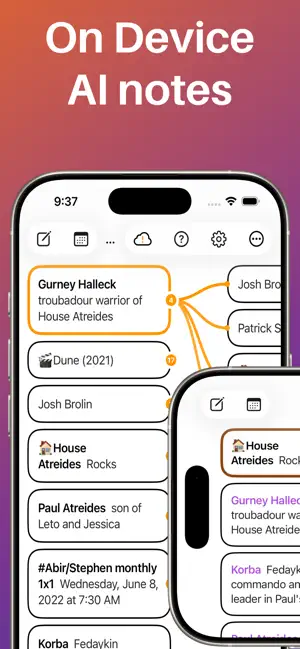


About iXnote: AI Notes & Context
Context is all you need. Walk into every meeting with the right context already in front of you. iXnote is your Context Assistant. It gives you the right context, so you walk in ready and stay present in the room. CARDS, AND CONNECTED CARDS iXnote is built from one simple thing: the card. A card holds one thing. A person. A project. A meeting. A decision. Connect a card to the cards it relates to, and those connections become its context. Tap any card to see it in its context, the whole situation around it. FOLLOWALONG With FollowAlong, the context comes together as you talk. You never break stride to make it happen. It surfaces the cards that matter and captures the new ones, so you stay in the conversation and make the call. ON DEVICE FollowAlong runs entirely on your device, powered by the latest open-source AI models. Nothing you say is ever uploaded, and your cards stay in your own iCloud. It works on any iPhone, iPad, or Mac that supports Apple Intelligence. THE THINKING STAYS YOURS iXnote gives you the context. The thinking stays yours: the conclusions, the insight, the call in the room. SIMPLE BY DESIGN Just cards, and the connections between them. Simple enough to use in the middle of a meeting, ready to hold thousands of connected cards. ONE TAP FROM YOUR CALENDAR Import your meetings with one tap. iXnote makes connected cards for the people, the companies and the meeting itself, so the room is mapped before you arrive. AUTOMATE THE BORING PART Twelve Shortcuts actions put your cards within reach of everything else on your device. Make cards, connect them, find them, open one, or read back a day's transcript. Every card also has an appendix, text that stays out of the way but stays searchable, so your automations have somewhere to write. FREE - Unlimited cards and connections - Full-text search - iCloud sync across iPhone, iPad and Mac - Meeting import from your calendar - Export to JSON and CSV - Shortcuts and the Share Extension iXnote PRO - Custom categories with your own colors - Advanced search filters - Import from Obsidian, mind maps, and OPML outlines - Transcript export iXnote: the right context for the moment you're in. Terms of Use (EULA): https://www.apple.com/legal/internet-services/itunes/dev/stdeveula/
What’s new
Version 26.007 · Updated September 28, 2026
Tap your next meeting in FollowAlong to import it, attendees and all, and jump straight to it. Select a card and FollowAlong suggests the cards two steps out that several of its connections share, ready to connect with a long press. Exported transcripts now mark the meetings you were in and the cards you selected, so an AI tool reading one knows what was going on (Pro). Fixed: the live transcript no longer pauses when you select a different card. Fixed: edits to a card show everywhere as soon as you save.
App privacy
The developer, ixnote, LLC, reported these privacy practices to Apple.
Data Not Collected
The developer does not collect any data from this app.
Alternatives to iXnote: AI Notes & Context
Looking for apps like iXnote: AI Notes & Context? Here are 6 similar apps on the App Store. The highest rated is TriggerFlo: Focus Timer (5.0/5), and all 6 are free to download.
-
 PageMoss
-
 EchoPilot by McKintoye
-
 Pencil Fire
-
 TriggerFlo: Focus Timer
5.0
TriggerFlo: Focus Timer
5.0
-
 ClearTangle: AI Second Brain
-
 PostPiny
| App | Rating | Price | Last updated | Compare |
|---|---|---|---|---|
| iXnote: AI Notes & Context | 5.0 / 5 (1 rating) | Free | September 28, 2026 | |
| PageMoss | – | Free | Jan 29, 2026 | Compare |
| EchoPilot by McKintoye | – | Free | Jun 18, 2026 | Compare |
| Pencil Fire | – | Free | Sep 1, 2026 | Compare |
| TriggerFlo: Focus Timer | 5.0 / 5 (1) | Free | Oct 17, 2026 | Compare |
| ClearTangle: AI Second Brain | – | Free | Oct 20, 2026 | Compare |
| PostPiny | – | Free | Sep 21, 2025 | Compare |