

CrewTap
george strnad Productivity iPhoneiPadiPod touch
CrewTap is a free Productivity app for iPhone and iPad by george strnad. Rated 5.0/5 from 1 ratings. Requires iOS 16.0. Updated September 24, 2026.
- Rating
- 5.0
- 1 ratings
- Price
- Free
- on the App Store
- Size
- 153 MB
- Age 17+
- Updated
- Sep 24
- 2026 · v2.3.83
Screenshots


About CrewTap
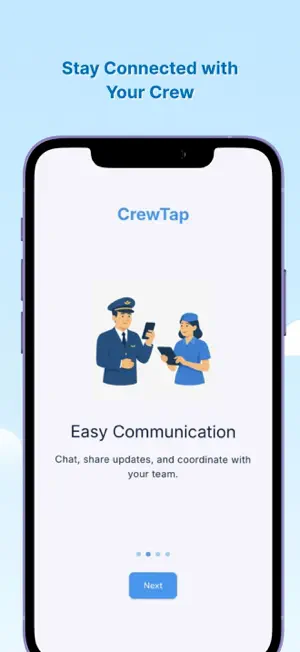
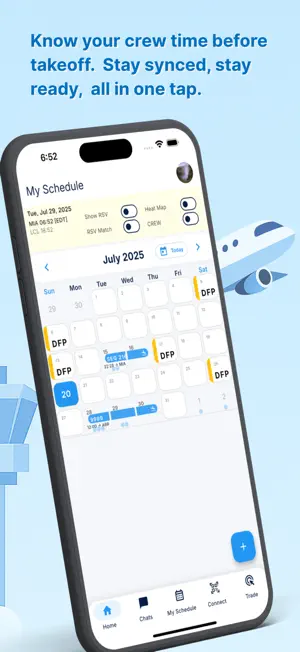
CrewTap is your all-in-one flight crew scheduling and management app, designed to help airline professionals — from pilots to cabin crew — stay organized, in sync, and always prepared for duty. Whether you're tracking your roster, logging flights, or checking your next shift, CrewTap gives you a seamless experience that fits right into your daily crew routine. Built for flight crews by people who understand the lifestyle, CrewTap makes it easy to manage your airline calendar, stay on top of your duty roster, and keep track of every shift. From pilots logging their flight hours to crew members needing a centralized view of their schedules, CrewTap keeps everyone connected. With real-time updates, smart flight schedule management, and an intuitive crew calendar, you'll always know what's next. No more scattered screenshots or outdated PDFs — CrewTap syncs your shifts, helps plan your travel, and offers a clear view of your month ahead. Whether you're a regional airline pilot, a long-haul flight attendant, or part of a growing charter operation, CrewTap adapts to your needs. Use the built-in logbook to track hours, rest periods, and destinations. Share your roster, connect with your crew, and get flight-ready without the friction. From early call times to last-minute changes, CrewTap is built to keep airline crew life simple and manageable. Your time is valuable — spend less of it on logistics and more on what matters most: flying and staying connected with your team. Key Features: Flight crew scheduling made simple Airline roster tracking and shift updates Pilot logbook and duty time management Crew calendar and shared scheduling tools Real-time shift changes and alerts Built-in travel planning support CrewTap supports airline crew members with a modern crew app that makes sense — not just for today’s operations, but for your long-term career. Log your flights, check your schedule, and manage every aspect of your crew life from one clean interface. No more juggling multiple tools — with CrewTap, you get a powerful crew scheduler, travel tracker, and duty roster assistant all in one. Designed for flight crews, by flight crews. Join the growing number of airline professionals using CrewTap to take control of their schedules and bring clarity to their flight life. Whether you’re organizing shifts, planning layovers, or reviewing your logbook at the end of the month — CrewTap is built for the pace, precision, and unpredictability of life in the skies. Stay ready and informed with CrewTap’s real-time crew tracking features. Never miss an update about your duty assignments or changes to your flight schedule. Your airline crew calendar should work with you — not against you. CrewTap is here to make that happen. Whether you're flying domestically or internationally, CrewTap adapts to your route. Our smart crew management system tracks your layovers, flags overlaps in your duty roster, and keeps your airline crew operations smooth. We know how hectic the aviation lifestyle can be — CrewTap helps bring structure, reliability, and visibility to your ever-changing schedule. Using CrewTap feels natural. It’s not just another crew app; it’s your flight deck companion. Designed with real airline feedback, every part of the app — from your roster view to your pilot logbook — has been refined to serve the real needs of real airline crews. CrewTap can also serve as a personal crew tracker for airline staff who want more clarity in their monthly schedule. The app empowers pilots and crew to own their routine, take note of every shift, and show up to duty prepared and on time. Flight crew communication and coordination should be stress-free. That’s why we’ve built CrewTap to support quick access to shift details, roster history, and a visual airline calendar you can trust.
What’s new
Version 2.3.83 · Updated September 24, 2026
Automatic flight logging now works with your phone locked, which is how a phone spends a flight. Until this release the app only recorded OUT/OFF/ON/IN while you were looking at the screen. Also in this release: • Import your roster straight from your airline calendar link • Pairing chats with the crew on your trip, with presence and read receipts • A rebuilt flight log, and a layout that works on iPhone and iPad • Push notifications that actually arrive • Company email confirmation working again for supported airlines • Lower battery use on the ground — GPS idles at the gate and steps up when the aircraft moves
App privacy
The developer, george strnad, reported these privacy practices to Apple.
Data Not Linked to You
The following data, which may be collected but is not linked to your identity, may be used for the following purposes:
- Contact Info: Email Address, Name
- Diagnostics: Crash Data
- Location: Coarse Location
- Identifiers: User ID, Device ID
Used for: Analytics, App Functionality
Alternatives to CrewTap
Looking for apps like CrewTap? Here are 6 similar apps on the App Store. The highest rated is Stasher - Home Inventory (5.0/5), and all 6 are free to download.
-
 Stasher - Home Inventory
5.0
Stasher - Home Inventory
5.0
-
 SkyCrew by Sky Elements
-
 One & Done: Daily Focus
-
 LiquiDonate
5.0
LiquiDonate
5.0
-
 SuperSwapp
-
 ShiftPal – Shift Tracker
| App | Rating | Price | Last updated | Compare |
|---|---|---|---|---|
| CrewTap | 5.0 / 5 (1 rating) | Free | September 24, 2026 | |
| Stasher - Home Inventory | 5.0 / 5 (2) | Free | Sep 20, 2026 | Compare |
| SkyCrew by Sky Elements | – | Free | May 25, 2026 | Compare |
| One & Done: Daily Focus | – | Free | Sep 21, 2026 | Compare |
| LiquiDonate | 5.0 / 5 (1) | Free | Oct 27, 2025 | Compare |
| SuperSwapp | – | Free | Apr 11, 2026 | Compare |
| ShiftPal – Shift Tracker | – | Free | May 3, 2026 | Compare |
Compare CrewTap with the top alternatives: ratings, updates, ASO score and keyword gaps →