

Smart Inventory Manager
Alberto Huesca Business iPhoneiPadiPod touch
Smart Inventory Manager is a free Business app for iPhone and iPad by Alberto Huesca. Rated 4.5/5 from 2 ratings. Requires iOS 18.2.
- Rating
- 4.5
- 2 ratings
- Price
- Free
- on the App Store
- Size
- 7 MB
- Age 4+
- Updated
- Dec 20
- 2025 · v1.2
Screenshots


About Smart Inventory Manager
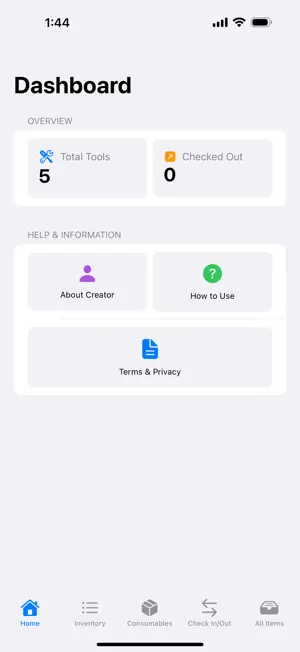
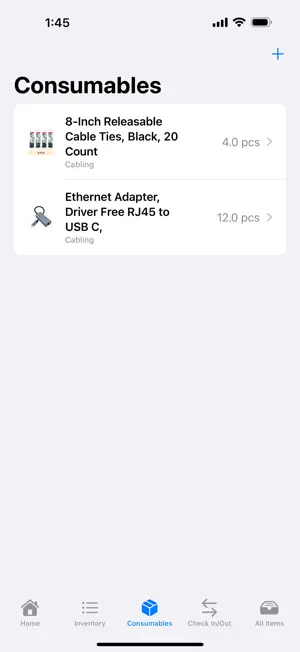
Tired of lost tools, misplaced equipment, or running out of essential supplies? Smart Inventory Manager is your simple, powerful, and completely offline solution for tracking everything in your workshop, garage, or job site. Designed for clarity and ease of use, Smart Inventory Manager helps you stay organized and accountable without needing an internet connection. Your data stays securely on your device. Key Features: Comprehensive Tracking: Manage both durable tools and consumable items in one place. Detailed Item Records: Add tools and consumables with names, categories, quantities (for consumables), serial numbers, locations, notes, and images for easy identification. Works Completely Offline: No internet connection required. Manage your inventory anywhere, anytime. Your data remains private on your device. Employee Check-In/Out: Easily assign tools to employees and track who has what. Reduce loss and improve accountability. Status at a Glance: Quickly see which tools are available or checked out, and who is using them. Consolidated View: See all your tools and consumables together in the "All Items" tab. PDF Inventory Reports: Generate professional PDF reports of your entire inventory, complete with images, perfect for record-keeping, insurance purposes, or sharing.
What’s new
Version 1.2 · Updated December 20, 2025
New features: Low stock alerts: set custom thresholds for consumables and get notified when supplies run low More Apps section: discover other apps by the developer with direct App Store links Terms of Service: accessible from Settings with details about the free app Design improvements: Modernized dashboard: updated HomeScreen with gradients, shadows, and improved visual hierarchy Enhanced cards: summary and category cards with depth and modern styling Light theme: consistent light theme across all screens Performance and storage: Image optimization: automatic resizing and compression to reduce file sizes (images resized to max 1024px, compressed to ~70% quality) Faster performance: smaller image files improve app speed and reduce storage usage Bug fixes: Fixed syntax errors that prevented the app from building Improved image handling and display throughout the app User experience: Better navigation: streamlined More screen with easy access to All Items and Settings Improved visual feedback: enhanced low stock alerts with better styling Cleaner interface: consistent spacing, typography, and color scheme throughout
App privacy
The developer, Alberto Huesca, reported these privacy practices to Apple.
Data Not Collected
The developer does not collect any data from this app.
Alternatives to Smart Inventory Manager
Looking for apps like Smart Inventory Manager? Here are 6 similar apps on the App Store. The highest rated is Workshop AI: Tool Inventory (4.9/5), and all 6 are free to download.
-
 Tare: Restaurant Inventory
-
 Inventory: Track & Manage
-
 ToolWorks
-
 Workshop AI: Tool Inventory
4.9
Workshop AI: Tool Inventory
4.9
-
 Inventory: Product Tracker App
4.1
Inventory: Product Tracker App
4.1
-
 Mobile Inventory: Scan & Track
4.5
Mobile Inventory: Scan & Track
4.5
| App | Rating | Price | Last updated | Compare |
|---|---|---|---|---|
| Smart Inventory Manager | 4.5 / 5 (2 ratings) | Free | December 20, 2025 | |
| Tare: Restaurant Inventory | – | Free | Oct 18, 2026 | Compare |
| Inventory: Track & Manage | – | Free | Nov 27, 2023 | Compare |
| ToolWorks | – | Free | Oct 25, 2026 | Compare |
| Workshop AI: Tool Inventory | 4.9 / 5 (10) | Free | Sep 15, 2026 | Compare |
| Inventory: Product Tracker App | 4.1 / 5 (17) | Free | Feb 13, 2026 | Compare |
| Mobile Inventory: Scan & Track | 4.5 / 5 (21) | Free | Oct 13, 2026 | Compare |