

Scanner App - Scan PDF & Photo
Ketan Padsala Productivity iPhoneiPadiPod touch
Scanner App - Scan PDF & Photo is a free Productivity app for iPhone and iPad by Ketan Padsala. Requires iOS 15.0. Updated July 8, 2025.
- Price
- Free
- on the App Store
- Size
- 34 MB
- Age 4+
- Updated
- Jul 8
- 2025 · v1.3
Screenshots


About Scanner App - Scan PDF & Photo
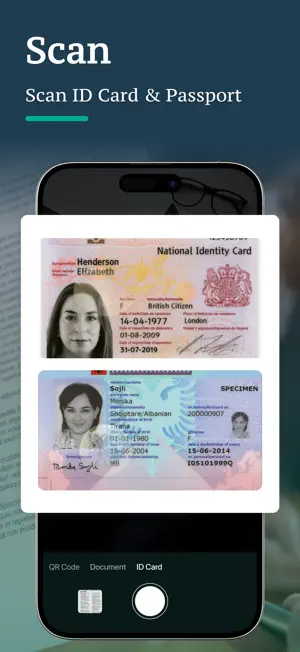
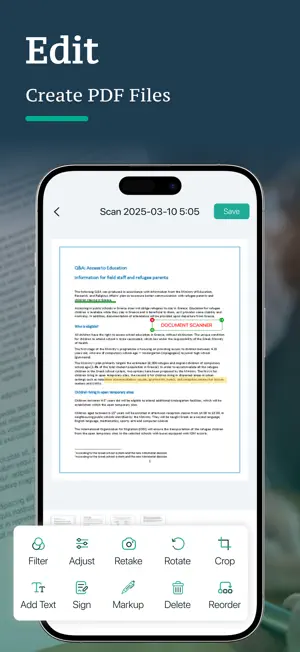
Doc Scanner: Scan Documents, PDFs, and More Turn your iPhone or iPad into a powerful and professional PDF Scanner with iDoc Scanner. Whether you need a Document Scanner, ID Scanner, QR Code Scanner, this all-in-one solution delivers clear, fast, and secure scans — anytime, anywhere. Scan Anything, Anywhere Quickly scan a variety of physical documents using your device camera: * Paperwork, contracts, textbooks, handwritten notes * Passports, ID cards, driver's licenses (ID Scanner) * QR Codes & barcodes (QR Scanner) * Auto edge detection and smart cropping for perfect precision * Scan in color, grayscale, or black & white Multi-language Support iDoc Scanner is designed for global use. Scan, edit, and manage files in your preferred language. Supports: English, French, German, Spanish, Hindi, Arabic, Russian, Italian, Gujarati, and more. Edit & Enhance Your Scans Make every scan look professional: * Crop, rotate, and adjust brightness/contrast * Add annotations, highlights, or e-signatures * Apply filters for clarity (B&W, Color, Grayscale) * Merge multiple pages or reorder as needed Convert & Export Instantly Do more than scanning: * Scan to PDF in seconds * Convert PDF to Text, HTML, or Images * Turn photos and notes into professional PDFs Manage Documents with Ease Stay organized and efficient: * Create folders for documents * Rename, delete, or reorder files easily * Use smart search (by name or content) * Share via email, cloud storage, or messaging apps Perfect for Everyone Whether you’re a student, professional, or traveler, iDoc Scanner simplifies your workflow: * Students: Scan notes, textbooks, and assignments * Professionals: Digitize contracts, business cards, and receipts * Travelers: Store travel documents securely * Home users: Organize bills, invoices, and forms Why iDoc Scanner? A complete mobile scanning toolkit: * PDF Scanner, Smart Document Scanner * ID Scanner, QR Scanner, Barcode Reader * E-Signature Tool * Scan to PDF, PDF Converter, Receipt Scanner Read our full Terms of Service and our Privacy Policy at: - Privacy Policy: https://www.freeprivacypolicy.com/live/2c2bcf74-a8dd-4f21-b89c-1cfc7ecbeb9a - Terms of Use: https://www.freeprivacypolicy.com/live/016e5965-ce26-4f74-b2e0-a3b874ecdcdb
What’s new
Version 1.3 · Updated July 8, 2025
Added Face Lock for enhanced privacy Minor bug fixes and UI improvements
App privacy
The developer, Ketan Padsala, reported these privacy practices to Apple.
Data Not Collected
The developer does not collect any data from this app.
Alternatives to Scanner App - Scan PDF & Photo
Looking for apps like Scanner App - Scan PDF & Photo? Here are 6 similar apps on the App Store.
-
 Translate Now: All Languages
-
 Pic to PDF Converter +
-
 Retn : Imprint One Focus
-
 signaturiX
-
 Daily Walk with Jesus
-
 Signature Maker ◆ Sign Creator
| App | Rating | Price | Last updated | Compare |
|---|---|---|---|---|
| Scanner App - Scan PDF & Photo | – | Free | July 8, 2025 | |
| Translate Now: All Languages | – | Free | Jul 30, 2025 | Compare |
| Pic to PDF Converter + | – | Free | Sep 3, 2026 | Compare |
| Retn : Imprint One Focus | – | Free | Jan 6, 2026 | Compare |
| signaturiX | – | Free | Jan 8, 2026 | Compare |
| Daily Walk with Jesus | – | Free | Apr 24, 2025 | Compare |
| Signature Maker ◆ Sign Creator | – | Free | Oct 16, 2026 | Compare |