

JPG To PDF: Converter Scanner
RANIA ABDELALEEM Productivity iPhoneiPadiPod touch
JPG To PDF: Converter Scanner is a free Productivity app for iPhone and iPad by RANIA ABDELALEEM. Rated 5.0/5 from 1 ratings. Requires iOS 16.5.
- Rating
- 5.0
- 1 ratings
- Price
- Free
- on the App Store
- Size
- 16 MB
- Age 4+
- Updated
- Apr 9
- 2025 · v1.3
Screenshots


About JPG To PDF: Converter Scanner
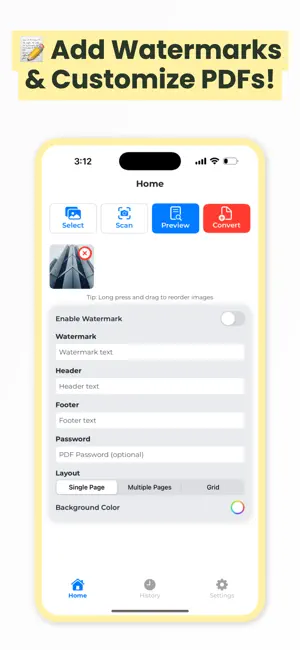
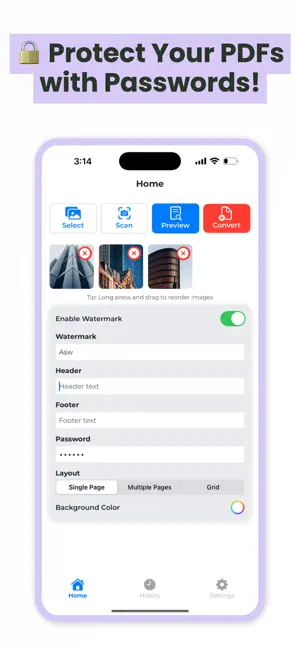
Convert your JPG images and photos into professional PDF documents with ease! Whether you need to organize your JPG files, convert photos to PDF, or secure your documents, this app makes it quick and simple. ** Key Features: ** • Select JPG Images: Easily choose JPG files or photos from your gallery or scan new images directly. • Fast JPG to PDF Conversion: Convert your JPG and photos to PDF instantly while keeping high quality. • Preview PDF: Check your converted PDF before saving to ensure the best results. • Custom Layouts: Choose from Single Page, Multiple Pages, or Grid when converting JPG or photos to PDF. • Watermark and Customize: Add custom text or watermark to your PDF files created from JPG and photos. • Add Header and Footer: Make your PDF more informative by adding headers and footers to your JPG or photo conversions. • Password Protect PDFs: Secure your converted PDF from JPG and photos with a password. • Rearrange JPGs: Long press and drag to reorder your JPG and photo selections before creating a PDF. • High-Quality Output: Keep your JPG and photos crisp and clear when converting to PDF. ** Why Choose This App? ** Our JPG to PDF converter is perfect for anyone needing to convert JPG images or photos to PDF quickly and efficiently. Whether for work, school, or personal use, this app offers the best way to manage and convert your JPG files and photos to PDF. ** Perfect for: ** ◆ Creating PDF albums from JPG photos ◆ Generating secure PDF documents from JPG files ◆ Sharing multiple photos as a single PDF ◆ Customizing PDF documents from JPG images with watermarks and headers ** Download Now! ** ◆ Get the JPG To PDF: Converter Scanner app today and make document management easier than ever! Convert your JPG images and photos to PDF in seconds.
What’s new
Version 1.3 · Updated April 9, 2025
- Smooth new button animations - Faster conversion & better performance - Small bug fixes
App privacy
The developer, RANIA ABDELALEEM, reported these privacy practices to Apple.
Data Used to Track You
The following data may be used to track you across apps and websites owned by other companies:
- Identifiers: Device ID
- Usage Data: Advertising Data
Data Not Linked to You
The following data, which may be collected but is not linked to your identity, may be used for the following purposes:
- Identifiers: Device ID
- Usage Data: Advertising Data
Used for: Third-Party Advertising, Analytics
Alternatives to JPG To PDF: Converter Scanner
Looking for apps like JPG To PDF: Converter Scanner? Here are 6 similar apps on the App Store. The highest rated is PDF Converter : Picture to PDF (5.0/5), and all 6 are free to download.
-
 Photo to PDF - JPEG Converter
-
 PDF Converter : Picture to PDF
5.0
PDF Converter : Picture to PDF
5.0
-
 PDF Converter: Maker & Scanner
4.8
PDF Converter: Maker & Scanner
4.8
-
 PDF Converter.ㅤ
1.0
PDF Converter.ㅤ
1.0
-
 Photo to PDF - Image Converter
4.5
Photo to PDF - Image Converter
4.5
-
 UniPDF: PDF Converter, Scanner
| App | Rating | Price | Last updated | Compare |
|---|---|---|---|---|
| JPG To PDF: Converter Scanner | 5.0 / 5 (1 rating) | Free | April 9, 2025 | |
| Photo to PDF - JPEG Converter | – | Free | Sep 17, 2026 | Compare |
| PDF Converter : Picture to PDF | 5.0 / 5 (1) | Free | Oct 21, 2026 | Compare |
| PDF Converter: Maker & Scanner | 4.8 / 5 (6) | Free | Sep 28, 2026 | Compare |
| PDF Converter.ㅤ | 1.0 / 5 (1) | Free | Jul 30, 2026 | Compare |
| Photo to PDF - Image Converter | 4.5 / 5 (103) | Free | Sep 17, 2026 | Compare |
| UniPDF: PDF Converter, Scanner | – | Free | Oct 20, 2026 | Compare |