

RandomFinder: Files & Photos
孟仁 潘 Utilities iPhoneiPadiPod touchMac
RandomFinder: Files & Photos is a free Utilities app for iPhone and iPad by 孟仁 潘. Rated 5.0/5 from 1 ratings. Requires iOS 16.0. Updated September 24, 2026.
- Rating
- 5.0
- 1 ratings
- Price
- Free
- on the App Store
- Size
- 7 MB
- Age 4+
- Updated
- Sep 24
- 2026 · v2026.09
Screenshots


About RandomFinder: Files & Photos
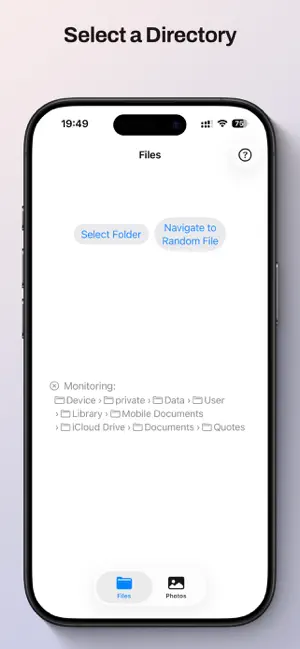
Rediscover your digital world through the joy of random exploration! RandomFinder helps you uncover forgotten gems by letting you select a folder and then locating a random file within it, or by locating a random photo from your Photos library. It's the perfect companion for revisiting cherished memories, rediscovering useful applications, or simply adding an element of surprise to your digital life. Free to download with file exploration included. Unlock Pro features with a one-time purchase that works across Mac, iPhone, and iPad. Key Features: • Free file exploration - browse any folder and discover random files at no cost • Pro: Photos library integration - randomly explore your entire photo library • Pro unlocks across all devices - buy once on any platform and restore on all your Apple devices • Effortless folder exploration - simply select any directory and let RandomFinder do the rest • Real-time directory monitoring - automatically detects changes to your folders • Drag and drop support - easily target any directory • Smart filtering - focuses on user-relevant content while ignoring system files • Global keyboard shortcuts - navigate to random files and photos without leaving your current workflow • Native macOS integration - files revealed in Finder, photos opened in Photos app • Blazing fast performance - handles tens of thousands of files instantly and reflects directory changes in real-time Great for: • Photo memories - rediscover precious moments from your entire Photos library • Music libraries - surprise yourself with tracks you haven't heard in years • Document archives - find and revisit important files you've forgotten • Application folders - rediscover apps you didn't remember you had • Creative inspiration - find unexpected connections and ideas across all your content RandomFinder respects your privacy and security - it never modifies your files or photos and works within macOS's sandbox protection. With universal purchase, you get the full RandomFinder experience across Mac, iPhone, and iPad - each version deliberately designed and carefully crafted to be the best possible experience for that platform. Add a touch of spontaneity to your digital life and let RandomFinder guide you to rediscover what you already have!
What’s new
Version 2026.09 · Updated September 24, 2026
- Press ⌘R to navigate to a random file, or ⌘P for a random photo, right from the File menu - "Reset to Defaults" in Settings is now dimmed when your settings are already at their defaults - The sidebar no longer shows a redundant "Navigation" section header - Fix the clear button in the keyboard shortcut recorder on macOS 26 & 27 - Fix photo permission alerts: correct app name, correct Settings link, and a clearer message when access is restricted
App privacy
The developer, 孟仁 潘, reported these privacy practices to Apple.
Data Not Collected
The developer does not collect any data from this app.
Alternatives to RandomFinder: Files & Photos
Looking for apps like RandomFinder: Files & Photos? Here are 6 similar apps on the App Store. The highest rated is ImageInfoCleaner (5.0/5), and 5 of the 6 are free to download.
-
 Exif Snap: EXIF Toolkit
-
 DOT. Offline AI Assistant
-
 解压专家-多格式快速压缩解压软件
-
 ImageInfoCleaner
5.0
ImageInfoCleaner
5.0
-
 Uni! - Unicode Keyboard
-
 WatchBreath
| App | Rating | Price | Last updated | Compare |
|---|---|---|---|---|
| RandomFinder: Files & Photos | 5.0 / 5 (1 rating) | Free | September 24, 2026 | |
| Exif Snap: EXIF Toolkit | – | 1.99 USD | Aug 9, 2026 | Compare |
| DOT. Offline AI Assistant | – | Free | Apr 23, 2026 | Compare |
| 解压专家-多格式快速压缩解压软件 | – | Free | Jun 17, 2024 | Compare |
| ImageInfoCleaner | 5.0 / 5 (1) | Free | Apr 18, 2026 | Compare |
| Uni! - Unicode Keyboard | – | Free | Dec 29, 2025 | Compare |
| WatchBreath | – | Free | Oct 14, 2025 | Compare |