

MapCam - GPS Map Camera
HKinfoway Technologies Photo & Video iPhoneiPadiPod touch
MapCam - GPS Map Camera is a free Photo & Video app for iPhone and iPad by HKinfoway Technologies. Rated 4.4/5 from 7 ratings. Requires iOS 15.6.
- Rating
- 4.4
- 7 ratings
- Price
- Free
- on the App Store
- Size
- 44 MB
- Age 4+
- Updated
- Oct 12
- 2026 · v1.6
Screenshots

About MapCam - GPS Map Camera
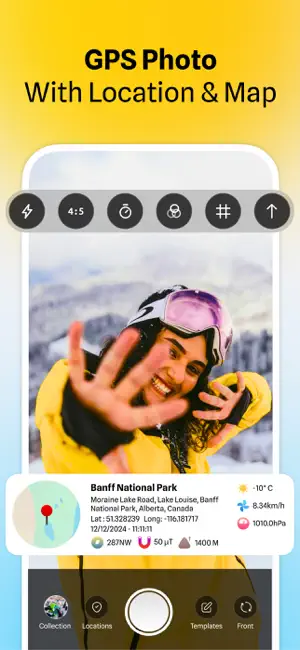
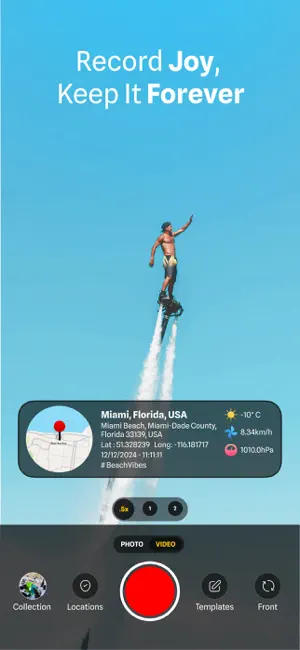
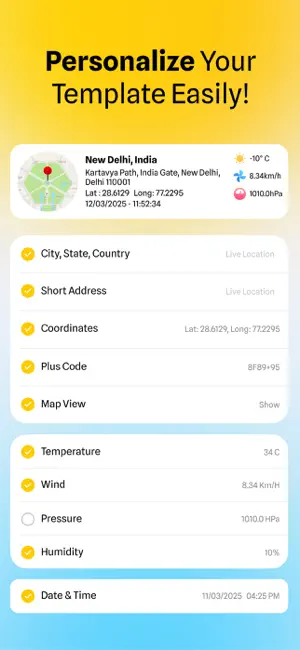
Capture, tag, and organize your photos and videos with GPS, maps, and timestamps. MapCam - GPS Map Camera adds accurate location details to your photos and videos — latitude and longitude, address, date, time, and compass direction, plus altitude, weather, temperature, humidity, and wind. Perfect for travel memories, site proof, surveys, real estate, field work, and social content. NEW IN THIS VERSION - 131 stamp templates: 101 ready-to-use designs plus 30 customizable ones. On customizable templates you choose which details show (date/time, address, coordinates, weather and more), add your logo, and adjust the layout. The Basic customizable template is free; the other templates are part of PRO. - Redesigned Choose Template screen, also reachable from Settings. - 7 camera control styles: Classic (free), plus Cockpit, Crescent, Floating, Cluster, Ribbon, and Sidecar (PRO). - Fullscreen aspect ratio, plus photo and video size and quality options. - Portrait Only mode, and Remember Settings so the camera stays how you left it (PRO). - Custom file names — free formats include Date & Time, Sequence, Time Zone, and Plus Code (more formats with PRO). - Share photos directly from the app, or email your photos and videos — with an improved in-app gallery. CAPTURE WITH LIVE LOCATION - GPS camera: coordinates, address, date, and time are added automatically as you shoot. - Map location picker: pin any spot or search an address to assign coordinates manually. - Front and rear camera support for both photos and videos. STAMP THE DETAILS YOU NEED - GPS coordinates, address, date, time, and compass direction. - Altitude, weather, temperature, humidity, and wind. - Notes and custom text with flexible layouts. KEEP YOUR ORIGINAL QUALITY - Choose your resolution and quality. - Stamps are overlaid without altering the underlying image — your original photo stays intact. PRIVACY - Your photos are stamped on your device. Your pictures and location are not uploaded, shared, or sold — they stay on your device. FILTERS - Apply filters to your photos and videos — free for everyone. HELP WHEN YOU NEED IT - Expanded User Guide with 15 topics. - FAQ with 29 questions, available in 12 languages. WHO IT'S FOR - Travelers and creators — remember where every photo was taken and make content ready to share. - Field teams, surveyors, and engineers — document on-site work with timestamped, geotagged proof. - Real estate — capture listings with confirmed address and location. - Outdoor and adventure — log hikes, routes, and expeditions. MapCam PRO Unlock the full experience: all prebuilt and customizable stamp templates, six extra camera control styles, Remember Settings, advanced file-name formats, and watermark removal. Start with a 1-week free trial on the annual plan. HOW IT WORKS 1. Open MapCam and allow location access. 2. Take a photo or video — GPS, address, date, and time are added automatically. 3. Pick a template and customize the layout, font, and details. 4. Save or share in one tap. Privacy Policy: https://gpsmapcamera.wallzy.app/privacy-policy Terms of Use: https://gpsmapcamera.wallzy.app/terms-condition
Ratings & reviews
4.4
7 ratings
What’s new
Version 1.6 · Updated October 12, 2026
A big update — new templates, new camera styles, custom file names, and lots of fixes. NEW - 131 stamp templates — 101 ready-made designs plus 30 customizable ones (pick your details, add a logo, adjust the layout). Several older designs are back, too. The Basic customizable template is free; all other templates are part of PRO. - Redesigned Choose Template screen, now also in Settings. - 6 new camera control styles — Cockpit, Crescent, Floating, Cluster, Ribbon, and Sidecar (PRO). Classic stays free. - New Fullscreen aspect ratio. - Photo and video size and quality options. - Portrait Only mode. - Remember Settings — the camera stays as you left it between launches (PRO). - Custom file names — free formats: Date & Time, Sequence, Time Zone, Plus Code (more with PRO). - Share photos directly from the app. - Improved in-app gallery. - Expanded User Guide (15 topics) and a new FAQ (29 questions in 12 languages). - New paywall with a 1-week free trial. - Swipe back to the previous screen, better layouts on small iPhones, and a clearer gallery button on bright backgrounds. FIXES & IMPROVEMENTS - Fixed no sound on videos recorded in landscape. - Removed the recording start sound from the beginning of saved videos. - Better behavior during phone calls — video still works, and recording is safely blocked while the microphone is in use. - Fixed a small flicker when returning to the camera screen. - Fixed the stamp logo shifting when the stamp position changed. - Smoother template browsing. - Smaller download size (assets reduced by more than half). - Fixed push notifications. - Works with no network — a "continue" option instead of getting stuck.
App privacy
The developer, HKinfoway Technologies, reported these privacy practices to Apple.
Data Not Linked to You
The following data, which may be collected but is not linked to your identity, may be used for the following purposes:
- Usage Data: Product Interaction
- Diagnostics: Crash Data
- Location: Precise Location
Used for: Analytics, Product Personalization
Alternatives to MapCam - GPS Map Camera
Looking for apps like MapCam - GPS Map Camera? Here are 6 similar apps on the App Store. The highest rated is GPS Camera - GPS Map Camera (5.0/5), and all 6 are free to download.
-
 Geo Timestamp : GPS Map Camera
3.9
Geo Timestamp : GPS Map Camera
3.9
-
 GPS Camera - GPS Map Camera
5.0
GPS Camera - GPS Map Camera
5.0
-
 Timestamp Camera - GPS Map
5.0
Timestamp Camera - GPS Map
5.0
-
 Geotag Photos: GPS Map Camera
-
 GPS Timestamp Camera - GPS Map
4.0
GPS Timestamp Camera - GPS Map
4.0
-
 GPS Map Camera Geotag Location
4.7
GPS Map Camera Geotag Location
4.7
| App | Rating | Price | Last updated | Compare |
|---|---|---|---|---|
| MapCam - GPS Map Camera | 4.4 / 5 (7 ratings) | Free | October 12, 2026 | |
| Geo Timestamp : GPS Map Camera | 3.9 / 5 (8) | Free | Jul 22, 2026 | Compare |
| GPS Camera - GPS Map Camera | 5.0 / 5 (1) | Free | Apr 29, 2026 | Compare |
| Timestamp Camera - GPS Map | 5.0 / 5 (2) | Free | Oct 9, 2026 | Compare |
| Geotag Photos: GPS Map Camera | – | Free | Jul 13, 2026 | Compare |
| GPS Timestamp Camera - GPS Map | 4.0 / 5 (4) | Free | Apr 9, 2024 | Compare |
| GPS Map Camera Geotag Location | 4.7 / 5 (26) | Free | Jan 17, 2025 | Compare |