

AICollage: Photo Collage Maker
Prutvi Photo & Video iPhoneiPadiPod touch
AICollage: Photo Collage Maker is a free Photo & Video app for iPhone and iPad by Prutvi. Rated 4.8/5 from 14 ratings. Requires iOS 15.0.
- Rating
- 4.8
- 14 ratings
- Price
- Free
- on the App Store
- Size
- 106 MB
- Age 4+
- Updated
- Jul 28
- 2026 · v1.1.3
Screenshots



About AICollage: Photo Collage Maker
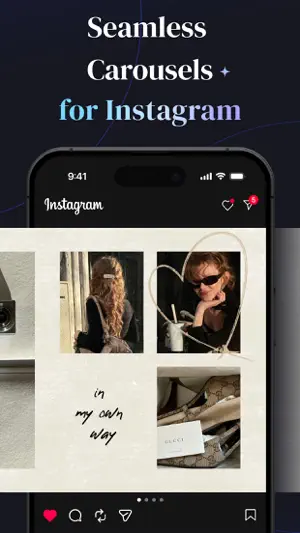
We built AICollage for creators who want their Instagram to feel elevated, not just posted. If you care about the vibe of your Instagram, this is where you create refined pic collages, fluid carousel posts, and eye-catching grid layouts. As your go-to photo collage maker and photo editor, AICollage brings together trending templates, flexible layouts, and a rich set of visual elements, giving you the control to compose images, Live Photos, and videos with clarity and ease. Whether you’re sharing moments or building a personal brand, this is where your visuals begin to reflect a more defined sense of taste. From editing to sharing, AICollage has got you covered: Collage & Photo Editing Workflow - Work with photos, Live Photos, and videos in one place, so everything feels connected. - Build with carousels, grids, freestyle canvases, and stitches, whatever your layout calls for. - Layer, blend, cut out, and draw freely, giving your ideas the space to take form. Templates That Lead the Trend - Drop original, studio-quality templates straight into your Reels, Stories, and Carousels. - Never repeat a look with a constantly updated library of trend-setting layouts. Seamless Swipeable Carousels - Seamless panoramic layouts that dissolve boundaries between slides, letting each frame connect as part of one story. The Art of Grid Layouts - Bring any number of photos together, setting a clean, effortless rhythm for your feed. - Arrange your grids your own way. Even the simplest, minimalist layout can tell a distinct story. Freestyle Canvas Collage - Adjust the layout, zoom in and out, fine-tune every detail with full flexibility. Shape a canvas that fits your vision down to the exact pixel. Keep Scrolling With Long Stitches - Connect photos end to end for a long vertical scroll, crafted for a pure down-scroll experience. Powerful Photo Editor - Apply filters, effects, and adjustments like brightness and contrast in one place, so your visuals stay sharp without jumping between apps. - Add text for quick, expressive edits, from subtle captions to playful meme-style overlays, without breaking the look of your composition. - Customize logos and watermarks as part of your layout, keeping everything polished, flexible, and ready to share in just one pass. Tons of Free Stickers and Assets - Style your collage with stickers, frames, backgrounds, and more, with new elements added regularly to push your aesthetic further. 15+ Photos to a Single Post - Break past the photo limit to tell your story in full. AICollage helps you curate an entire visual journal in one post. Post Straight to Instagram and beyond - Choose from every format and size you need. - Go live on Instagram, YouTube, TikTok, Facebook, X, and beyond in one tap, without leaving your workflow. Always One Step Ahead - GIF collages, video editing, AI tools, with new ideas constantly evolving. - Be early to every trend, with fresh templates and stickers updated weekly, before everyone else catches on. About AICollage Pro - Go Pro for full access, with the freedom to realize your ideas fully. Made for those who hold their work to a higher standard. - Weekly and yearly plans available. - Your subscription will automatically renew at the end of each term unless auto-renew is turned off at least 24 hours before the current period ends. The renewal fee will be charged to your Apple account within 24 hours before the subscription period ends. You can manage your subscription and turn off auto-renewal anytime in your account settings after purchase. - Privacy Policy: https://aicollage.zankhana.ltd/privacypolicy.html - Terms of Use: https://aicollage.zankhana.ltd/terms.html Follow us on IG @aicollage.app for fresh ideas, new drops, and a closer look at how others are creating! If you have any questions or suggestions, feel free to reach out to us at [email protected].
Ratings & reviews
4.8
14 ratings
What’s new
Version 1.1.3 · Updated July 28, 2026
1. Supported live photo collages, preserving every vivid moment 2. Offered more templates & assets 3. Fixed minor bugs 4. Optimized UI and interaction 5. Improved user experience
App privacy
The developer, Prutvi, reported these privacy practices to Apple.
Data Used to Track You
The following data may be used to track you across apps and websites owned by other companies:
- Identifiers: Device ID
Data Not Linked to You
The following data, which may be collected but is not linked to your identity, may be used for the following purposes:
- Identifiers: Device ID
- Usage Data: Product Interaction
- Diagnostics: Crash Data
Used for: Analytics
Alternatives to AICollage: Photo Collage Maker
Looking for apps like AICollage: Photo Collage Maker? Here are 6 similar apps on the App Store. The highest rated is Ola: Carousel & Reel Maker (5.0/5), and all 6 are free to download.
-
 AI Collage Maker: Auto Collage
3.7
AI Collage Maker: Auto Collage
3.7
-
 AI Collage Image & Video Maker
-
 Post Maker - Carousel, Story
-
 Ola: Carousel & Reel Maker
5.0
Ola: Carousel & Reel Maker
5.0
-
 Photo Grid: Collage Maker
4.9
Photo Grid: Collage Maker
4.9
-
 Grid Photo Collage Post Maker
4.7
Grid Photo Collage Post Maker
4.7
| App | Rating | Price | Last updated | Compare |
|---|---|---|---|---|
| AICollage: Photo Collage Maker | 4.8 / 5 (14 ratings) | Free | July 28, 2026 | |
| AI Collage Maker: Auto Collage | 3.7 / 5 (6) | Free | Aug 6, 2024 | Compare |
| AI Collage Image & Video Maker | – | Free | May 6, 2025 | Compare |
| Post Maker - Carousel, Story | – | Free | Jul 10, 2026 | Compare |
| Ola: Carousel & Reel Maker | 5.0 / 5 (2) | Free | Oct 20, 2026 | Compare |
| Photo Grid: Collage Maker | 4.9 / 5 (8) | Free | Jul 30, 2026 | Compare |
| Grid Photo Collage Post Maker | 4.7 / 5 (63) | Free | Jul 22, 2026 | Compare |