

Read Aloud AI - Text to Speech
Dekiru AI LLC Utilities iPhoneiPadiPod touch
Read Aloud AI - Text to Speech is a free Utilities app for iPhone and iPad by Dekiru AI LLC. Rated 4.6/5 from 10 ratings. Requires iOS 15.1.
- Rating
- 4.6
- 10 ratings
- Price
- Free
- on the App Store
- Size
- 34 MB
- Age 17+
- Updated
- Dec 18
- 2025 · v1.13
Screenshots

About Read Aloud AI - Text to Speech
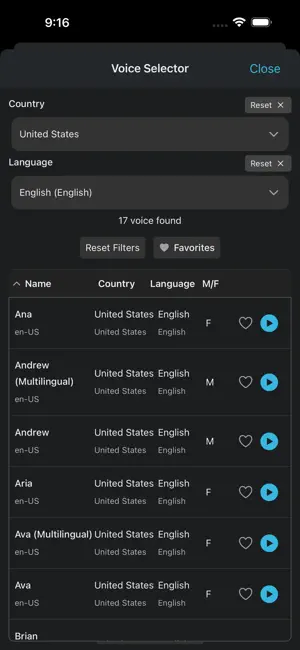
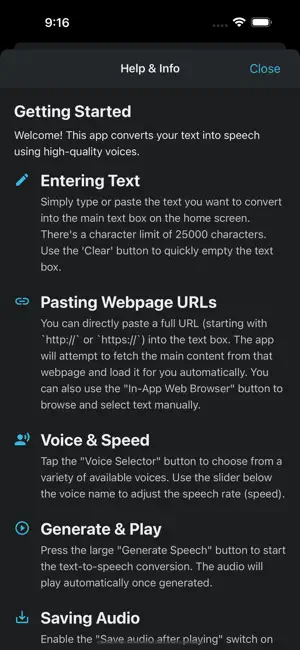
Read Aloud AI is your personal text-to-speech companion, letting you turn written content into realistic, easy-to-listen audio. Whether you're reading articles, studying for class, listening on the go, or just giving your eyes a break, our app makes it simple to convert text to high-quality spoken voice. Powered by advanced neural speech synthesis, Read Aloud AI provides lifelike voices in multiple languages. Paste your own text or type on the fly — hit play and listen. Turn text into natural-sounding speech with Read Aloud AI! Listen to articles, notes, emails, or any text on the go. Perfect for productivity, accessibility, and absorbing content effortlessly. KEY FEATURES: - High-Quality Voices: Choose from a selection of clear and natural text-to-speech (TTS) voices. - Read Webpages Easily: Simply paste a URL (webpage link), and Read Aloud AI will fetch the main content and read it aloud for you. No more copy-pasting large blocks of text! - Type or Paste Text: Input text directly or paste from your clipboard. - Adjustable Speed: Control the playback rate (speed) to listen at your preferred pace (0.5x to 2.0x). - Save & Manage Audio: Option to save the generated speech as audio files directly on your device. Access and replay your saved audio anytime. - In-App Browser: Browse websites within the app and easily send selected text or the page URL to the text-to-speech engine. - Clipboard Helper: Quickly paste content copied from other apps. Option to auto-play pasted text. - iOS Shortcut Support: Integrate Read Aloud AI with the Shortcuts app on iOS for powerful automation workflows. - Clean Interface: Simple, intuitive design with Light and Dark mode support. - Help & Info: Convenient in-app guide to get you started and explain all features. WHO IS THIS FOR? - Students: Listen to lecture notes, research papers, and textbooks. - Professionals: Catch up on emails, reports, and articles during commutes. - Content Consumers: Listen to blog posts and news articles while multitasking. - Accessibility Needs: Assists users with visual impairments or reading difficulties like dyslexia. - Anyone who prefers listening over reading! Download Read Aloud AI today and give your eyes a rest! Experience the convenience of having text read aloud anytime, anywhere.
Ratings & reviews
4.6
10 ratings
What’s new
Version 1.13 · Updated December 18, 2025
• Fixed a crash caused by recent changes to Microsoft services
App privacy
The developer, Dekiru AI LLC, reported these privacy practices to Apple.
Data Not Collected
The developer does not collect any data from this app.
Alternatives to Read Aloud AI - Text to Speech
Looking for apps like Read Aloud AI - Text to Speech? Here are 6 similar apps on the App Store. The highest rated is Easy Text to Speech Reader (5.0/5), and all 6 are free to download.
-
 Text to Speech Listen PDF Text
1.0
Text to Speech Listen PDF Text
1.0
-
 Text to speech - AI Echo Voice
4.7
Text to speech - AI Echo Voice
4.7
-
 Read Aloud: Text to Speech TTS
3.7
Read Aloud: Text to Speech TTS
3.7
-
 TTS: Text to Speech Pro
4.6
TTS: Text to Speech Pro
4.6
-
 Text To Speech - AI Voice
1.0
Text To Speech - AI Voice
1.0
-
 Easy Text to Speech Reader
5.0
Easy Text to Speech Reader
5.0
| App | Rating | Price | Last updated | Compare |
|---|---|---|---|---|
| Read Aloud AI - Text to Speech | 4.6 / 5 (10 ratings) | Free | December 18, 2025 | |
| Text to Speech Listen PDF Text | 1.0 / 5 (1) | Free | Jul 24, 2025 | Compare |
| Text to speech - AI Echo Voice | 4.7 / 5 (39) | Free | Apr 7, 2026 | Compare |
| Read Aloud: Text to Speech TTS | 3.7 / 5 (13) | Free | Mar 7, 2024 | Compare |
| TTS: Text to Speech Pro | 4.6 / 5 (15) | Free | Feb 11, 2026 | Compare |
| Text To Speech - AI Voice | 1.0 / 5 (1) | Free | Jun 29, 2025 | Compare |
| Easy Text to Speech Reader | 5.0 / 5 (2) | Free | Aug 27, 2026 | Compare |