

Travel Budget Log: TripBudgy
Murat Unsal Travel iPhoneiPadiPod touch
Travel Budget Log: TripBudgy is a free Travel app for iPhone and iPad by Murat Unsal. Rated 4.7/5 from 6 ratings. Requires iOS 17.0. Updated August 14, 2026.
- Rating
- 4.7
- 6 ratings
- Price
- Free
- on the App Store
- Size
- 68 MB
- Age 4+
- Updated
- Aug 14
- 2026 · v3.0.4
Screenshots


About Travel Budget Log: TripBudgy
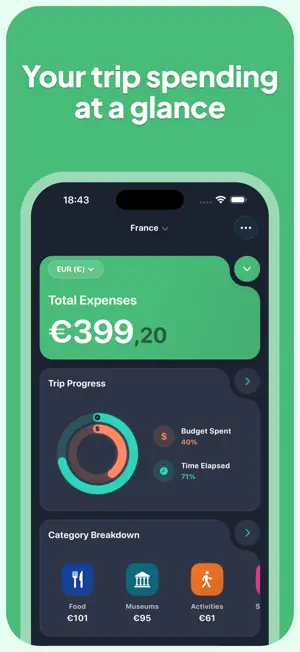
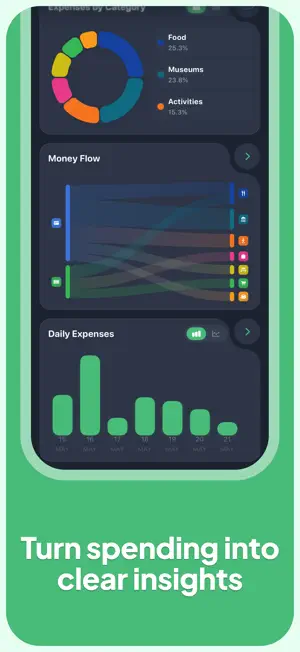
TripBudgy is a travel budget app and travel expense tracker for solo trips, family holidays, and group travel. Create a trip, set a budget, and record spending manually, with natural-language text or voice, or with AI-assisted receipt and photo scanning. See how much you have spent, how quickly your budget is moving, and what remains in your chosen home currency—even when you pay in several currencies. Join thousands of travelers who use TripBudgy to organize trip budgets and shared expenses. "We used TripBudgy for our 4-week trip through Europe. The shared expenses and real-time syncing were flawless. The receipt scanner saved us hours!" – David L., Avid Traveler PLAN, RECORD, AND UNDERSTAND YOUR TRIP SPENDING • CREATE TRIPS AND BUDGETS: Start with a trip budget, choose a base currency, and follow progress as your journey unfolds. Use daily spending pace and averages to spot when you may want to adjust your plans. • ADD EXPENSES YOUR WAY: Enter the amount, merchant, date, location, payment method, category, and notes yourself, or describe a purchase naturally. Say or type “Spent 12 euros on lunch” to create an expense draft in seconds. • AI-ASSISTED RECEIPT SCANNER: Photograph a receipt, invoice, or other expense photo, including one in another language. TripBudgy suggests details such as amount, date, currency, category, and payment method. AI suggestions are drafts: review and correct them before saving. • SHARED TRIPS AND GROUP EXPENSES: Invite friends, family, or travel companions, record who paid, choose who participates in each expense, and assign shares. See balances and organize settlement of shared costs without reconstructing every receipt at the end. • MULTI-CURRENCY TRAVEL EXPENSES: Record spending in local currencies and see converted totals in your selected base or home currency. This makes a multi-country itinerary easier to compare while preserving the original expense currency. SEE THE STORY BEHIND YOUR BUDGET • CUSTOMIZABLE DASHBOARD: Arrange interactive cards for budget progress, spending pace, remaining funds, and daily averages, so the numbers you need are visible at a glance. • TRAVEL SPENDING ANALYSIS: Review daily, category, and payment-method patterns with donut charts, trend views, and Sankey-style flows that show how money moves through your trip. • EXPENSE MAP: Attach locations to expenses and view your spending footprint on a map. Revisit the financial side of a route, city break, road trip, or multi-stop adventure. • YOUR OWN TAXONOMY: Customize categories, payment methods, and tags with a structure that matches how you travel, whether you track accommodation, food, transport, activities, or business expenses. KEEP YOUR RECORDS USEFUL • IMPORT HISTORY: Bring historical travel expenses into TripBudgy from a CSV file when you are moving from another app or spreadsheet. • EXPORT REPORTS: Export CSV or PDF reports for personal records, shared-cost tracking, reimbursement, or business expense documentation. • CLOUD BACKUP AND SYNC: Keep trip data available across supported devices with cloud backup and synchronization. Availability and data freshness depend on your network, device, and service environment. A SIMPLE TRAVEL WORKFLOW 1. Create a trip, choose your base currency, and set a budget. 2. Add expenses manually, by voice or text, or with an AI-assisted scan, then review suggestions before saving. 3. Share the trip, monitor your dashboard and balances, and adjust spending as you travel. Whether you are planning a solo adventure, coordinating a family holiday, or settling a group getaway, TripBudgy brings your travel budget, expense tracker, receipt scanner, and shared-cost tools together in one place. Privacy Policy: https://tripbudgy.com/page/privacy-policy Terms of Use: https://tripbudgy.com/page/terms-of-use
Ratings & reviews
4.7
6 ratings
What’s new
Version 3.0.4 · Updated August 14, 2026
We've made some bug fixes and performance improvements in this release.
App privacy
The developer, Murat Unsal, reported these privacy practices to Apple.
Data Used to Track You
The following data may be used to track you across apps and websites owned by other companies:
- Identifiers: Device ID
Data Linked to You
The following data, which may be collected and linked to your identity, may be used for the following purposes:
- Purchases: Purchase History
- Location: Coarse Location
- Identifiers: User ID, Device ID
- Diagnostics: Performance Data
- Contact Info: Email Address
Used for: Analytics, App Functionality
Data Not Linked to You
The following data, which may be collected but is not linked to your identity, may be used for the following purposes:
- Identifiers: Device ID
- Usage Data: Product Interaction, Other Usage Data
- Location: Precise Location
- User Content: Emails or Text Messages, Customer Support
Used for: Third-Party Advertising, Developer’s Advertising or Marketing, Analytics, App Functionality
Alternatives to Travel Budget Log: TripBudgy
Looking for apps like Travel Budget Log: TripBudgy? Here are 6 similar apps on the App Store. The highest rated is Waypoint: Outdoor Navigation (5.0/5), and all 6 are free to download.
-
 Travel Expenses - Spentrip
4.4
-
 Waypoint: Outdoor Navigation
5.0
-
 Trexpense - Travel Budget
5.0
-
 Trip Budget: Travel Expenses
-
 TallyTrip: Travel Planner
5.0
-
 TravelBudget - Expense tracker
4.3
| App | Rating | Price | Last updated | Compare |
|---|---|---|---|---|
| Travel Budget Log: TripBudgy | 4.7 / 5 (6 ratings) | Free | August 14, 2026 | |
| Travel Expenses - Spentrip | 4.4 / 5 (9) | Free | Oct 15, 2026 | Compare |
| Waypoint: Outdoor Navigation | 5.0 / 5 (3) | Free | Sep 8, 2026 | Compare |
| Trexpense - Travel Budget | 5.0 / 5 (9) | Free | Sep 7, 2026 | Compare |
| Trip Budget: Travel Expenses | – | Free | Oct 11, 2026 | Compare |
| TallyTrip: Travel Planner | 5.0 / 5 (5) | Free | Jul 25, 2026 | Compare |
| TravelBudget - Expense tracker | 4.3 / 5 (11) | Free | Jul 20, 2026 | Compare |