

Chat Archive: Export & Backup
Danilo Souza Utilities iPhoneiPadiPod touch
Chat Archive: Export & Backup is a free Utilities app for iPhone and iPad by Danilo Souza. Rated 5.0/5 from 2 ratings. Requires iOS 18.0.
- Rating
- 5.0
- 2 ratings
- Price
- Free
- on the App Store
- Size
- 62 MB
- Age 4+
- Updated
- Sep 25
- 2026 · v2.8.0
Screenshots



About Chat Archive: Export & Backup
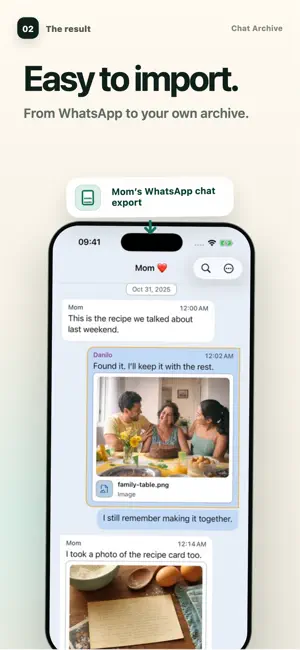
Some conversations matter long after the phone that carried them. They hold a parent’s voice, the date of an agreement, a photograph, a receipt, the words that settled a decision. Chat Archive turns a WhatsApp chat export into a private, readable archive on your iPhone—carefully arranged, searchable, and ready to move with you. BUILT AROUND THE CONVERSATION A conversation is not only its text. It is the sender, the date, the reply, and the photo, document, or voice message beside it. Chat Archive reads the ZIP created by WhatsApp’s Export Chat command, identifies the messages and participants, and arranges the content included in the file in chronological order. Names, dates, media, and voice messages remain in context. A PRECISE, VISIBLE PROCESS 1. In WhatsApp, export the conversation. For the fullest archive, include media. This keeps the available photos, videos, voice messages, and attachments with the conversation. 2. Save or transfer the exported ZIP to the iPhone where you want to keep it. 3. Open it in Chat Archive, review what WhatsApp included, and confirm the import. The result is a readable backup outside WhatsApp: a separate archive you can return to on this iPhone or carry to a new one. MADE TO BE REVISITED Search across imported conversations. Within one conversation, refine by sender, date, time, weekday, file type, filename, or nearby context. Jump to the moment you need without scrolling through years of messages. Listen to voice messages included in the export at 1×, 1.5×, or 2×. Transcribe included voice messages on your device, then search what was said. Select one message, several messages, or a whole day. Save an excerpt, give it a title, and use Labels to bring related passages together across conversations. A RECORD YOU CAN READ, SHARE, AND PRINT Create a carefully composed PDF with messages in order, names, dates, and available images and transcripts. Save a PDF of the full conversation, or select a set of messages and create a focused PDF of only that selection. CHECK YOUR OWN ARCHIVE FIRST Import your first conversation and inspect the messages, search results, media thumbnails, voice messages, and complete PDF preview. IF A CONVERSATION WAS LOST If the chat still exists on an old phone, with the other person, or with a member of the group, export that copy and open it in Chat Archive. The conversation becomes readable and searchable again on your iPhone. YOUR CONVERSATION. YOUR IPHONE. Premium unlocks the complete conversation, its full voice-message history, and the complete PDF for saving, sharing, or printing. You choose the file. Imported conversation content is processed locally on your iPhone. Chat Archive is not cloud storage, so keep the original exported ZIP somewhere you trust. Chat Archive is independent and is not affiliated with WhatsApp or Meta. WhatsApp and Meta are trademarks of their respective owners. Terms: https://www.apple.com/legal/internet-services/itunes/dev/stdeula/ Privacy: https://chatarchive.app/privacy
What’s new
Version 2.8.0 · Updated September 25, 2026
A smoother start for your conversations. • Getting started now includes guidance tailored to what you want to do with your chats. • Trouble importing? Prepare a support report, choose and edit the chat text you include, and review everything before sending. • Unlocking Premium now comes with a little celebration. Thank you for helping us make Chat Archive better.
App privacy
The developer, Danilo Souza, reported these privacy practices to Apple.
Data Used to Track You
The following data may be used to track you across apps and websites owned by other companies:
- Purchases: Purchase History
- Location: Coarse Location
- Identifiers: Device ID
- Usage Data: Product Interaction, Advertising Data
Data Linked to You
The following data, which may be collected and linked to your identity, may be used for the following purposes:
- Purchases: Purchase History
- Location: Coarse Location
- Identifiers: Device ID
- Usage Data: Product Interaction, Advertising Data
Used for: Developer’s Advertising or Marketing, Analytics, App Functionality
Data Not Linked to You
The following data, which may be collected but is not linked to your identity, may be used for the following purposes:
- Diagnostics: Crash Data, Other Diagnostic Data
Used for: Analytics, App Functionality
Alternatives to Chat Archive: Export & Backup
Looking for apps like Chat Archive: Export & Backup? Here are 6 similar apps on the App Store. The highest rated is WA Chat Export Viewer (5.0/5), and all 6 are free to download.
-
 WA Chat Export Viewer
5.0
WA Chat Export Viewer
5.0
-
 ChatViewer
-
 WTBackup: Chat & PDF Export
3.7
WTBackup: Chat & PDF Export
3.7
-
 Chat Keeper
4.2
Chat Keeper
4.2
-
 WA Chat Viewer
-
 Message Recovery Backup: WApp
4.3
Message Recovery Backup: WApp
4.3
| App | Rating | Price | Last updated | Compare |
|---|---|---|---|---|
| Chat Archive: Export & Backup | 5.0 / 5 (2 ratings) | Free | September 25, 2026 | |
| WA Chat Export Viewer | 5.0 / 5 (4) | Free | Jul 31, 2026 | Compare |
| ChatViewer | – | Free | Dec 23, 2025 | Compare |
| WTBackup: Chat & PDF Export | 3.7 / 5 (3) | Free | Oct 10, 2026 | Compare |
| Chat Keeper | 4.2 / 5 (58) | Free | Sep 29, 2026 | Compare |
| WA Chat Viewer | – | Free | Aug 11, 2026 | Compare |
| Message Recovery Backup: WApp | 4.3 / 5 (64) | Free | Aug 28, 2025 | Compare |