

MOMOKI: Keyboard Theme & Font
Haruder Utilities iPhoneiPadiPod touch
MOMOKI: Keyboard Theme & Font is a free Utilities app for iPhone and iPad by Haruder. Requires iOS 16.0. Updated September 4, 2026.
- Price
- Free
- on the App Store
- Size
- 24 MB
- Age 4+
- Updated
- Sep 4
- 2026 · v3.1.2
Screenshots
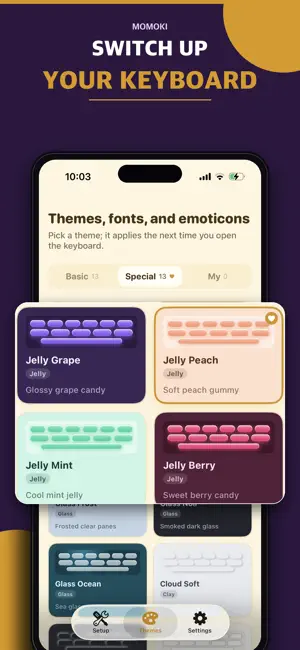


About MOMOKI: Keyboard Theme & Font
Make your keyboard yours. MOMOKI turns the keyboard you use all day into something that actually looks like you — your own photo behind the keys, your own colors, hundreds of cute emoticons a single tap away, and the phrases you type over and over saved and ready. YOUR PHOTO, YOUR KEYBOARD Pick any photo from your library and set it as your keyboard background. Then fine-tune every part of it — keys, surfaces, accents and text — with your own colors and opacity, and watch it update in a live preview before you save. Redo it as many times as you like. 26 READY-MADE THEMES (3 FREE) Not in the mood to design? Choose from twenty-six hand-tuned themes — Classic Cream, Pink Milk, Sky Blue, Matcha Green, Lavender, Cherry Blossom, Cocoa Brown, Midnight Gold, Charcoal Mono, Retro Pixel, Neon Cyber, Minimal Gray, and more, or System to match the iOS keyboard. HUNDREDS OF EMOTICONS, ONE TAP AWAY Sixteen categories of kaomoji — cute, love, joy, sad, animals, magic and more — plus fifteen categories of symbols and decorations. Stop hunting for that one face you copied last week: tap it and it's sent. Build and save your own emoticons too. MACROS FOR WHAT YOU TYPE EVERY DAY Save the addresses, account numbers and greetings you retype constantly, then insert them from the keyboard's Macros tab with one tap. Keep five for free — Pro removes the limit — and reorder them however you like. YOUR CLIPBOARD, RIGHT ON THE KEYBOARD A Clipboard tab keeps what you've copied within reach — no more switching apps to find that link again. It holds your last three items free, ten with Pro, and you can clear them all whenever you want. FONTS THAT TRAVEL ANYWHERE (4 FREE) Eleven text styles that work in any app — four free, the rest with an ad or Pro — Cursive, Bold, Italic, Monospace, Double-struck, Circled, Squared and more. Type once, send it styled, on Messages, Instagram, TikTok or anywhere else. BUILT THE WAY YOU LIKE IT Three keyboard heights, haptic feedback, auto-capitalization, the double-space period, and an optional number row. Emoji search and a recents list that remembers what you actually use. NO ADS IN THE KEYBOARD. NO TRACKING. Fonts, emoticons and themes are all bundled on your device, so the keyboard needs no connection to do its work, and what you type is never sent anywhere. Ads appear only on this app's own screens. Pro (a one-time purchase) removes them and unlocks every theme and font for good. If you only want the themes, the All Themes Pack is a cheaper one-time purchase.
What’s new
Version 3.1.2 · Updated September 4, 2026
Some issues have been fixed.
App privacy
The developer, Haruder, reported these privacy practices to Apple.
Data Used to Track You
The following data may be used to track you across apps and websites owned by other companies:
- Usage Data: Advertising Data
Alternatives to MOMOKI: Keyboard Theme & Font
Looking for apps like MOMOKI: Keyboard Theme & Font? Here are 6 similar apps on the App Store. The highest rated is Custom Keyboard: Themes & GIF (5.0/5), and all 6 are free to download.
-
 PrettyKey: Keyboard Themes
-
 Custom Keyboard: Themes & GIF
5.0
Custom Keyboard: Themes & GIF
5.0
-
 Aesthetic Keyboard & Fonts
4.4
Aesthetic Keyboard & Fonts
4.4
-
 BZTIcon: Kaomoji & Cute Fonts
-
 tadak: Custom Keyboard
-
 TypeMoji: Kaomoji Keyboard
5.0
TypeMoji: Kaomoji Keyboard
5.0
| App | Rating | Price | Last updated | Compare |
|---|---|---|---|---|
| MOMOKI: Keyboard Theme & Font | – | Free | September 4, 2026 | |
| PrettyKey: Keyboard Themes | – | Free | Oct 23, 2026 | Compare |
| Custom Keyboard: Themes & GIF | 5.0 / 5 (1) | Free | Oct 19, 2026 | Compare |
| Aesthetic Keyboard & Fonts | 4.4 / 5 (55) | Free | Oct 26, 2026 | Compare |
| BZTIcon: Kaomoji & Cute Fonts | – | Free | Oct 22, 2026 | Compare |
| tadak: Custom Keyboard | – | Free | Oct 26, 2026 | Compare |
| TypeMoji: Kaomoji Keyboard | 5.0 / 5 (2) | Free | Aug 30, 2026 | Compare |