
GPS Speedometer: HUD Speed
Aliaksei Marozau Navigation iPhoneiPadiPod touch
GPS Speedometer: HUD Speed is a free Navigation app for iPhone and iPad by Aliaksei Marozau. Rated 4.6/5 from 152 ratings. Requires iOS 17.0.
- Rating
- 4.6
- 152 ratings
- Price
- Free
- on the App Store
- Size
- 11 MB
- Age 4+
- Updated
- Sep 24
- 2026 · v1.3
Screenshots

About GPS Speedometer: HUD Speed
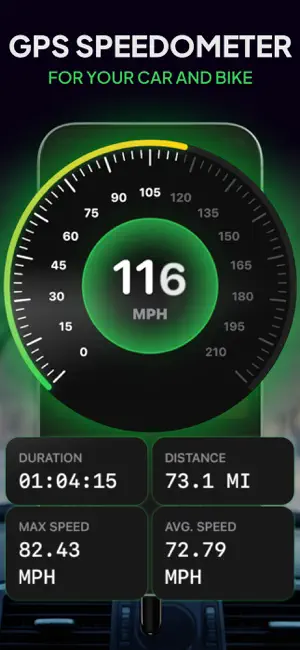
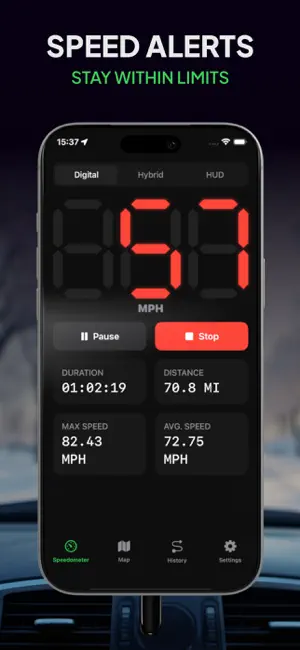
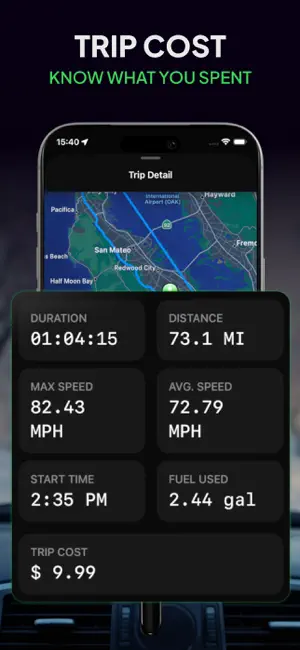
Turn your phone into a precise GPS speedometer, HUD display and trip logger. No sensors, no setup, no connection to your car — open the app and go. Driving, cycling, motorcycling, scooters, boats, running: your speed comes straight from GPS satellites, so it stays accurate even where a factory odometer drifts. See your speed, your way: - Digital, analog and hybrid speedometer views - km/h, mph and knots - Current, average and maximum speed at a glance - Separate car and bike modes, each with its own layout - Themes and colors you can adjust to taste HUD mode for night driving: A mirrored display projects your speed onto the windshield, so your eyes stay on the road instead of the dashboard. Never miss the limit: Set your own threshold and get an instant alert the moment you cross it. Live map and compass: Track your speed and position together on a real-time map, with a built-in compass for heading. Every trip, logged: - Automatic history with distance, duration, average and top speed - Full trip breakdown and route map (PRO) - Export any trip as a PDF (PRO) — useful for mileage reports and expense claims Know what each trip costs (PRO): Enter your fuel price and consumption, or set custom values for a specific trip. The app shows how much fuel each drive burned and what it cost you. Works where there is no signal: GPS needs satellites, not cell coverage. Speed, distance and trip recording keep working off-grid — and with maps cached in advance, so does the map view. GPS Speedometer PRO: Download and use the speedometer for free. PRO unlocks: - Full trip details and route map - Cost of every trip - Custom fuel values per trip - Export trips to PDF Weekly — 3-day free trial, then $3.99 per week Annual — $19.99 per year Payment is charged to your Apple ID account at confirmation of purchase. Your subscription renews automatically unless it is canceled at least 24 hours before the end of the current period. Any unused portion of a free trial is forfeited when you purchase a subscription. Manage or cancel anytime in your Apple ID account settings. For your safety: treat your vehicle's own speedometer as the primary reference and set up the app before you start driving, never while moving. Privacy Policy: https://appres.io/privacy/ Terms of Use: https://appres.io/terms/
Ratings & reviews
4.6
152 ratings
What’s new
Version 1.3 · Updated September 24, 2026
• Landscape: the speedometer, map, history and settings now turn with your iPhone — handy in a car mount. • Full-screen speedometer: tap the speed to hide everything else; tap again to bring it back. Recording keeps going. • Live route: the map draws your route while you record a trip. • A setup that fits how you travel: on first launch, pick walking/running, bicycle, scooter, watercraft, car or motorcycle, and the speedometer scale and speed limit start with values that suit it. • Appearance: choose Light, Dark or System in Settings. • New tab bar with the Liquid Glass look on iOS 26. It shrinks as you scroll. • Now in German, Spanish, French, Italian and Dutch. Numbers, dates and currency names follow your language and region. • Trips are saved the moment you tap Save Trip. If almost nothing was recorded, the app suggests discarding the trip. • A short explanation before the app asks for background location access. • PDF export: the map is no longer stretched, the whole route fits on the page, and prints are sharper. • Fuel cost: decimals stay exactly as you enter them, and the trip screen and the PDF always show the same cost. • Subscribed from History? Your trip now opens right away. • Bug fixes and improvements.
App privacy
The developer, Aliaksei Marozau, reported these privacy practices to Apple.
Data Linked to You
The following data, which may be collected and linked to your identity, may be used for the following purposes:
- Purchases: Purchase History
- Location: Coarse Location
- Identifiers: User ID, Device ID
- Usage Data: Product Interaction
Used for: Analytics, App Functionality
Alternatives to GPS Speedometer: HUD Speed
Looking for apps like GPS Speedometer: HUD Speed? Here are 6 similar apps on the App Store. The highest rated is Speedometer: MPH Tracker (4.6/5), and all 6 are free to download.
-
 Speedometer- Speed GPS Tracker
1.3
Speedometer- Speed GPS Tracker
1.3
-
 Speedometer: GPS Tracker App
3.5
Speedometer: GPS Tracker App
3.5
-
 Speedometer GPS : MPH Tracker
4.5
Speedometer GPS : MPH Tracker
4.5
-
 Speedometer: MPH Tracker
4.6
Speedometer: MPH Tracker
4.6
-
 Speedometer GPS: Speed Monitor
4.4
Speedometer GPS: Speed Monitor
4.4
-
 MPH Speedometer – GPS Odometer
4.2
MPH Speedometer – GPS Odometer
4.2
| App | Rating | Price | Last updated | Compare |
|---|---|---|---|---|
| GPS Speedometer: HUD Speed | 4.6 / 5 (152 ratings) | Free | September 24, 2026 | |
| Speedometer- Speed GPS Tracker | 1.3 / 5 (7) | Free | Sep 18, 2025 | Compare |
| Speedometer: GPS Tracker App | 3.5 / 5 (8) | Free | Jul 22, 2026 | Compare |
| Speedometer GPS : MPH Tracker | 4.5 / 5 (157) | Free | Aug 13, 2026 | Compare |
| Speedometer: MPH Tracker | 4.6 / 5 (702) | Free | Sep 10, 2026 | Compare |
| Speedometer GPS: Speed Monitor | 4.4 / 5 (426) | Free | Jul 31, 2026 | Compare |
| MPH Speedometer – GPS Odometer | 4.2 / 5 (587) | Free | Aug 14, 2026 | Compare |