

ZenBucks - AI Expense Tracker
Jawad Zaabalawi Finance iPhoneiPadiPod touch
ZenBucks - AI Expense Tracker is a free Finance app for iPhone and iPad by Jawad Zaabalawi. Requires iOS 15.0. Updated October 16, 2025.
- Price
- Free
- on the App Store
- Size
- 103 MB
- Age 4+
- Updated
- Oct 16
- 2025 · v5.1.5
Screenshots

About ZenBucks - AI Expense Tracker
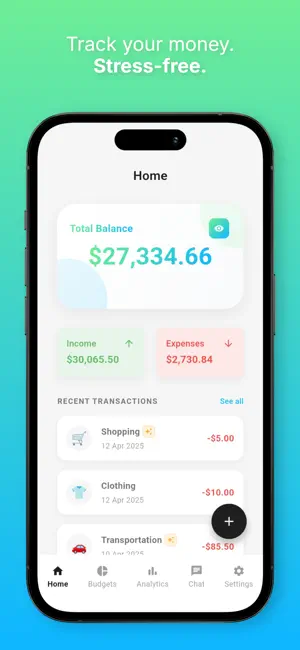
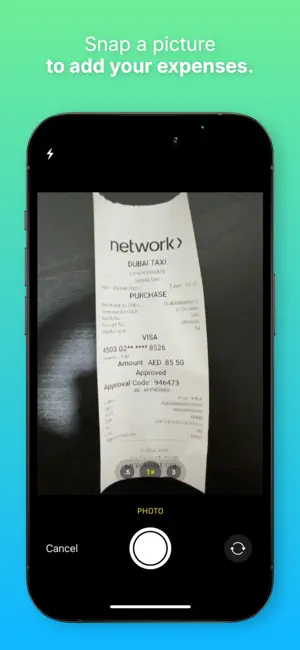
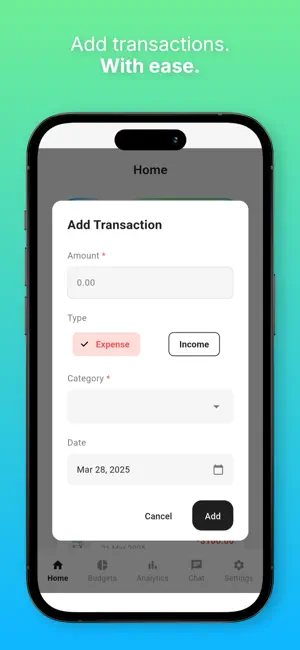
KEY FEATURES: • Expense Tracking - Log expenses or snap a picture of your receipt to easily add expenses • Multi-Currency Support - Track expenses in 200+ currencies with real-time exchange rates • AI Buddy - Let your AI buddy handle adding and categorizing expenses in any currency • Receipt Scanning - Scan receipts from camera or photo gallery, even foreign receipts • Custom Categories - Organize your spending your way • Smart Budgeting - Manage how much you're spending and where it's going • Beautiful Analytics - Visualize your financial journey with intuitive charts • Offline Support - Track expenses anywhere, even without an internet connection • Secure Cloud Sync - Access financial data across devices, any time, anywhere Perfect for: • Anyone looking for a simple and easy-to-use app for financial clarity • Anyone who wants to track expenses without complexity and clutter • Anyone wanting better financial habits Start your stress-free financial journey today with ZenBucks! Links: Website: https://www.zenbucksai.com/ Support: https://www.zenbucksai.com/support Privacy policy: https://www.zenbucksai.com/privacy Terms of service: https://www.zenbucksai.com/terms Note: Unlimited AI usage (beyond free credits) and advanced analytics require a ZenBucks Pro subscription.
What’s new
Version 5.1.5 · Updated October 16, 2025
**MAJOR UPDATE**: • 200+ currencies with real-time conversion • AI chat & receipt scan now handle foreign currencies • Choose base & display currencies separately • Pick receipts directly from photo gallery • Display currency as symbols or codes • Get smart, personalized descriptions for your transactions with AI chat • Receipt scanning now breaks down individual items with AI-generated descriptions **Enhanced User Experience** • Improved onboarding navigation and design • Enhanced UI for tablets • Fixed a keyboard UI bug
App privacy
The developer, Jawad Zaabalawi, reported these privacy practices to Apple.
Data Linked to You
The following data, which may be collected and linked to your identity, may be used for the following purposes:
- Purchases: Purchase History
- Identifiers: User ID
Used for: Analytics, App Functionality
Data Not Linked to You
The following data, which may be collected but is not linked to your identity, may be used for the following purposes:
- Location: Coarse Location
- Identifiers: Device ID
- Usage Data: Product Interaction
- Diagnostics: Crash Data
Used for: Analytics, App Functionality
Alternatives to ZenBucks - AI Expense Tracker
Looking for apps like ZenBucks - AI Expense Tracker? Here are 6 similar apps on the App Store.
-
 AIM AI Money Tracker
-
 Fin: AI Money Coach & Budget
-
 Juno AI: Expense Tracker
-
 MonetFlowz
-
 AI Finance Planner - Budget
-
 Budgetelo: Budget Planner
| App | Rating | Price | Last updated | Compare |
|---|---|---|---|---|
| ZenBucks - AI Expense Tracker | – | Free | October 16, 2025 | |
| AIM AI Money Tracker | – | Free | Jan 25, 2026 | Compare |
| Fin: AI Money Coach & Budget | – | Free | May 11, 2026 | Compare |
| Juno AI: Expense Tracker | – | Free | Jul 1, 2026 | Compare |
| MonetFlowz | – | Free | Feb 21, 2026 | Compare |
| AI Finance Planner - Budget | – | Free | May 8, 2026 | Compare |
| Budgetelo: Budget Planner | – | Free | Oct 3, 2026 | Compare |