

Video Grid Collage Maker
Aliaksandr Andrashuk Photo & Video iPhoneiPadiPod touch
Video Grid Collage Maker is a free Photo & Video app for iPhone and iPad by Aliaksandr Andrashuk. Rated 4.9/5 from 15 ratings. Requires iOS 18.0.
- Rating
- 4.9
- 15 ratings
- Price
- Free
- on the App Store
- Size
- 38 MB
- Age 4+
- Updated
- Oct 26
- 2026 · v3.33
Screenshots
About Video Grid Collage Maker
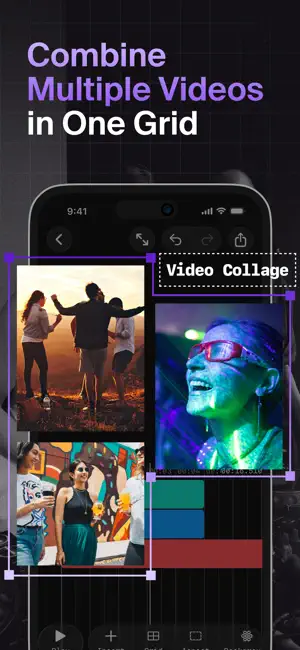
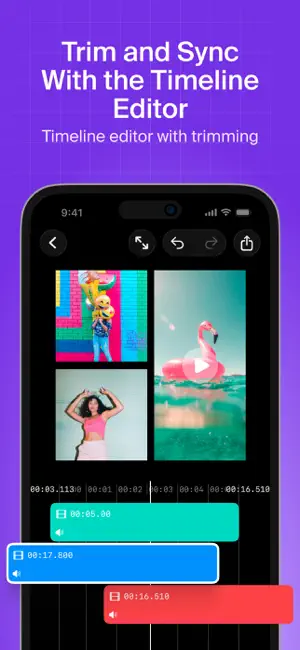
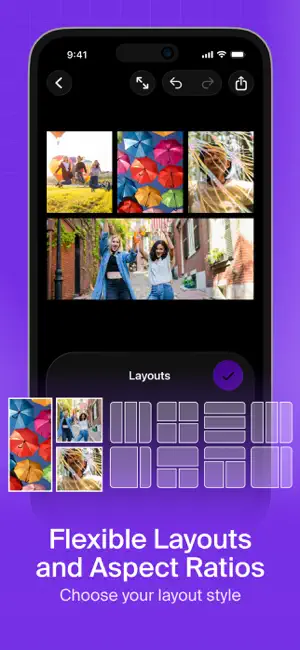
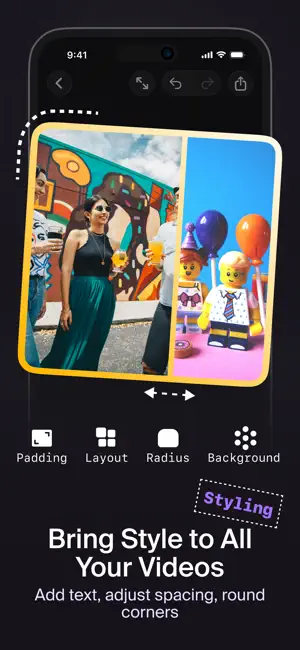
The easiest way to put several videos in one frame. Side by side, in a grid, picture-in-picture or blended as layers: pick a template, drop in your clips, and it's ready to post. No editing skills, no learning curve. Most video apps today feel like an airplane cockpit. Video Grid Collage keeps it simple: the grid does the work, you just choose the clips. HOW IT WORKS 1. Pick a template: vertical for Reels, TikTok and Shorts, square, landscape, animated, puzzle, gradient or blend 2. Add videos and photos from your library or Files: the grid fills itself 3. Export and share: sharp up to 4K, with your iPhone's HDR intact YOUR FIRST PROJECT IS ALWAYS FREE Every feature, unlimited exports, no watermark. Pro unlocks every project after that. NEW: BLEND Layer videos and photos on top of each other, each filling the whole frame. Give each layer a blend mode — Screen, Lighten, Multiply, Darken, Overlay, Soft Light or Difference — and its own opacity: double exposures and dreamy looks in a few taps. Start from a Blend template and stack up to 9 layers. PERFECT FOR – Reactions and commentary – Before & after – Comparisons and duets – Multi-angle moments – Travel and year-in-review recaps – Birthdays, weddings and family memories WHY CREATORS PICK IT It's all there, and it stays out of your way until you need it: – 100 layouts with up to 9 cells playing at once – Templates beyond the grid: Puzzle, Gradient, Blend and Picture in Picture – Multi-track timeline: every cell plays its own sequence of clips, up to 100 in the grid — trim, split, reorder and snap them into place – Overlays: place photos and videos anywhere on top – Auto Captions: turn speech into editable subtitles in dozens of languages – Remove Background: cut out people, pets or objects in photos and videos – Text in 20 fonts with colors, outlines and HDR glow – Animations: fade, slide, zoom and pop, with spring and bouncy timing – Speed from 0.25× to 5×, Reverse, Flip, Mirror and Rotate – 16 filters plus brightness, contrast, saturation, exposure, temperature and hue – Music: add songs from your library or Files, set the volume, fade in and out – Background: a color, transparent, or any photo or video – Spacing, rounded corners and borders – 9 aspect ratios: 9:16 for Reels, TikTok and Shorts, 1:1 and 4:5 for feed, 16:9 for YouTube – Undo and redo, saved projects, portrait and landscape editing Everything renders right on your iPhone. Video Grid Collage is free to download; optional in-app purchases unlock Pro. We ship updates almost every week — send us your ideas and we will build them. Terms of use https://www.apple.com/legal/internet-services/itunes/dev/stdeula/
Ratings & reviews
4.9
15 ratings
What’s new
Version 3.33 · Updated October 26, 2026
NEW: BLEND Layer videos and photos on top of each other, each filling the whole frame. Every layer gets its own blend mode — Screen, Lighten, Multiply, Darken, Overlay, Soft Light or Difference — and its own opacity. Pick a Blend template on the start screen and add more layers from Insert, up to 9. MORE IN THIS UPDATE – Single video at the bottom of the start screen: clips play one after another, without a grid – Albums in the media picker: Favorites, your own and shared albums, and media types – Change the Puzzle template right in the editor – The Gradient slider is now called Softness and sits in the Gradient menu ALSO NEW IN VERSION 3 – Puzzle: one video or photo split into pieces that slide together into one picture – Picture in Picture: a second video in a small window in the corner – Gradient layouts: a soft fade between two cells instead of a hard line – Remove Background: cut out people, pets or objects in photos and videos – Reverse any video – Auto Captions in dozens of languages – Multi-track timeline: several clips in each cell, with split, reorder and snapping to clip edges and the playhead – Photo and video overlays – Music and sound with volume and fades – Speed from 0.25× to 5× – 16 filters, color adjustments, Flip, Mirror and Rotate – Borders, rounded corners and photo or video backgrounds – Text in 20 fonts with outlines and HDR glow – Animations with spring and bouncy timing – Up to 9 cells and 100 layouts – Export up to 4K at 60 fps with HDR – Undo and redo, saved projects and landscape editing We ship updates almost every week — send us your ideas!
App privacy
The developer, Aliaksandr Andrashuk, reported these privacy practices to Apple.
Data Not Linked to You
The following data, which may be collected but is not linked to your identity, may be used for the following purposes:
- Usage Data: Product Interaction
- Diagnostics: Crash Data
Used for: Analytics
Alternatives to Video Grid Collage Maker
Looking for apps like Video Grid Collage Maker? Here are 6 similar apps on the App Store. The highest rated is Velura Studio (5.0/5), and all 6 are free to download.
-
 VideoGrid: Photo Collage Maker
3.8
-
 Photo Clearer AI
4.3
-
 PureCollage
4.1
-
 Velura Studio
5.0
-
 Shadow Studio
5.0
-
 ReelGrid: Video Collage Maker
4.6
| App | Rating | Price | Last updated | Compare |
|---|---|---|---|---|
| Video Grid Collage Maker | 4.9 / 5 (15 ratings) | Free | October 26, 2026 | |
| VideoGrid: Photo Collage Maker | 3.8 / 5 (56) | Free | Apr 22, 2026 | Compare |
| Photo Clearer AI | 4.3 / 5 (193) | Free | Apr 18, 2025 | Compare |
| PureCollage | 4.1 / 5 (19) | Free | Oct 20, 2026 | Compare |
| Velura Studio | 5.0 / 5 (3) | Free | Jul 15, 2026 | Compare |
| Shadow Studio | 5.0 / 5 (8) | Free | Apr 28, 2026 | Compare |
| ReelGrid: Video Collage Maker | 4.6 / 5 (5) | Free | Oct 29, 2026 | Compare |