

Tabletop: Flip Clock & Photos
建华 张 Utilities iPhoneiPadiPod touch
Tabletop: Flip Clock & Photos is a paid Utilities app for iPhone and iPad by 建华 张. Requires iOS 16.6. Updated August 31, 2026.
- Price
- 2.99 USD
- on the App Store
- Size
- 4 MB
- Age 4+
- Updated
- Aug 31
- 2026 · v2.0
Screenshots

About Tabletop: Flip Clock & Photos
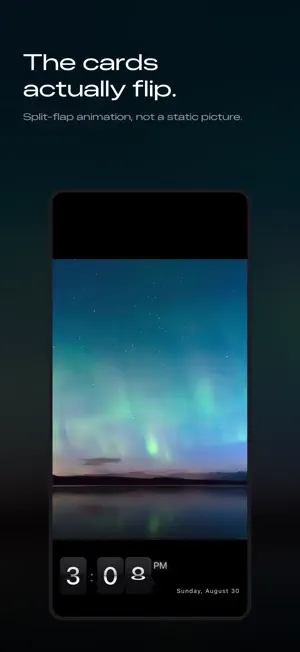
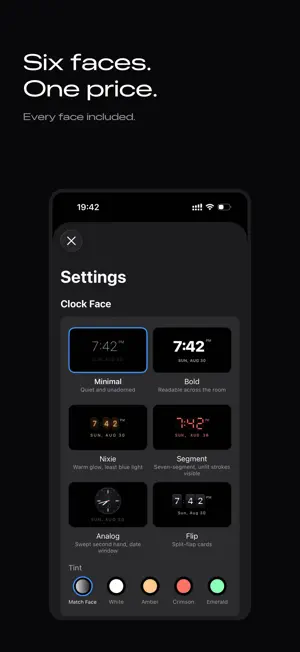
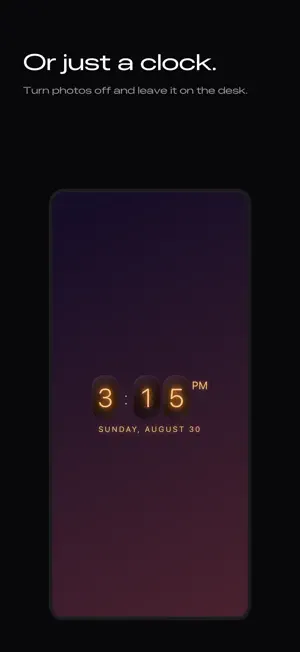
Turn your iPhone or iPad into a full-screen desk clock, with your own photos drifting quietly behind the time. Set it on a desk, a nightstand, or a shelf and leave it there. Tabletop is meant to be looked at, not used. SIX CLOCK FACES • Flip — split-flap cards, with a real mechanical flip • Nixie — warm glow, least blue light • Segment — seven-segment, unlit strokes visible • Analog — swept second hand, date window • Bold — readable across the room • Minimal — quiet and unadorned Every face can be tinted white, amber, crimson, or emerald, or left to match the face's own color. YOUR PHOTOS, BEHIND THE CLOCK Choose up to 500 photos from your library. They cross-dissolve into one another and drift slowly, so the picture never looks frozen — and the clock stays readable on top. Change the pace to 5, 30, or 60 seconds, in order or shuffled. Swipe in either direction, or tap the screen and use the toggle, to move between the photos and the full-screen clock. ONE PURCHASE Every clock face and every tint is unlocked the moment you open the app. No ads. No subscriptions. No account to create. BUILT TO SIT THERE • Keeps the screen awake while it's open • Switches to the clock on its own during a window you set, for overnight • 12- or 24-hour, with or without seconds, three date formats • Portrait and landscape, iPhone and iPad PRIVACY We don't run a server. Photos you choose are copied into the app's own storage on your device and are never sent anywhere. There are no analytics SDKs, no advertising SDKs, no tracking identifiers, and no accounts. ACCESSIBILITY VoiceOver reads the time aloud rather than announcing an image. Turning on Reduce Motion stops the photo drift and the flip animation.
What’s new
Version 2.0 · Updated August 31, 2026
Version 2.0 is a full redesign. SIX CLOCK FACES • Flip — split-flap cards with a true mechanical flip • Nixie — warm tube glow, the least blue light of any face • Segment — seven-segment display with unlit strokes visible • Analog — swept second hand and a date window • Bold — readable across the room • Minimal — quiet and unadorned ONE PRICE, EVERYTHING INCLUDED Tabletop is now a one-time purchase. Every clock face and every tint is unlocked from the start. No ads, no subscriptions, no accounts, and no tracking. We don't run a server — your photos stay on your device. PHOTOS • Photos now cross-dissolve instead of cutting • A slow, continuous drift keeps the picture from feeling frozen • Tap the screen to reveal the clock/photo toggle, or swipe in either direction FIXES AND REFINEMENTS • Fixed crashes when rotating the device • Rebuilt the settings screen • Corrected seven-segment digit spacing • Smoother transition between the clock and photo views
App privacy
The developer, 建华 张, reported these privacy practices to Apple.
Data Not Collected
The developer does not collect any data from this app.
Alternatives to Tabletop: Flip Clock & Photos
Looking for apps like Tabletop: Flip Clock & Photos? Here are 6 similar apps on the App Store. The highest rated is Geek Tools - AI / QR / Crypto (5.0/5), and 3 of the 6 are free to download.
-
 Recent Contacts - LinkUp
-
 Photo Resizer - Resize Images
4.0
Photo Resizer - Resize Images
4.0
-
 AcePrompt
-
 Geek Tools - AI / QR / Crypto
5.0
Geek Tools - AI / QR / Crypto
5.0
-
 Tmoji: Secure Emoji Messages
-
 QRForge: QR Scanner Generator
5.0
QRForge: QR Scanner Generator
5.0
| App | Rating | Price | Last updated | Compare |
|---|---|---|---|---|
| Tabletop: Flip Clock & Photos | – | 2.99 USD | August 31, 2026 | |
| Recent Contacts - LinkUp | – | 1.99 USD | Oct 10, 2026 | Compare |
| Photo Resizer - Resize Images | 4.0 / 5 (1) | Free | Aug 12, 2026 | Compare |
| AcePrompt | – | 2.99 USD | Mar 22, 2026 | Compare |
| Geek Tools - AI / QR / Crypto | 5.0 / 5 (1) | 0.99 USD | Mar 17, 2026 | Compare |
| Tmoji: Secure Emoji Messages | – | Free | Aug 14, 2026 | Compare |
| QRForge: QR Scanner Generator | 5.0 / 5 (4) | Free | Nov 12, 2025 | Compare |