

GPS Map Camera - Geotag Photos
Sanket Rola Navigation iPhoneiPadiPod touch
GPS Map Camera - Geotag Photos is a free Navigation app for iPhone and iPad by Sanket Rola. Requires iOS 16.6. Updated October 18, 2026.
- Price
- Free
- on the App Store
- Size
- 115 MB
- Age 4+
- Updated
- Oct 18
- 2026 · v1.2.0
Screenshots


About GPS Map Camera - Geotag Photos
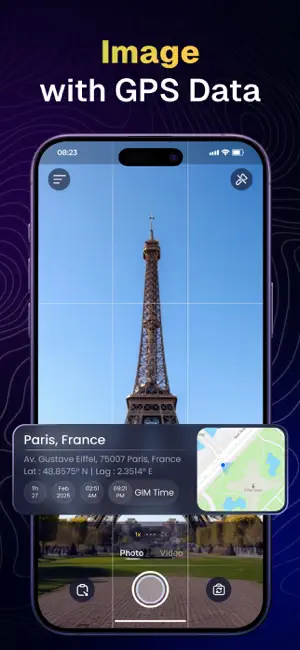
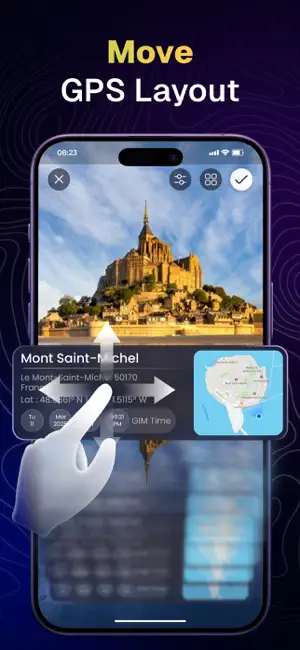
Install a GPS map camera app on your smartphone to geotag photos and add GPS location information. GPS Camera Map - Timestamp Photos is the ultimate app for families, travelers, and outdoor enthusiasts eager to document their adventures with precise real-time location details. Whether you're capturing your child’s first thrilling experience, recording unforgettable family trips, or ensuring safety with geotagged photos, this app is your indispensable companion. Don’t just take pictures—create lasting memories with confidence and security! Track your live location along with your photos using the GPS Map Camera - Geotag Photos & Add GPS Location app. Share your geotagged photos with family and friends to showcase your favorite travel moments. Key features: Address Overlay Capture moments by displaying the exact street addresses directly on your photos. Whether you’re taking pictures at a park, playground, school, or vacation destination, the address overlay ensures that your memories are precise. This feature is especially helpful for parents who want to track their children’s locations during trips. Date & Time Stamp Want to capture the exact moment of a special event? The date and time stamp feature ensures that each photo you take is marked with the time, making it easy to track milestones, birthdays, school events, and family vacations. Precise Map View Would you like a visual representation of the locations where your photos were taken? The GPS Map feature includes a live map view, enabling users to see precisely where each photo was captured. This functionality is perfect for family road trips, nature walks, and storytelling based on specific locations. Would you like a visual representation of the locations where your photos were taken? The GPS Map feature includes a live map view, enabling users to see precisely where each photo was captured. This functionality is perfect for family road trips, nature walks, and storytelling based on specific locations. How to use: 1. Open camera & select advanced or classic templates, arrange formats of stamps, change settings according to your requirement of GPS photomaps location stamp. 2. Add geo location stamps automatically to your clicked pictures. Download GPS Map Camera now and start capturing, tracking, and sharing your family’s special moments today! To unlock every templates, users need to purchase the premium version of the app. GPS Map Camera has 2 unique plans. Subscribe to have access to premium version of the app. One Week - $5.99 One Year - $49.99 * Subscription payments will be charged to your iTunes account at confirmation of your purchase and upon commencement of each renewal term. Subscription with a free trial period will automatically renew to a paid subscription. You can cancel your subscription or free trial in the iTunes settings at least 24-hours before the end of the free trial period. The cancellation will take effect the day after the last day of the current subscription period and you will be downgraded to the free service. Your payment will be charged to your iTunes Account as soon as you confirm your purchase. Privacy Policy: https://sanketrolaappstore.blogspot.com/2024/06/privacy-policy.html Terms of use: https://sanketrolaappstore.blogspot.com/2024/06/terms-of-use.html
What’s new
Version 1.2.0 · Updated October 18, 2026
Bug fixes and UI improvements!
App privacy
The developer, Sanket Rola, reported these privacy practices to Apple.
Data Used to Track You
The following data may be used to track you across apps and websites owned by other companies:
- Identifiers: Device ID
- Usage Data: Advertising Data
Data Not Linked to You
The following data, which may be collected but is not linked to your identity, may be used for the following purposes:
- Identifiers: Device ID
- Usage Data: Advertising Data
- Diagnostics: Performance Data
Used for: Third-Party Advertising, Analytics
Alternatives to GPS Map Camera - Geotag Photos
Looking for apps like GPS Map Camera - Geotag Photos? Here are 6 similar apps on the App Store. The highest rated is GPS Map Camera Lite (5.0/5), and all 6 are free to download.
-
 Roamerz
-
 Car GPS
1.0
Car GPS
1.0
-
 GPS Map Camera Lite
5.0
GPS Map Camera Lite
5.0
-
 AutoEco-factor
-
 Lightfoot Connect
-
 Globe 3D: Maps, Street & GPS
4.8
Globe 3D: Maps, Street & GPS
4.8
| App | Rating | Price | Last updated | Compare |
|---|---|---|---|---|
| GPS Map Camera - Geotag Photos | – | Free | October 18, 2026 | |
| Roamerz | – | Free | Oct 22, 2026 | Compare |
| Car GPS | 1.0 / 5 (1) | Free | Jun 18, 2026 | Compare |
| GPS Map Camera Lite | 5.0 / 5 (1) | Free | Sep 12, 2026 | Compare |
| AutoEco-factor | – | Free | Oct 12, 2026 | Compare |
| Lightfoot Connect | – | Free | Sep 5, 2026 | Compare |
| Globe 3D: Maps, Street & GPS | 4.8 / 5 (12) | Free | Oct 19, 2026 | Compare |